• After 15+ years, we've made a big change: Android Forums is now Early Bird Club. Learn more here.

[Free] Wallpaper Active

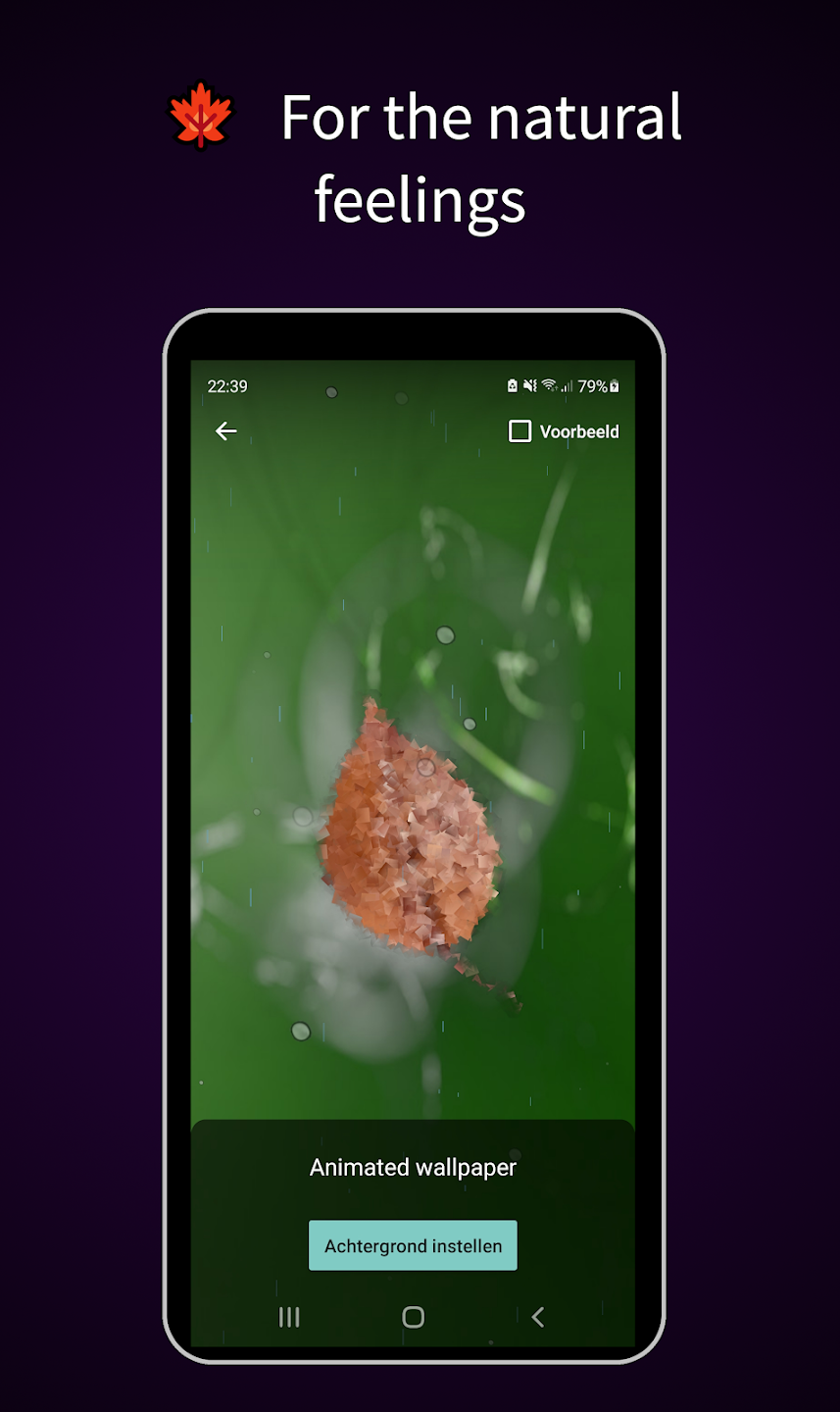
Wallpaper Active contains a set of animated and parallax wallpapers, to make your phone look more awesome and unique. The app contains several landscapes and weather themed backgrounds, rendered with parallax and animations. Best of all, it is free to use. No advertisements or in-app purchases.

promotionwithoutplaybutton-png.160934

340546d1642361418t-free-wallpaper-active-promotionwithoutplaybutton.jpg


Why this wallpaper app?
  • Free, no adds
  • Updated with new content and features
  • Working together with artists for creating HQ content

Download for free

https://play.google.com/store/apps/details?id=com.sixdots.weatherwallpapers

Screenshots
Qm4ZDuZQEPmhvR5yUMNK-JFaF31X5bpqzckRQsXytXzxy_CXcsjYY9iXWm1r59l2xn4=w2560-h1440

Attachments

  • PromotionWithoutPlayButton.png
    PromotionWithoutPlayButton.png
    982.1 KB · Views: 259
  • screenshot1.png
    screenshot1.png
    1.2 MB · Views: 271
  • screenshot2.png
    screenshot2.png
    1.2 MB · Views: 281
  • screenshot3.png
    screenshot3.png
    1.3 MB · Views: 272

Edittext skipped

I am using constraint layout.When I am clicking next in the keypad the second edittext is skipped after first Edittext and focus the third eedittext. Please help me to sortout the issue.
Code:
   <?xml version="1.0" encoding="utf-8"?>
   <androidx.constraintlayout.widget.ConstraintLayout xmlns:android="http://schemas.android.com/apk/res/android"
xmlns:app="http://schemas.android.com/apk/res-auto"
xmlns:tools="http://schemas.android.com/tools"
android:layout_width="match_parent"
android:layout_height="match_parent"
tools:context=".MainActivity">
<androidx.appcompat.widget.Toolbar
   android:id="@+id/toolbar"
   android:layout_width="0dp"
   android:layout_height="wrap_content"
   android:background="#2A2E43"
   android:minHeight="?attr/actionBarSize"
   app:layout_constraintEnd_toEndOf="parent"
   app:layout_constraintStart_toStartOf="parent"
   app:layout_constraintTop_toTopOf="parent">
   <ProgressBar
       android:id="@+id/toolbar_progress_bar"
       android:layout_width="wrap_content"
       android:layout_height="wrap_content"
       android:layout_gravity="end"
       android:indeterminateTint="@color/white"
       tools:layout_editor_absoluteX="272dp"
       tools:layout_editor_absoluteY="4dp" />
</androidx.appcompat.widget.Toolbar>
<TextView
   android:id="@+id/deviceNameAndAddressText"
   android:layout_width="wrap_content"
   android:layout_height="wrap_content"
   android:layout_marginTop="8dp"
   android:text="not connected"
   app:layout_constraintEnd_toEndOf="parent"
   app:layout_constraintStart_toStartOf="parent"
   app:layout_constraintTop_toBottomOf="@+id/toolbar" />
<ImageView
   android:id="@+id/one"
   android:layout_width="25dp"
   android:layout_height="25dp"
   android:layout_marginStart="16dp"
   android:layout_marginTop="28dp"
   app:layout_constraintStart_toStartOf="parent"
   app:layout_constraintTop_toBottomOf="@id/toolbar"
   android:src="@drawable/one" />
<TextView
   android:id="@+id/initial"
   android:layout_width="wrap_content"
   android:layout_height="wrap_content"
   android:layout_marginStart="11dp"
   android:layout_marginTop="26dp"
   android:text="initial"
   android:textColor="#2A2E43"
   app:layout_constraintStart_toEndOf="@id/one"
   app:layout_constraintTop_toBottomOf="@id/toolbar" />
<TextView
   android:id="@+id/denaturaion"
   android:layout_width="wrap_content"
   android:layout_height="wrap_content"
   android:layout_marginStart="11dp"
   android:layout_marginTop="11dp"
   android:text="Denaturation"
   android:textColor="#2A2E43"
   app:layout_constraintStart_toEndOf="@+id/one"
   app:layout_constraintTop_toBottomOf="@+id/initial" />
<EditText
   android:id="@+id/temp1"
   android:layout_width="57dp"
   android:layout_height="45dp"
   android:layout_marginStart="20dp"
   android:layout_marginTop="11dp"
   android:ems="10"
   android:inputType="number"
   android:hint="\u2103"
   android:imeOptions="actionNext"
   android:textAlignment="center"
   app:layout_constraintStart_toEndOf="@+id/denaturaion"
   app:layout_constraintTop_toBottomOf="@+id/deviceNameAndAddressText"
   app:layout_constraintEnd_toStartOf="@+id/mm_1"/>
<EditText
   android:id="@+id/mm_1"
   android:layout_width="55dp"
   android:layout_height="45dp"
   android:layout_marginStart="21dp"
   android:layout_marginTop="37dp"
   android:ems="10"
   android:hint="mm"
   android:imeOptions="actionNext"
   android:textAlignment="center"
   android:inputType="number"
   app:layout_constraintHorizontal_bias="0.0"
   app:layout_constraintStart_toEndOf="@+id/temp1"
   app:layout_constraintTop_toBottomOf="@+id/toolbar"
   app:layout_constraintEnd_toStartOf="@+id/colon"/>
<TextView
   android:id="@+id/colon"
   android:layout_width="wrap_content"
   android:layout_height="wrap_content"
   android:layout_marginStart="7dp"
   android:layout_marginTop="50dp"
   android:text=":"
   android:textColor="#2A2E43"
   app:layout_constraintStart_toEndOf="@+id/mm_1"
   app:layout_constraintTop_toBottomOf="@+id/toolbar"
   app:layout_constraintEnd_toStartOf="@id/ss_1"/>
<EditText
   android:id="@+id/ss_1"
   android:layout_width="53dp"
   android:layout_height="45dp"
   android:layout_marginStart="9dp"
   android:layout_marginTop="36dp"
   android:layout_marginEnd="16dp"
   android:ems="10"
   android:inputType="number"
   android:hint="ss"
   android:imeOptions="actionNext"
   android:textAlignment="center"
   app:layout_constraintEnd_toEndOf="parent"
   app:layout_constraintStart_toEndOf="@+id/colon"
   app:layout_constraintTop_toBottomOf="@+id/toolbar"
   /></androidx.constraintlayout.widget.ConstraintLayout>

problem sending an email.

Hi,
My wife has purchased a Lenovo tablet - which is giving her problems as, she says, the "controls" are not as obvious as those on her previous model. In particular, an email she has written does not seem to want to be sent, as there is no SEND button. The email is showing as a DRAFT, but she cannot send it from there.
Ironically, she can reply when I send her an email.
Sorry to sound somewhat pathetic, but we are both in our ninth decade!
Thanks
Clive

Help Pan - Is it possible to set a different notification sound for SMS and a different one for e-mail?

Dobrý den. Koupil jsem si mobil NARZO 30 s OS ANDROID 11. Jde nastavit jiný zvuk oznámení pro SMS a jiný pro e-mail? Prosím o radu.


Translated by DonB

Good day. I bought a NARZO 30 mobile phone with OS ANDROID 11. Is it possible to set a different notification sound for SMS and a different one for e-mail? Please, give me an advice.

Help WhatsApp Backup issue

I can't seem to backup my WhatsApp.It either gets stuck on preparing back up or it gets stuck at 50%.
I have tried many solutions found online such as clearing cache, unlinking and linking Google to WhatsApp many times, used a different Google account, used mobile data and different WiFi networks, deleted old backups, restarted my phone, turned video backup off, deleted chats which I did not need.

I have been trying since yesterday since I am getting a new phone today and need to transfer my WhatsApp chats.
Please help

Harassment on Galaxy A11 Phone

Help Android and Samsung Pros:

I have two Samsung A11 phones through Straighttalk and and a Samsung S5 that shouldn't have cell service. My cellular wireless signal is automatically connecting with incomming harassing people. (Its a criminal back door). Does anyone know how to shut down the antennas on the boot? I am a root on the S5 phone. It may be some sort of secret service mode being used for criminal purposes. Wifi and airplane mode have no effect. How do I cut these guys off? Erase all of their software.. it's a hidden connection.Thank you. J Carver

Help Unidentified alert (vibration and beep) every 5 minutes

Every 5 minutes exactly, my Galaxy S9 G960U1 running Android 10 vibrates and then gives me a flat-toned beep lasting about half a second. It's not associated with any notifications, toasts, or changes in status bar icons. It happens even with sounds set to Mute, and with Do not disturb and Airplane mode turned on! The only thing that stops the beep is "Mute all sounds", but even then it still vibrates, and of course muting all sounds isn't any sort of solution. The only saving grace is that if I have a headset connected, it only beeps through the headset. Another oddity is that I've checked through every alarm and notification sound available on my phone and it doesn't sound like any of them! I don't recall ever hearing this beep for anything else before.

I've tried all of the following:
  • Clearing notifications
  • Restarting the phone
  • Disabling NFC
  • Disabling Accessibility > Advanced Settings > Reminder alerts (it was off to begin with, but I enabled and disabled it)
  • In App Notifications, disabling all notifications for every app that allows it
  • Disabling everything in Notifications settings except "Do not disturb"
  • Installing a notification history app
  • Disabling the Google app (suggested in a YouTube video about unknown notifications)
  • Clearing the cache partition

Additional information:
  • I haven't installed any new apps or system updates or made any configuration changes recently (except the above mentioned notification history app I installed to troubleshoot this, which didn't help). In fact, this started happening while I was in bed, this morning.
  • I have "Don't auto-update apps" set in the Play store, and haven't updated anything in the last 3 days
  • The 5 minute interval is based on when the phone was last started, not according to the clock, e.g. I was getting the vibration and beep on the hour mark, then at :05, :10, :15, :20, etc., but after restarting the phone at 5:05 it was happening at 5:07, 5:12, 5:17, etc. I verified that the first beep always comes 2 minutes (exactly 120 seconds) after the lock screen is displayed, and then exactly every 5 minutes, to the second, thereafter.
I understand that a factory reset would very likely get rid of the problem, but I don't consider that a solution, that's giving up without a solution, and the total time cost would be more than I can afford right now, so I really hope someone knows what's going on or at least has some idea of where to look.

Worst Customer service ever

Just spent 12HOURS on straight talk support. My old Verizon compatible phone crapped out and I bought a replacement that is ATT only.

Put an ATT sim (from ST) in the phone and they farted around all day trying to make it work. Apparently until you get to THIRD level support they are nothing but chair warmers. They finally got me working, but not b4 changing my cell number (Which I've had for 12 Years) too a new number.

I'm currently now fighting with them to get it changed back. Because it seems they are just as "lost" doing this as they were with the original issue.

If anyone has a number that goes directly into 3RD level support, or the name / email of someone WAY up high within the company.

I'm getting VERY fed up with them saying "thank your for patiently waiting" when any average person would say "waiting patiently". If I've heard that phrase once , I've heard it 1000 times, and EVERY damn rep I've talked to uses that incorrect phrase..

I truly believe that I'd get better support from a chimpanzee that these brain dead people.

Help S2FE, why I can't connect it to a PC properly?

WRONG TITLE it is an S20FE
Until now all my phones and tablets were very easily connected to a pc: plug-in / select transfer files (instead of charging) and I could move files, from the pc or to the pc like the device was an HD.
Now I try to do the same with the S20 but looks like I can only COPY from the phone to the PC, no way I can write in the phone. I thought it could be a matter of write permissions but I was not able to find any, and if so in which app? The file manager has full authorization
Do you experience the same crap? (note: I do not want to use any extra sw for this)

Thanks in advance to whomever will reply

Tablet not backing up correctly

I have a generic Chinese made tablet a Mediatek TYD-108H running Android 6.0 . I have been looking at the automatic backups and something puzzles me. The tablet backs up overnight automatically OK but, when I check the backup it shows only 10 apps have been backed up. Given that I've got about 80 apps installed, I find this puzzling.

1. All apps have been downloaded off Play Store.
2. The backup shows up on Google Drive but with only 10 apps backed up. The apps backed up all seem to be Google apps + YouTube app. Nothing else.
2. I have checked via Settings on my tablet and cannot find any way at all of doing a manual backup !! I have looked in Settings/apps, Settings /Backup, and even looked in Developer options but there is no visible option to do a manual backup.

So, how do I get ALL my apps backed up on the automatic backup and how can I initiate my own manual backup ??

Thanks in advance for any assistance.

Help Is it difficult to unlock the T-Mobile version of the Oneplus 8?

Right now the Oneplus 8 is on sale on the oneplus official website for 250 dlls. The problem is that I need the international version and that one is out of stock right now but the T-Mobile version is available. Should I buy the T-Mobile version and just unlock it? Is that possible? I also don't want all the crapware that T-Mobile installs in their phones. Can I install the original OS without it being too high of a risk of me messing up the phone forever?

I'm sorry if this isn't the right place to ask this and I appreciate any advice I can get

Seeking Recommendation for Backup App or File Manager App

Can anyone recommend a Backup App or File Manager App that can:

1. Copy over files from my Moto G Power (2020) to a USB Flash Drive plugged in with an OTG cable.

2. I do not want to encrypt, I do not want to compress, I want the files or database copied over in their original format.

3. I wish to copy over the following types of files or databases:
.jpg picture files
.mp4 video files
.mp3 music and audio files
.ogg ringtone files
.docx text files
.txt text files
.pdf Acrobat files
SMS / MMS messages from Message+ (this may also be called Verizon Messages)
Contacts Info
Call log

Reading with firefox an htm file in memory

Hi all,
this is always a pain in the neck. Bought new phone, Android 11, I need to read a file, named file.htm, in memory with firefox (or other browsers). This should be my home. I authorize FF to read memory (unfortunately there is only the checkbox for multimedia files, I do not know if this is an issue), and in the address I type

file:///storage/emulated/0/file.htm

No way, no message, just white page. Also with previous phones the first time I did this was a problem, but this time seems really hard.
Tried also to launch the file from the file manager but it does not propose me FF even if it is the default browser, just some crap like pictures and similar app.

Thanks in advance to whomever will reply

OnePlus 6 & 6T End of Life

OnePlus have officially announced the EoL, (End of Life), support for the OnePlus 6 series of devices.


This means there will be no further updates for these devices.


zOoFSqFl.jpg


See... https://forums.oneplus.com/threads/...-and-oneplus-6t.1523813/page-48#post-23946298


Now that the Oneplus 6 is over 42 months, (3.5 years), old and the OnePlus 6T is over 36 months, (3 years), old they have reached their, linked, scheduled EoL, (End of Life), and will no longer receive Regular Software Maintenance or Software Security Maintenance, (Android Security patches), see...


https://forums.oneplus.com/threads/oneplus-software-maintenance-schedule.862347/


9pJOJuEl.png


Truly, one of the best phones I have ever, (and still have), owned!
biggrin.png

Apps Android Studio

Hey guys;
I was wondering is it possible to add custom pallets to Android studio ? i want to create a custom view and be able to drag and drop my custom view component to the new projects i am making .

Also if the custom pallets is possible, is there anyway that i can download some useful ones like customized card view to simplify development and save time ?

Many thanks :)

Android studio rename video file in internal storage

Hi All,
I am a complete newbie to android development. I have created an app which takes a 5 second video and stored it in the phones internal storage. The path is shown as "/storage/emulated/0/DCIM/camera" . However I cannot rename the file to a customized file name through code. I am doing the following in my code (assuming filename is the String containing the .mp4 file name:

File dir=new File ("/storage/emulated/0/DCIM/Camera/");
File fromfile=new File (dir,filename);
File tofile=new File(dir,"myname.mp4");
fromfile.renameTo(tofile);

What am I doing wrong? Any help will be appreciated
Thanks

Filter

Back
Top Bottom