• After 15+ years, we've made a big change: Android Forums is now Early Bird Club. Learn more here.

Galaxy Tab S7 FPS issue

I’m wondering if anyone else has experienced this problem with certain games. Within the last couple weeks my tablet frame rate seems to have slowed down significantly while playing World of Warships. Initially gameplay will be fine but after a period of 10-15 minutes there’s a significant, noticeable decrease in FPS. I’m not sure if this is due to overheating or perhaps hardware beginning to fail. Samsung wants me to send it in for service but I thought I’d check w/ the hivemind to see if there was any tips or advice before having to do so. Here’s what I’ve already tried:
  • Uninstalling/reinstalling the game.

  • Clearing app cache.

  • Soft reboot.

  • Hard reboot.

  • Factory reset.

  • Trying w/ cover on/off.
None of these things has made any improvement. Kind of out of ideas at this point. After this starts happening it appears to impact the OS as well since touch responses and other sluggishness w/ the UI appear. Thoughts anyone?

Custom Sort Order for Alarms

How can I sort all my alarm settings alphabetically by Alarm Name?

When I open my Alarm window, and click on the 3-dot menu in the upper right, the three menu items are:
Edit, Sort, Settings.

When I click on Sort, the two options are Alarm time order -- and Custom order.

When I click on Custom order NOTHING happens. The menu just closes. I am unable to click and drag the alarms to resort them. So, uh WHAT is "Custom order" and HOW do ya' do it please?

Thank you.

Creating a Directory After Android 11

I've been searching the internet for almost 7hrs now, I can't seem to find a code that works and it took me a while to find out that the method below no longer works and is deprecated

Code:
File file = new File(Environment.getExternalStorageDirectory(),sName);
file.mkdirs();

Also tried adding android:requestLegacyExternalStorage="true" in the manifest but still the same result.

So my question is: Is it possible to create a directory directly in internal storage automatically when the app starts for the first time, similar to what WhatsApp does?

Like if someone downloads and opens the app for the first time there'd be a new directory created (after gaining the permission to do so) in Internal Storage directly (not in Android/data sub-folders) for the app files in the future

And if it's possible, how can I do such a thing?

I'd be very grateful for as little as any pointer in that direction, I've been on this issue for much more time than I expected

Thank you in advance

Tap to speak

Hello,

Recently the Tap to Speak feature has turned on on my phone and won't go away. The screen is at the bottom and blocking all of my access to the buttons at the bottom so I can't get to settings. I can't make a phone call...I basically can't do anything that's blocked by this screen. I can't get the screen to go away. There's no exit "x" at the top and the buttons don't do anything. The settings button just brings me to the settings for controlling voice typing but doesn't let me go anywhere else. Please help if you can.

Lefty

No wifi, no update

I do not have wifi. I'm not ambulatory to the city Home Depot to update my OS. I'd really like the security updates. I have an unlimited data plan. I'd like to hear from any attorneys on here - Can i sue Google if my phone gets compromised by hackers after a security update is available but Google wouldn't allow an update to occur using my unlimited data plan?

Help Help With phone stuck in fastboot

So full information. I have a Motorola G7. Last night while it was on its charging dock, the cable got unplugged and the battery died. I have had it on the charger all morning, but no matter what i do (tried rebooting from recovery, using the options in fast-boot to reboot it, hard reboot with power button) when i try to boot the phone up it sits on the splash screen for a few moments, then goes dark and returns me to the fast-boot screen. It absolutely will not boot android up. Ive never had issues rebooting the phone or anything along these lines. Ive even tried using the fast-boot commands to reboot it and it still just immediately returns to the fast-boot screen on the phone. Any one know a method i can use to get it out of this apparent bootloop?

The information at the bottom of the fast-boot screen is as follows for anyone needing it. Thank you in advance for any help. I'm by no means a newbie when it comes to android but ive never encountered this specific error and have found nothing but useless information when trying to research it.

Ap Fastboot Flash Mode (Secure)
BL: MBM-2.1-river_retail-0ff20295b20-200404
Baseband: M632_26.100.01.120.03R River_NA_CUST
Product/Variant: river XT1963-1 64GB PVT
CPU:SDM632
Console [NULL]: null
Tools Mode Config: Disabled
Battery OK {Charging]
Flashing_unlocked
Connect USB data cable

  • Locked
Restaurant Experience 2021

I'm curious as to the experience and atmosphere of dining out these days. I've pretty much been a recluse for the last year or so... imagine that. I'm wanting to take my family out for a nice dinner to celebrate my youngest child's graduation. I don't want the evening to be a bummer. She has worked long and hard for years and a night out with family at her favorite restaurant seems in order. Any idea if this is a good or bad idea? Please share your recent experiences so I have a clue what I'm getting into.

Help HTC One M9 stuck in bootloop. [Broken, Assumed Unfixable]

My HTC One M9 has become stuck in a bootloop, and I am unable to launch recovery mode or start the phone normally. Usually, recovery mode would show an image of my phone with a red exclamation mark, although it is just a black background with a silver HTC logo, and then jumps to a normal bootloop after 15 seconds or so. There have been a couple of (seemingly unrepeatable) occasions where the phone has started up normally but after I unlock it, it freezes and after a minute or so crashes and starts the bootloop again. Usually, I would try to factory reset it, but as I can't access recovery mode, I can't clear cache or reset it.
When I start the phone in download mode (Power + Volume Down while phone is off), it confirms that it is locked and S-ON. At the bottom, there is a few things. 'Security checking failed GT_CONNECT_FAIL' is the first line, although I believe I had that issue before this, and it hadn't affected anything. Underneath that is the disclaimer about flashing. Underneath the disclaimer there are three lines. 'SD MOUNTED' (I use a 64 GB Sandisk SD card, if that's important), 'OTG NOT MOUNTED' and 'File NOT FOUND'
I have Linux knowledge, although I'm not really a phone person so you might have to explain some things to me.
Thanks in advance!

Motion activated super slow-mo video capture

Hi,

Have any S21 owners experimented with the motion activated, super slow-mo functionality for video recording ?

I've always used my phones to take lots of video and photos of the wildlife in my garden and on paper this super slow-mo feature is brilliant, particularly for recording the birds coming to feed on a rig I've built that attaches to my tripod. However, I find it virtually impossible to focus !

As with normal video and photo, it seems you can press the screen once on the area you want to be in focus and a small focusing circle appears and the phone focuses on that given area. I then drag the motion detection targeting box over that circle and at that point the phone is correctly in focus, however, as soon as I press record to arm the record function (so the phone is awaiting motion to trigger), it immediately loses focus on the subject - it always reverts to focusing on something way off in the distance.

The subject I'm trying to focus on is approx 30cm away from the phone.

Has anyone got this feature to successfully focus (and stay focused !!) on subjects relatively close to the phone ?

Many thanks for your time.

Help Disabling Unknown Voice Access Feature

Hi Guys,

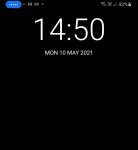
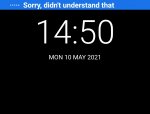
recently, I started getting these four dots on the top left corner of my Note 9 Screen. It identifies itself as voice control, but it is not google voice access. It also tells me to say 'stop listening' to disable it. Yet, after a short while, it reactivates and starts listening to audio. While it's listening, It displays a running transcript of the audio it's hearing.

Anyone knows what this might be and how I can get rid of it?

I have attached some screenshots of what I'm talking about.

Attachments

  • 20210511_153637.jpg
    20210511_153637.jpg
    37.5 KB · Views: 159
  • 20210511_153617.jpg
    20210511_153617.jpg
    49.1 KB · Views: 144
  • Screenshot_20210510-151839_Gmail.jpg
    Screenshot_20210510-151839_Gmail.jpg
    96.7 KB · Views: 163

Migration of App Data from OnePlus5T to Moto G 5G Plus

Hi,

As a Smart Home tech have a few Apps that are logged in to client sites with site specific login info.
Using Google Backup on the OnePlus phone brings the App onto the new Moto G 5G Plus phone but without any of the site information.

What is the best way to completely transfer the app with all its data to the new phone?

Was told that Rooting both phones for access to file systems was the only way. Happy to execute this ideally through a tutorial if possible.

Thanks in advance.

Cheers.

Help A Very Odd Wifi Problem

For years now, using my Galaxy S9 Plus, I've never had any problem with the WIFI at the bar that I work at and frequent. Yet a few weeks ago I go in there, and the WIFI continuously disconnects. I can connect to it, however, once I boot up an app, a minute or will pass then it d/cs with a "Wi-Fi keeps disconnecting" message under the bar's WIFI.

The routers aren't even a year old. And I've tried everything that Google search and other sites have told me to try. Including unplugging and replugging the routers power, and even doing a factory reset to my cellphone.

They go through CenturyLink and have a....
Larger, stand up, black router
Smaller, white router
A WIFI booster

What's really odd is that all other devices connected to the WIFI work just fine. And my cellphone will connect to any other WIFI with no problems. It's just my phone and this WIFI that have suddenly stopped cooperating.

As I'm typing this out, I'm thinking it's probably more of a router issue. But then I circle back to, "Well, why does everything else that uses the WIFI work fine?" I even logged into a VPN on my phone and tried that, no luck.

I really don't see them going into the router and blocking my phone, let alone, knowing how to. If they had, would I be able to even log on in the first place?

I am so confused and desperate for help. Any advice would be appreciated.

Thank you.

Filter

Back
Top Bottom