• After 15+ years, we've made a big change: Android Forums is now Early Bird Club. Learn more here.

Help my phone has TANKED!

I've looked everywhere and I can't find no help. im having a issue with my phone, i was playing music i download and all of a sudden my phone restarted itself. upon reloading it it's not unlocking. i can type 2 digits in and it says incorrect password. if i type my pin or a random combination of 4-6 digits the screen flashes black and goes back to unlock like nothing ever happened? i cant unlock via samsung as it says there was a problem and i cant check anything has been hacked because i cant access messages to reach my two step verfication. someone please help with a fix? it's driving me insane. i cant even turn off the phone. only soft reset which i can't access the Recovery mode.

Does AndroidX BiometricPrompt APIs identify new faces registered in device?

I am using AndroidX BiometricPrompt APIs to authenticate user to use my app using their registered fingerprint or face id.

As fingerprint authentication can be used with crypto object and secret key is stored for this fingerprint in keystore. And when new fingerprint registered the key gets invalidated and user will be prompted to register for biometric login again when he tries to login into the app.

Similar functionality I need to implement for Face ID authentication into app, but did not find anything related to identification of new face id registration in android device / API.

Request your inputs to implement new Face ID registration which will invalidate user login using Face ID and ask him to register again.

Thanks in advance.

Touch screen issues

I got my screen replaced recently and noticed some issues related to the touch. Whenever I drag with 2 fingers and let go of one, my screen doesn't register the finger still pressed. The video shows the issue: my left finger never leaves the screen, but when I lift my right finger you can see a separation in the left line. Anyone know how to fix? My device is a samsung A20e.

Attachments

Factory reset not unlocking/unblocking phone

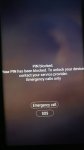
I have a Samsung Galaxy Note 8 on Tmobile and I put in the phone pin after startup (not sim pin) wrongly 3 times. I got a message saying - "pin blocked. Your pin has been blocked. To unlock your device, contact your service provider".

I had no access to any phone functions (except 911/SOS calls), so I reluctantly did a factory reset which seemed successful (i can hear Samsung voice prompts to set up phone), but i am still getting the screen with the message above and no access to the phone itself.

I have no idea what Android version on the phone, it cannot be older than Pie.

Anyone come across this issue before?

Attachments

  • WhatsApp Image 2021-01-14 at 17.37.09.jpeg
    WhatsApp Image 2021-01-14 at 17.37.09.jpeg
    18.1 KB · Views: 916

How to fix error coding

Android manifest.
Code:
<?xml version="1.0" encoding="utf-8"?>
<manifest xmlns:android="http://schemas.android.com/apk/res/android"
    package="com.example.secondapp"
    android:versionCode="1"
    android:versionName="1.0" >

    <uses-sdk
        android:minSdkVersion="23"
        android:targetSdkVersion="30" />

    <application
        android:allowBackup="true"
        android:appComponentFactory="androidx.core.app.CoreComponentFactory"
        android:debuggable="true"
        android:extractNativeLibs="false"
        android:icon="@mipmap/ic_launcher"
        android:label="@string/app_name"
        android:roundIcon="@mipmap/ic_launcher_round"
        android:supportsRtl="true"
        android:testOnly="true"
        android:theme="AppTheme" >
        <activity android:name="com.Second app.MainActivity" >
            <intent-filter>
                <action android:name="android.intent.action.MAIN" />

                <category android:name="android.intent.category.LAUNCHER" />
            </intent-filter>
        </activity>
    </application>
</manifest>

Java:
/**
* Automatically generated file. DO NOT MODIFY
*/
package "com.Second app;"

public final class BuildConfig {
  public static final boolean DEBUG = Boolean.parseBoolean("true");
  public static final String APPLICATION_ID = "com.example.secondapp";
  public static final String BUILD_TYPE = "debug";
  public static final int VERSION_CODE = 1;
  public static final String VERSION_NAME = "1.0";
}

Filter

Back
Top Bottom