• After 15+ years, we've made a big change: Android Forums is now Early Bird Club. Learn more here.

Planning to Install Solar Panels

Is there anyone who has gone solar and may help me with several questions? I plan to install solar panels and don't really know whether it is better to have microinverters or go with string invertor. Besides, how should I decide which type of microinverter is more appropriate for the system. I would also appreciate if you could recommend quality solar providers in California. Thank you in advance!

presidential debates 2020

i say round goes to Biden.

trump comes off as an a$$hole. very aggressive and he seems to enjoy being a flat out d!ck!!!!!!!!

it is almost as misogynistic as the clinton trump debate in 2016 where he would follow her on the debate stage.

now i'm not judging on political stances, i'm just judging by character. and that was a terrible performance from an incumbent president.

it was almost embarrassing on his performance. i really felt bad for chris wallace who was abused by the president.

Help Sims cards..

So my phone, moto edge plus did come with a new sims card, the very first thing, it tells me to do is,
remove the new sims card and put in your old one. So When my Moto Edge Plus updated a few days ago, it tells me to "Insert new sims card to activate it." Warning sign "your sims card cannot be acitvated please call."
Still the sims card only a few years old.
I do not want to lose this number or even my information build within the sims card, and I do not want to get a newer one either, because then endless loop...

Help SMS restore from PC SMS.dat file to Android

Hello, I neeed help with SMS recovery on my Phone, from a sms.dat file on my PC.
Story is, I needed to do a hard reset on an Alcatel Pixi 4 (5010D) Android 6.0
I used an old discontinued app on my PC to make a backup of Contacts, call logs, sms, apps and music.
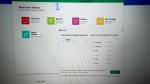
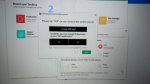
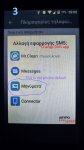
The app is called Moborobo and required USB debugging. I tested both the back up and the restore function before I proceeded with the hard reset.They seemed to work just fine. After that I did the hard reset and attempted to restore the data. The Moborobo restored all data just fine, except for sms. When I clicked for the SMS restore again (Photo 1), a window popped asking to check my phone and change the SMS app (photo 2). I looked but the app suggested is not among the choices (photo 3).
Know that Mr.Clean app was automatically installed when I connected to my PC via USB, and appears Mobo Daemon is an extention of it or sth.
Photo 3 was taken after I tried choosing each app, but the pop of photo 2 won't go away and restoration wont proceed no matter what button I click on both PC or Android. I also downloaded Google's Messages app in hopes it could be compatible, but no luck.
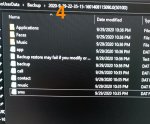
On photo 4 are the files created when I did the backup via the Moborobo pc app, I didn't mess with those.
Since there is a SMS.dat file, is there a way for me to put those messages back on the phone?
Sadly I couldn't find any help online from Moborobo because its discontinued.
Please somebody help, I really need those messages.
Thanks in advance.

Attachments

  • 1.jpg
    1.jpg
    374.9 KB · Views: 460
  • 2.jpg
    2.jpg
    488.2 KB · Views: 389
  • 3.jpg
    3.jpg
    436.4 KB · Views: 370
  • 4.jpg
    4.jpg
    724.4 KB · Views: 421

Phone won’t connect to wifi after rebooting router

I have a moto E play. Don’t like it but am stuck with it.

Whenever we turn our router off and on again, or when the service is interrupted and reboots itself, some of our devices, usually my mobile, won't reconnect to wifi unless we reboot a second time. It has been roughly explained to me why this happens, certain devices “stealing” other devices MAC addresses, but is there an easier way to reconnect the stranded devices than by rebooting the router, the results of which are unpredictable. Perhaps by changing the MAC address in the device’s settings? Our Virgin Hub 3 router takes more than 5 minutes to reboot.

Does resetting the phone at “Setting>System>Reset option>Reset WiFi Mobile and Bluetooth” achieve anything? What would be lost?

Can MAC and IP address be changed under Settings>System>About phone> Status?

This question must have been asked so many times. Is the problem caused by a characteristic of some routers? Or some phones? Why cannot the router manufacturers and phone manufacturers get together to fix it?

Chronic memory problems

Anyone know why Huawei create phones with insufficient internal storage and how to resolve this? For lack of money I've always got low memory phones, but they always worked if limited number of apps/photos etc. until Huawei Y6 2018 that I have.


The phone got full and eventually I got tired of deleting photos etc and got an SD. I thought this would resolve the problem. I transferred most but not all media to the card. But within weeks it was full again. Now ALL my photos and videos are on the SD card and I only have 3-4 apps that are absolutely necessary for work, but it’s still full.


It seems that any space that I free by transferring photos or deleting data or apps is immediately occupied, so that I’m in bizarre situation of having less apps and photos on my phone than before only for it to be more full. The apps memory is totally bloated are far in excess of what it should be when I add up the size of all individual apps.


Other than this the phone is pretty good. Any solutions much appreciated. I have looked extensively but only found suggestion of deleting data which I’ve done or factory reset. Thanks

Getting rid of unwanted apps

I have this new phone: Samsung S10e. It was an unlocked phone I bought from Amazon, but was apparently an ATT phone before it was unlocked. It is loaded with ATT crapware and some other apps that I don't want and would like to get rid of. Like some sort of Game of Thrones app. But they are somehow locked onto the phone and there is no "uninstall" selection available in Setup | Apps.

Can anyone tell me the magic to get rid of this junk?

Thanks,

Merge Empires (by FuryLion)

Play the most addictive game on your phone! Build your own empires, choose the smartest strategy to defeat bosses!

FEATURES:
•Merge buildings to discover new heroes and ages.
•Variety of objects, heroes and bosses. There are more than 50 kinds of buildings, different heroes and epic bosses!
•Idle system. Your civilization grows automatically, even if you are offline.
•Compete with friends and players from all over the world in leaderboard to get unique rewards.

Merge, build, and develop to be greatest ruler of your civilizations!!


Price:Free

Play Store Download link: https://play.google.com/store/apps/details?id=com.furylion.mergeempires

Help connectingA21s to Android File Transfer

i recently bought a Samsung A21s, as i was setting it up i connected to the Mac all ok. A couple of days later it would not connect. The phone window that pops up asking you to choose, charging, media, file transfer does not appear now.
I looked into the developer section and set it to debugging mode but still no connection.
I have wasted two days contacting Samsung who told me to install Smart Switch, that was useless it's for backing up and restoring the phone data not file transfer.
Has anyone worked out why AFT no longer works.

Problem After Update

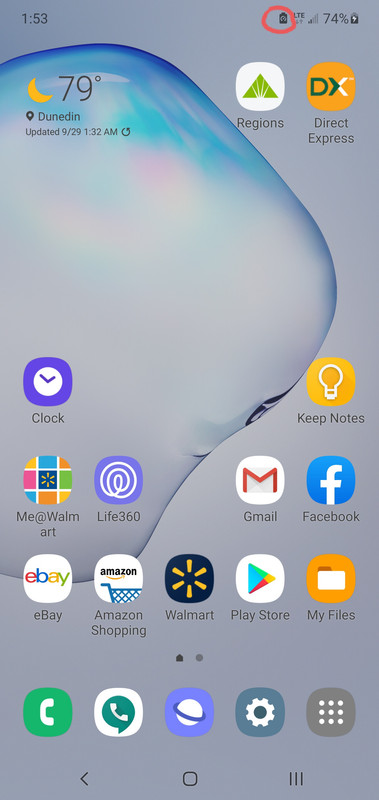
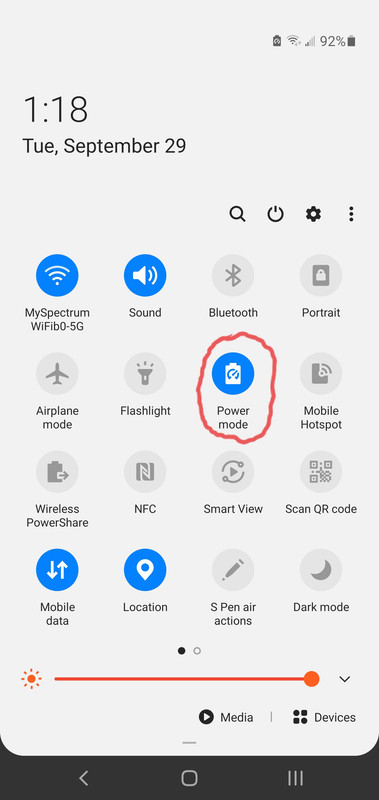
After I did the latest system update (Unlocked Snapdragon) I have a new icon that I can't get rid of. When I hit the Power mode button from the pulldown menu it just goes straight into Optimized mode with no settings or options given and then the icon goes away. Is there a way to stay in High Performance mode and get rid of that icon?
20200929-015514.jpg
20200929-131918.jpg

Help Transfer files to Mac

I switched to an iphone a month or so ago and was able to successfully transfer all my files except my insane number of photos. I decided to leave them on there so I could transfer them directly to my PC later. I have Android File Transfer installed on my mac, but when I connect my phone via USB-c, the message that was coming up was "Make sure your device is unlocked and "file transfer" is selected" or something to that effect, now when I plug my phone into my computer via USB-c, the Android File Transfer error message is now saying "Please connect your android device with a USB cable to get started." I've restarted my device twice, but I can't do anything, it won't recognize my phone anymore. Please help, I just want my pictures on my computer and don't know what to do.

Help Can't get GPS location fix

Some weeks ago Waze started acting up and not finding GPS location.
Then it randomly bounced between on and off, and now I can't get it at all.
GPS test says NO FIX, with 16 satellites in view and 3 in use (though they vary a bit).
Would this be due to a malfunctioning GPS receiver? If so, is it possible to replace it?

Help Flight mode not working - still getting Messages

Hi, i am not sure if this issue is device specific or software specific. I have a Sony Xperia XZs with Oreo which works nicely for almost everything. I was sad to see the old Sony messaging app go, and be replaced by Google's "messages", which works okay but not as well as the one from Sony.
Anyway, I always set my phone in Flight mode at night, to be undisturbed by calls or notifications, but there is a weird thing: Text messages don't come through, but other media messages such as when someone sends photos, do get through and cause a notification which is very disturbing. I tried turning on both flight mode and "do not disturb" but there is still a silent notification with a flashing light when the media message arrives. This is freaking me out. Does flight mode not work?? I always hav Wifi and 4G data turned off when I don't use them, so that shouldn't be causing any troubles either. I always thought that flight mode was supposed to really turn off all hardware connectivity, but it seems it is only turning off notifications (except media notifications apparently). This is really freakish.
Anyone any ideas?

I orignially posted this question in a device sub-forum but as it will probably go unnoticed there I decided to post under the more general forum. Now I noticed that I posted in the "lounge". Huh? Well, I hope to get help anyway...

Filter

Back
Top Bottom