• After 15+ years, we've made a big change: Android Forums is now Early Bird Club. Learn more here.

Help Apps randomly exiting while I'm typing

Hi! I've had my P30 for a few months now and this is an issue that I've had almost since the beginning. When I'm typing, the app I'm on would suddenly exit out. The app didn't crash, just closed out as if I pressed the home button. This happens very regularly, like 5-10 times a day. It has happened on WhatsApp, reddit, Messenger, basically any app where I need to type. I've switched from Swipe to Gboard and it's the same. As far as I can tell, there isn't a trigger word or phrase. Several times I noticed that it happened when I was typing really fast, so I slowed down my speed, which seems to reduce the frequency but not eliminate it altogether. What's the root of this issue? Anyone having the same problem? I never had this issue with my previous iPhones, and this is my first Android. Appreciate any input!

free download TED squirrel adventure DEMO

Please try TED squirrels Adventure Android Game
an Adventure game of Ted, TED searching for magic crystals.., the source life of squirrels kingdom
https://play.google.com/store/apps/details?id=com.Rgames.TEDsquirrelDEMO
-wqYfheiooR8g-30PaEYCnFvLlnHmaAsuzUd40zNUCZU7FQw-S13xd0lbknZWgG2exY=w2752-h1344

m8wH4WJWOQ5FQgTz6Q1vOK8nld4qVOlMeO9j3fZ6_aAcLDScy6DzegIrUsRnQ2XEWQ=w2752-h1344


in Full version features :
• Consists of 31 levels
• Fight giant boss
• Cool cinematic and action
• Many variations of enemies
• Items or Secret to find and collect
• Unlock All Achievements

Classic Low poly style, Bringing you nostalgic look to Golden age era of world console games 3D Graphic, to mobile

Help Conect Android Phone & Tablet by IP Address?

Through File Manager + App I am able to connect my phone & Tablets to my computer.by pressing Remote and adding my computers remote location eg 192.168 etc

However I cant seem to find out how I can do that between my phone and tablets
I try to add their IP Addresses and nothing happens
I have been adding the computer sign in and password in the box that comes up
Even saying anonymous doesnt work.

WiFi Hot Spot not detected

I just bought a Samsung Galaxy J2. I don't have internet at home so I must use my Kindle Fire & laptop through the phone's WiFi to get online. I followed instructions in manual but neither device detects the WiFi signal. Nor is the WiFi name or password found in the phone or in the paperwork like it was with my last phone. Any suggestions? Thanks.

Android firmware Hack/Update

Hello everyone,
So this is the sequel to this thread:

https://androidforums.com/threads/low-battery-life.1318473/

I figured that my phone has reached its maximum usage life, but I wanted to experiment changing its firmware and possibly replacing the old Jelly bean firmware it has to the relatively recent lollipop 5.1. On doing so, I came across this page:

https://www.xda-developers.com/update-firmware-any-samsung-phone/

The issue is that I can't find the firmware for my current model which is:

Model version: SM-N7505
Baseband version: N7505XXUANAC
Build number: JSS15J. N7505XXUANAD

I looked into possible ways to hack the phone's firmware and applying the firmware from another SM-N7505 but what I got from that was that my system would get "bricked".

Anyone familiar with this can shed some light?

ic_launcher...png files

Hi

I try to work with Android Studio. I started some interesting tutorials. When I made a small project in Kotlin, there haven't been any problems compiling the app. But now I made something in Java and every time there is always the same error message:

C:\Users\Peki\Documents\Projekte\Programming\Anroid\ActivityDemo\app\src\main\res\mipmap-hdpi\ic_launcher.png: AAPT: error: file failed to compile.

Any idea? I tried to find something on the net but unfortunately nothing helped.

Thanks.
Peki

Help Ok google doesn't work unless i have my headphones connected

Hello, I have this problem with my xiaomi redmi note 8 for 2 months and it is driving me crazy.

One day my "ok google" command stopped being answered by the cell phone. Try everything (battery saver, reconfigure voice, reinstall wizard, update google app) and nothing. Yesterday I discovered that when the headset is connected, ok google works without problems.

I know what you are thinking, the internal microphone of my cell phone should not be working. But the strangest thing is that it works perfectly and in fact the google application can make use of it. It just doesn't respond to the "ok google" command unless the headphones are connected.

I thank you in advance

Root How to Unlock the bootloader of the ZTE Avid Plus Z828

This process may be complicated depending on who you are. This tutorial is not for very beginers. You must have experience with root, QFIL and a little bit of bootloader knowleadge.

Unlocking the Bootloader:

You will need:

  • Your ZTE Avid Plus
  • A PC
  • Adb Commands installed
  • QFIL 2.0.1.9
  • Your QFIL firehose (emmc_firehose_8909.mbn) Check the attachments, and download it from there
  • A Hex editor (Like HxD)

Tutorial:

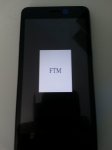
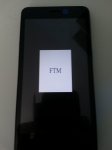
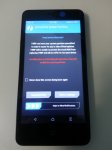
  • Hold power and volume down to boot to FTM mode
IMG_20200516_114231.jpg
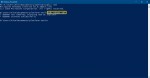
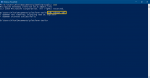
  • Using ADB commands, type: adb reboot EDL

Captuerereerre.PNG

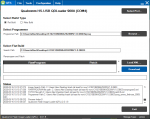
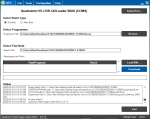
Open QFIL, You should see Qualcomm HS-USB QD-Loader 9008 (COM****)
  • Select "Flat build"
  • Select your firehose (emmc_firehose_8909.mbn)
Captssdsdure.PNG
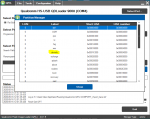
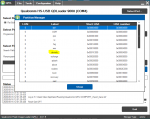
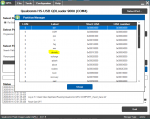
  • Select tools, partition manager
  • Click ok
We are intrested in the /devinfo partition only!

Capturewewewwee.PNG


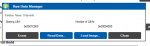
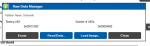
  • Right click devinfo only and click on "Manage Partition data"

Capturerererere.PNG

  • Click on "Read Data"
  • Check the logs on the main window, it will show you where it will be saved (Most frequently in the Appdata/Roaming/Qualcomm folder) and the file will be named something like this: ReadData_emmc_Lun0_0x1c000_Len16384_DT_**_**_****_**_**_**.bin
  • Copy the file we read to somewhere like the desktop and make a backup in case it does not work.
Next, open HxD or any other hex editor

  • Click File>Open and select the file we copied to the desktop
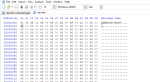
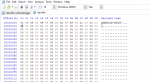
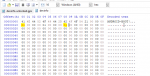
You should see a layout like this:

ZTE1.PNG

Edit this:

41 4E 44 52 4F 49 44 2D 42 4F 4F 54 21 00 00 00
00 00 00 00 00 00 00 00 00 00 00 00 00 00 00 00


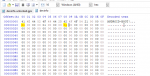
to this:

41 4E 44 52 4F 49 44 2D 42 4F 4F 54 21 00 00 00
01 00 00 00 00 00 00 00 01 00 00 00 00 00 00 00

ZTE2.PNG

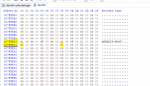
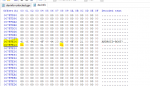
  • Go to offset 007FFE00 and repeat the same steps:
ZTE3.PNG

___________________________________________________________________________

What will this do?! The two 01s we put in this file will show to the bootloader that it was unlocked before via fastboot. Of course, we are editing it now and it was never unlocked via fastboot. This is enough to fool it :D


For people who don't know, on all android devices, there is the /devinfo partition that stores the information of the bootloader such as is_unlocked (aboot), is_tampered, is_verified, charger_screen_enabled, display_panel, bootloader_version, radio_version etc.
We have to modify it into saying is_unlocked and is_Critiacal_unlocked

____________________________________________________________________________________

  • Do not touch anything else and click File>Save
  • Boot your phone int EDL again.
(You might need to reopen QFIL)

Capturewewewwee.PNG

  • Back to the partitions, right-click /devinfo again and click "Manage partition Data" again
  • Click "Load image"
Capturerererere.PNG
  • Select the file we modified (Should be a .bin)
  • Wait a few seconds and restart your phone

Your bootloader should be unlocked!!

Credits to aleph security for the unlock bits https://alephsecurity.com/2018/01/22/qualcomm-edl-2#bootloader-unlocking

Download the Firehose:

Attachments

Root [ROM] [7.1.2] CrDroid 3.8.9 Unofficial [d2att/can - i747/m] compiled by Alexenferman

https%3A%2F%2Fcdn.teamandroid.com%2Fwp-content%2Fuploads%2F2016%2F12%2Fcrdroid.png


crDroid is designed to improve the performance, reliability and customizability of stock Android. It's based on Lineage OS and offers a lot of customization.

Note: Originally, I posted this thread on XDA but they removed the S3 D2 section. So, I posted it here.

This ROM is not for the i9300 Galaxy S3!!

Your (probably expired) warranty is now void.
I am not responsible for bricked devices or dead SD cards,
Please do some research if you have any concerns about features included in this ROM before flashing it! YOU are choosing to make these modifications, and if you point the finger at me for messing up your device, I will laugh at you.
Make sure to create a backup first using TWRP.


Issues/Bugs:
-None. You tell me!

Features: https://github.com/crdroidandroid/crdroid_features
CrDroid Website: https://crdroid.net/

Releases
Latest Version: V.3 FINAL
https://drive.google.com/open?id=1DW...T4ZNZieMwIUbAX

Change log for latest Version
Fixed not able to download files, Fixed Download Manager crashing, Fixed Media Provider crashing

Supported variants:

at&t [d2att] (i747)
Canadian [d2can] (i747m)
Technically should work on (at your own risk):
T-Mobile/Videotron [d2tmo]
Sprint [d2spr]
Verizon [d2vzw]

Screenshots:
Screenshot_20191222-190922.png Screenshot_20191222-190936.png Screenshot_20191222-190941.jpg Screenshot_20191222-190958.jpg Screenshot_20200105-115823.png Screenshot_20200105-120310.jpg

Open Gapps
Make sure you Use [ARM]-[7.1]
NOTE: Boot the system once before installing GApps. After booting up, reboot to your custom recovery and install GApps
Not doing so might result in a bootloop and you will have to flash again.
https://opengapps.org/

Install:
Boot to TWRP Recovery [VOL UP] [HOME] and [POWER]
Press [Backup]
Slide To Backup >>>
Go [Home]
Press Wipe
Press [Advanced Wipe]
Select [SYSTEM][DATA][CACHE][DALVIK CACHE]
Slide to Wipe >>>
Go [Home]
Press [Install]
Select [crDroidAndroid-7.1.2-20200102-d2att-v3.8.9.zip]
Slide To Install >>>
Press [Reboot System]
ENJOY! (First boot might take from 1 to 5 minutes so be patient)

Contributors
Alexenferman
ROM OS Version: Android 7.1.2
ROM Kernel: Linux 3.4.x
Based On: LineageOS 14.1

Version Information
Status: Stable
Development Status: Final
(I have moved on another project trying to get Lineage 16)

Build Sources
Device Tree: https://github.com/LineageOS/android..._samsung_d2att
Kernel: https://github.com/LineageOS/android_kernel_samsung_d2

Removing wallpaper from lockscreen

I have A70 and can't find dedicated section for it..
Anyway.
I somehow managed to put wallpaper onto the lock screen.
Now, I can't find a way to remove it. I went through every option possible - no mas. I just want blank screen.

Any ideas?

I know it's bad tone to ask 2 questions in one thread but - is there any way to reduce screen sensitivity? It is SUPER sensitive to any touch even with screen protector and plastic case on top of it. There is setting to increase sensitivity, but not to decrease it... I carry phone in hand all the time and have to be very careful not to press screen or, lock screen with that wallpaper pops right up....

[Working] Bootloader Unlocking on most Qualcomm ZTE Devices, /Devinfo partition modifiation

Warning: This unlocking method might not work on newer ZTE devices with Oreo+ and flagship devices. You have nothing to lose, but it might not do anything.

This tutorial is only for Qualcomm ZTE Devices.

Unlocking the Bootloader:

Warning: This bootloader unlocking method is not for beginners. It requires at least some knowleage on how to flash ROMS or partitions via QFIL and ADB commands. If you do not understand something here, than the tutorial might not be suitable for you. You can still try it, but at your own risk of course.

Confirmed Working on:
ZTE Imperial Max (Z963U)
ZTE Tempo X (N9317)
ZTE Avid 4 (Z855)
ZTE Grand X View 2 (K81)
ZTE Avid Plus (Z828)


You will need:

  • A Qualcomm ZTE device (I am using a ZTE Avid Plus Z828)
  • A PC
  • Adb Commands installed
  • QFIL 2.0.1.9
  • Your QFIL firehose (emmc_firehose_8***.mbn)
  • A Hex editor (Like HxD)

Tutorial:

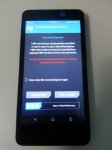
  • Hold power and volume down to boot to FTM mode
IMG_20200516_114231.jpg
  • Using ADB commands, type: adb reboot EDL

Captuerereerre.PNG

Open QFIL, You should see Qualcomm HS-USB QD-Loader 9008 (COM****)
  • Select "Flat build"
  • Select your firehose (emmc_firehose_8***.mbn)
Captssdsdure.PNG

  • Select tools, partition manager
  • Click ok
We are intrested in the /devinfo partition only!

Capturewewewwee.PNG

  • Right click devinfo only and click on "Manage Partition data"

Capturerererere.PNG

  • Click on "Read Data"
  • Check the logs on the main window, it will show you where it will be saved (Most frequently in the Appdata/Roaming/Qualcomm folder) and the file will be named something like this: ReadData_emmc_Lun0_0x1c000_Len16384_DT_**_**_****_**_**_**.bin
  • Copy the file we read to somewhere like the desktop and make a backup in case it does not work.
Next, open HxD or any other hex editor

  • Click File>Open and select the file we copied to the desktop
You should see a layout like this:

ZTE1.PNG

Edit this:

41 4E 44 52 4F 49 44 2D 42 4F 4F 54 21 00 00 00
00 00 00 00 00 00 00 00 00 00 00 00 00 00 00 00


to this:

41 4E 44 52 4F 49 44 2D 42 4F 4F 54 21 00 00 00
01 00 00 00 00 00 00 00 01 00 00 00 00 00 00 00

ZTE2.PNG

  • Go to offset 007FFE00 and repeat the same steps:

ZTE3.PNG

It looks like ZTE did put another ANDROID-BOOT! at this section, they thought I would not see the second one :D Make sure you edit that second one, otherwise the BL won't be unlocked.

___________________________________________________________________________

What will this do?! The two 01s we put in this file will show to the bootloader that it was unlocked before via fastboot. Of course, we are editing it now and it was never unlocked via fastboot. This is enough to fool it :D


For people who don't know, on all android devices, there is the /devinfo partition that stores the information of the bootloader such as is_unlocked (aboot), is_tampered, is_verified, charger_screen_enabled, display_panel, bootloader_version, radio_version etc.
We have to modify it into saying is_unlocked and is_Critiacal_unlocked

____________________________________________________________________________________

  • Do not touch anything else and click File>Save
  • Boot your phone int EDL again.
(You might need to reopen QFIL)

Capturewewewwee.PNG

  • Back to the partitions, right-click /devinfo again and click "Manage partition Data" again
  • Click "Load image"
Capturerererere.PNG
  • Select the file we modified (Should be a .bin)
  • Wait a few seconds and restart your phone and IT SHOULD BOOT SURELY!!
Your bootloader should be unlocked!!

IT IS WORKING!!

IMG_20200516_211406.jpg
TWRP is booting!


Credit to aleph security in the Unlocking the bootloader section at the bottom of the page for the values to change: https://alephsecurity.com/2018/01/22/qualcomm-edl-2/

s10e Voicemail

I have a new LG now and it lacks visual voicemail. It's an unlocked Verizon phone, and apparently a lot of people have had trouble with this. I'm tempted to return it and get the 10e instead. Does anyone out there have an unlocked Verizon 10e, and if so can they tell me if it was possible to get a visual voicemail app on their phone? Right now I have to go through the phone keypad and listen to a robot voice tell me what time the call came in, the number it came from, its duration, etc. Very tedious every time I get a VM. It seems astounding that Verizon (or LG?) made it this way, and it seems like a big FU to anyone who made the mistake of buying an unlocked phones (apparently Verizon phones don't have this problem, even LGs). Thanks!

Pings

I'm trying to get my phone to only "ping" when I get a new text. I keep getting pings for unknown apps. I shut off all the notifications from FB, but still getting them from unknown apps. Do I have to go into each apps and choose "silence" in order to make sure I only get noise notifications from one place? Or is there a simpler solution? Thx.

[Game][7.0+] New Game Hunt AR : Augmented Reality Shooting Game

Hello everyone,
My name is Anish and I would like to present to you all an Augmented Reality game Hunt AR.

Hunt AR is an Augmented Reality Shooting Game and Hunting game in which you hunt the birds in the real world. This game is inspired by the famous video game Duck Hunt which I used to play when I was a kid. The concept is the same you have to hunt down the birds but this time with augmented reality experience.

Hunt AR is a bird hunting game in the real world. Consider your device like a gun and find the creatures in the AR world and shoot them by pressing the fire button.

These creatures can spawn randomly anywhere in the real world so be alert. These creatures will come towards you to attack you so kill them before they do.

The game is available on Google Play: https://play.google.com/store/apps/details?id=com.anishjain.HuntAR

Gameplay Video:

The game is developed using ARCore and hence requires devices with android version 7 and above. Also, your device must be compatible with play services for AR.

Help putting Menu into a Toolbar in Activity

I am writing because I cannot successfully add a Menu into a Toolbar. i have made a toolbar using the Toolbar element. I have tried using the other flavors of a toolbar (androidx for instance) and all of them crash my app. So I am using the android-recommend 'Toolbar' - it's the only one that flies.

Anyway, I can see the Toolbar! Now for the Menu I wish to add. I have overridden the method

@override
public boolean onPrepareOptionsMenu (Menu menu) {
super.onPrepareOptionsMenu( menu );
getMenuInflater().inflate( R.menu.home_mainmenu, menu );
invalidateOptionsMenu();
return false;
}

I have tried endless variations and always no joy. So would some kind angel out there please give an example of how to place a Menu into a Toolbar?

Someone suggested altering the 'AppTheme' in styles.xml to: Theme......NoActionBar. I tried it both ways with no effect.

I'm a very experienced programmer but am new to Android, so all of these different versions of the same thing really confuse me..... Looking forward to hearing from you!

TIA

So - I figured it out. May this be of use to you.

First, we are talking about the xml entity <Toolbar>. Nothing more, Nothing less.

Your Activity class must extend Activity. --- NOT AppCompatActivity

In your Activity.onCreate(...) put this:

// the ui toolbar already exists, so a temporary variable works fine
Toolbar toolbar = findViewById(R.id.mytoolbar); // substitute your id
setActionBar( toolbar );

Now you must override like so:
/*
default processing to be done only once
boolean bMenuInitialized should be declared as a class field to false
*/
@override
public boolean onPrepareOptionsMenu (Menu menu) {
super.onPrepareOptionsMenu( menu );
if ( !bMenuInitialized ) {
getMenuInflater().inflate( R.menu.home_mainmenu, menu );
bMenuInitialized = true;
}
return true;
}

This override gets called every time the menu is displayed. That's why you only want to call it once i this context, so trip your flag - in this case bMenuInitialized. Good luck!

Filter

Back
Top Bottom