• After 15+ years, we've made a big change: Android Forums is now Early Bird Club. Learn more here.

Galaxy 20 vs Galaxy S20 Plus

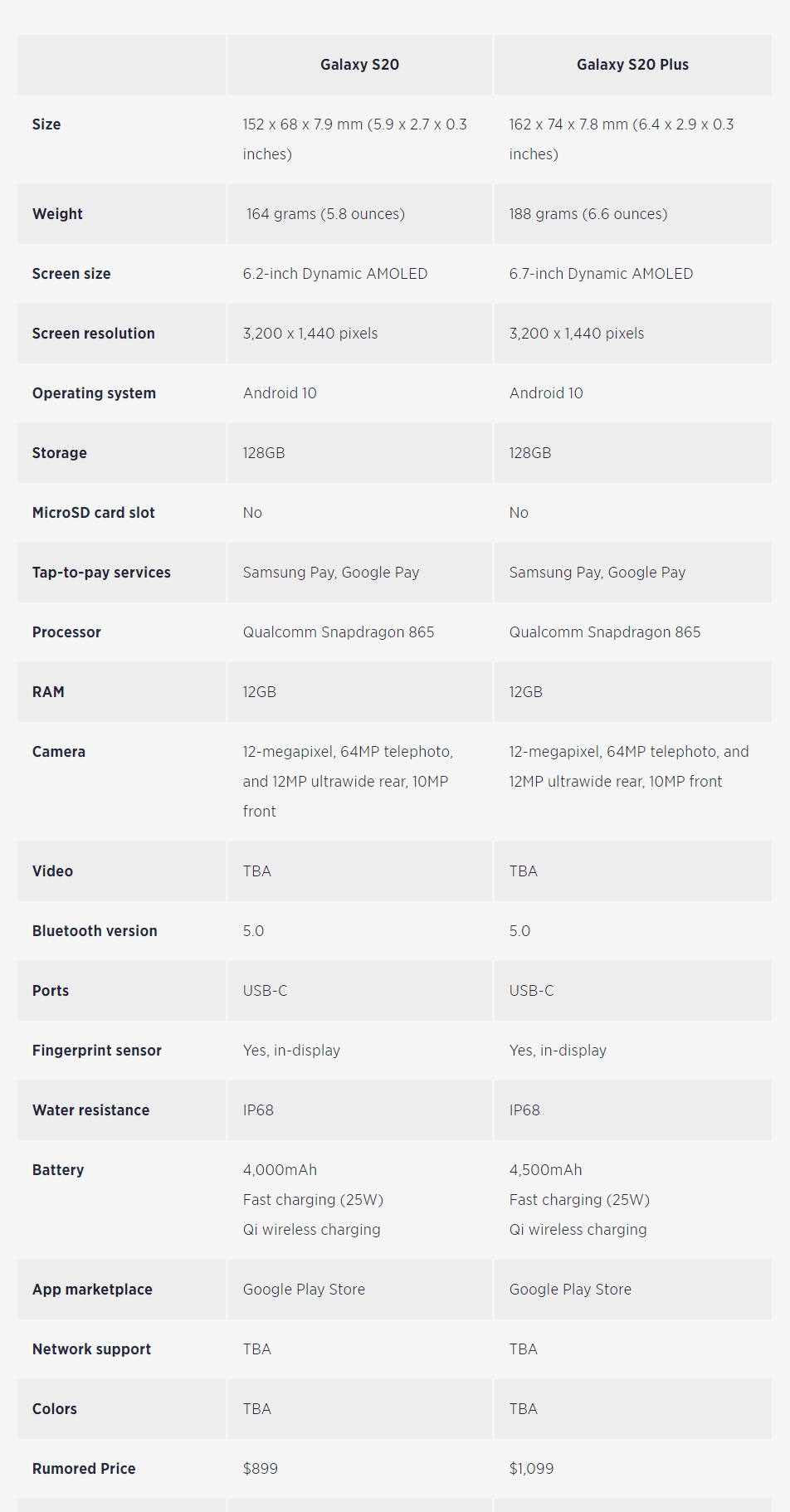
Just saw an interesting break down in an article (I'll link below), that breaks down the S20 and S20 Plus, the 2 phones most will probably be trying to decide from. An interesting question, which of these to get.

With nearly identical specs, the only real difference is the Plus is bigger 6.2-inch Dynamic AMOLED vs 6.7-inch Dynamic AMOLED

With the bigger S20 Plus getting a slightly bigger (500mah) battery.

There is talk of better camera software (time of flight) being on the Plus, which is a clear differentiator, but possible not something most now about or care about.

Ultimately, it looks like the S20 will be $899, and the S20 Plus will be $1099. Is the $200 premium worth the upgrade?

Full rumored spec breakdown here, taken from Digital Trends: https://www.digitaltrends.com/mobile/samsung-galaxy-s20-vs-s20-plus/

Capture11.PNG

[App][Free] Tomato List - Grocery Shopping App

Now all shopping lists are at your fingertips
Tomato List is a grocery list app that helps you save time and keep all the products in one place. It’s a very convenient solution to know exactly what you have to buy from your local supermarket, without using the classic “pen and paper” list. With a large variety of items to choose from, you can quickly find all the products that you need and add them to the list, or you can create your own ones.

Features that we provide
Unlimited number of shopping lists
Items grouped in categories
User-friendly and intuitive interface ✨
Personalize each list with different colors
Support the following languages: English, German, Spanish, Italian, French, Romanian. Many more will be added soon

Create an account using your email address or use the quick registration methods via Google and Facebook accounts.
All your lists will be synced with the cloud, so you can access all your shopping lists from any device using your account.

Play store link: https://play.google.com/store/apps/details?id=com.major.android.shoppinglist
Facebook: https://www.facebook.com/tomatoListApp
Pinterest: https://www.pinterest.com/tomatoList/

Video recording issue in android app

Hi,

In my application, i was using “https://android-arsenal.com/details/1/719” CWAC-Cam2 android library to record video. But now this library got deprecated. Please suggest me if any other android libraries available, which satisfy my below requirements.

Video Requirement:
  1. Control to access flash light
  2. Should compress captured video with less than 5sec of time
  3. Should convert video format to “.mp4” always
  4. Need display of video timer.
  5. Should pass timer

Apps Sensors don't gather data when phone is idle

Hi everyone,

I’m trying to develop an app for Android in which I pick up data from several sensors (if available on the device) and write it down to a file which will later be analyzed for certain uses.
I’m facing several problems, a minor one which I can kind of ignore and a major one that I haven’t been able to solve and makes the app not work properly.

- Minor problem

I’m gathering data from: Accelerometer, Linear Accelerometer, Gyroscope and Magnetometer and also from the GPS but that works quite differently and can only be sampled at much lower frequencies, so I’ll ignore it for now.
I gather the data by implementing a listener for each sensor:

Java:
    public class AccelerometerWatcher implements SensorEventListener
    {
        private SensorManager sm;
        private Sensor accelerometer;
 
        AccelerometerWatcher(Context context) {
 
            sm = (SensorManager)context.getSystemService(Context.SENSOR_SERVICE);
 
            assert sm != null;
            if (sm.getDefaultSensor(Sensor.TYPE_ACCELEROMETER) != null) {
                accelerometer = sm.getDefaultSensor(Sensor.TYPE_ACCELEROMETER);
            }
        }
    }

And I’m setting the frequency to ~50Hz by using:

Java:
    sm.registerListener(this, accelerometer, SensorManager.SENSOR_DELAY_GAME);

When gathering data, I understand the frequency can’t be 100% stable, but the weird thing is it stays more or less stable on every sensor (at around 50Hz) except on the Accelerometer, where most of the time it samples at 100Hz and sometimes drops down to 50Hz.

Is there something I might be doing wrong or any way to control this? So far it’s happened in every device I tried, although they don’t all behave in exactly the same way.

- Major problem

I’m writing down the info to a file by first writing everything I pick up from the sensors to a string and then every X seconds, writing what’s on the string to a file and clearing it so the sensor listeners can keep on writing on it but it doesn’t become infinitely long.

I write on the string like this:


Java:
     @override
        public void onSensorChanged(SensorEvent event) {
 
            if (event.sensor.getType() != Sensor.TYPE_ACCELEROMETER)
                return;
 
 
                if(initTime == -1)
                    initTime = event.timestamp;
 
                MyConfig.SENSOR_ACCEL_READINGS += ((event.timestamp - initTime) / 1000000L) + MyConfig.DELIMITER + event.values[0] + MyConfig.DELIMITER + event.values[1] + MyConfig.DELIMITER + event.values[2] + "\n";
    }

And then save it to a file using this:

Java:
    public class Utils {
 
        private static Timer timer;
        private static TimerTask timerTask;
 
        public static void startRecording() {
            timer = new Timer();
            timerTask = new TimerTask()
            {
                @override
                public void run()
                {
                    // THIS CODE RUNS EVERY x SECONDS
                    writeDataToFile();
                }
            };
            timer.scheduleAtFixedRate(timerTask, 0, MyConfig.SAVE_TIMER_PERIOD);
        }
 
        public static void stopRecording()
        {
            if(timer != null)
                timer.cancel();
            if(timerTask != null)
                timerTask.cancel();
 
            writeDataToFile();
        }
 
        private static void writeDataToFile()
        {
            String temp_accel = String.copyValueOf(MyConfig.SENSOR_ACCEL_READINGS.toCharArray());
            WriteData.write(MyConfig.RECORDING_FOLDER, MyConfig.FILENAME_ACCEL, temp_accel);
            MyConfig.SENSOR_ACCEL_READINGS = MyConfig.SENSOR_ACCEL_READINGS.replaceFirst(temp_accel, "");
        }

In the listener, every time I stop listening, I set “initTime” to -1 so the samples always start at 0 and go up to the duration of the listening period in miliseconds. (Ignore the DELIMITER it’s just a matter of formatting).

My main app-breaking problem, is the following:

In most phones (a few lucky ones work flawlessly) 1 or 2 things fail.

In some, after being idle for a while (locked and in your pocket for example) the sensors stop recording data so the app just writes blank values until I wake the phone up again.

In others, it’s even worse, not only do the sensors stop recording data, but the timer / writing to file, seems to stop working too, and when the phone wakes up again, it tries to write what it should’ve written while it wasn’t working and messes up all the timestamps, writing the same samples at different points “in the past” until it catches up to the current time. (If you visualize it as a graph, it basically looks as if the data gathering travelled back in time).

Is there any way in which I can make sure that the app keeps on working no matter what, whether the phone is locked, dozing, the app is minimized, on the background, foreground, etc.?

I tried a method I googled that consists of setting and alarm to "wake up the process" every X seconds (no matter what time I set to it, it only worked max once per minute).
I saw how for a few miliseconds every time the alarm went off, it captured samples again but then went to sleep right away, it didn't keep the phone "awake" for a longer period of time.
It solved nothing and even for the brief period it forced the sensors to gather data, it only helped wake up the sensors, the problem with the timer / writing to file still persisted.

Hope someone can shed some light on how to keep the phone gathering data no matter what, I've been trying everything I could think of and I'm not getting anywhere. Sorry for the brick of text, but I didn't really know how to explain it in a shorter way.


P.S: I saw that having the Battery Saver ON made it even worse, even on the phones where it usually worked properly, it started messing things up. So another question would be... How can I stop it from interfering?

Multitasking: Floating Apps, Split View Multiple

Each window floats on top of all other applications, allowing interaction with multiple applications at a time. Resize and position each individual floating window to your likings. Keep track of your favorite Shortcuts and Recent Applications and conveniently launch them through the Floating Sidebars on top of any other application. Open more apps at the same time in floating windows and enjoy real multitasking! Don't leave the current app for a small task. Floating Apps is the largest and the most advanced collection of floating mini apps available on Google Play. Access multiple apps simultaneously using the floating apps feature. Enable multitasking for your smartphone, use split view for multiple apps based on app usage. Create your own multi-window and dual display with multimode split-screen options.

Nokia 7.1 cant load android

Nokia 7.1, did the security update yesterday. On bootup screen came up - Android recovery then in red Cannot load Android system. It then gives me two options only
Try Again
Factory data reset.
Now I have a heap of photos Id like to get off the device before I do the factory data reset. Nokia unhelp center were utterly hopeless an quite condescending.
Im hoping somebody on the forum can help me access the data before I bin the phone and buy something descent

Help Downloaded images named oddly, only when using the app

(Mods, please move if better suited elsewhere.)

I've only recently started using Pinterest, at first just via browser, then I installed its app.

When I download photos using a browser, they're named something logical, like:

Pinterest_web.png


But downloading the exact same photo, using the exact same method [selecting 'Download image' from its 3-dot menu], with the app, its names are seemingly random characters, like:

Pinterest_app.png


Is there some way around this, some way to get meaningful file names? I mean besides dumping the app?! :D

Help Velocity Micro Cruz T510 - internal storage

Somehow this thread has gotten everyone confused. Let's try again.

I have a Velocity Micro Cruz T510. For some reason, apps are installing into internal system storage, (RAM??) not internal storage (SD). Internal system storage is less than 1 GB. Internal "SD" storage is 8 GB.

I am NOT talking about an external SD card that can be inserted and removed. I am talking about the internal
"/mnt/sdcard" space that came with the device.

Again, I am NOT talking about external SD.

My account- wifi fix?

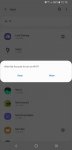
I need some help with my s8. Everytime I unlock it a message pops up and says, my account wants to turn on wifi. The options are allow and deny. Obviously I don't want my wifi on all the time for battery reasons. I know there's a way to disable this popup message but I cant remember how. Does anyone have any ideas? The app does not have notification permissions or wifi. No matter how many times I'll click deny it just pops back up when the device is unlocked.

Attachments

  • Screenshot_20200209-121510_Settings.jpg
    Screenshot_20200209-121510_Settings.jpg
    71.3 KB · Views: 248

Lost Files

Hi I connected my pocophone to my laptop in order to transfer files, the folder was named and inside it was various folders all named.

The first folder I was moving was 7Gb, and it was transfering fine it was nearly done and it said 5sec untill complete, but 15 mins later it said the same thing so I got impatient and checked the folder and the whole folder had transferred and was available.

So I tried to cancel the transfer but it never responded, so I used Ctrl Alt Del, and ended the program disconnected my phone, then I opened my phone to find my named folder, and transfer another file, but my named folder has disappeared,

It hasn't been deleted and my internal SD card is still full so the folders are still there but I just can't locate them can anyone help thanks.

Help Missing S9+ voice note - urgent

Hi all,

Today I recorded a very important voice note. I named it and saved it, but when I went back to find it it has gone.

Bizarrely, when I go to "my files" the "voice notes" section does show that the last time the folder was updated or used was the exact moment that I saved the recording.

Does anyone know if there is a way to recover this? I have searched my phone top to bottom.

I am on the latest version of Android.

Thank you.

  • Locked
Can't restore device settings, SMS, etc, after reset and new PIN creation?

Device: Google Pixel 3xl
Android 10

I had to reset my phone and create a new screen lock pin and could not restore old backup during the initial setup as it was requiring the OLD pin. So i was instructed to skip restore and do later.

Now the restore is not happening properly, it's been 3 days since reset. There was no notification to finish setup or in settings.

I have the restore backup in my google drive and I'm using Google One. I can preview the restore and see device settings, sms, and everything that i want restored but it's not happening.

I have learned that I need to reinstall G One and then click restore to bring back the Photos and Media, which it is doing right now but I am still not getting the device settings and call history, SMS, etc restored. I have learned that is Android's Job.

How do I direct android to restore the call history, device settings, apps, etc?

I can see it in Google drive but don't know how to activate it and it is not happening automatically as it has been 3 days since Fresh reset and new Pin was created.

I see this morning that there is a new backup added in google drive of the reset phone (which is not useful as it is a backup of the fresh reset none of the old info i need). This backup does not have the Google One icon behind it as i had not installed One back onto the phone and connected it to my google account, when this backup was created.

thanks for any help

Help Slow Data & wifi speeds in YouTube App but not Browser?

So I have been experiencing a lot of buffering while watch youtube videos in the YouTube app on my Galaxy S8. I did not pay much attention to but this morning I decided to hunt down the problem. I was trying to watch a video and I was getting buffer, even though the video was running a 144p quality. I have a 40 Mbps internet connection with Cox, so I should not have problems streaming a youtube video at any quality on my smartphone.

1. First I checked to make sure that there was nothing else on the network hogging the bandwidth.
2. I used my laptop to check my speed on speedtest.net. I got 32 Mbps UP and 15 Mbps DOWN.
3. I opened the speedtest.net app on my S8 and ran a speed test to the same server and got similar results as with my laptop.
4. I opened the YouTube App and tried to watch a video at 1080p. It buffered for 20 seconds before starting and went back to buffering after only playing for 5 seconds.
5. I copied the URL of the video and shut the YT app down and using the Chrome browser App I watched the video in 1080p with no slowdowns or buffering.

The same is true whether I am using WiFi or 4g LTE data. I cannot stream video reliably in the YouTube app, even with full bars of signal on 4G LTE. So it is clear that it is the YT app that is causing the issue. My question is WHY? Any suggestions?

Android formats External SD upon connection

I recently bought an Anker USB C 2 in 1 memory card reader. Great device, plug reader into Android device, insert memory card and user can copy/paste/delete files. Very convenient. It was working great, but all of a sudden as soon as I insert a memory card, Android formats the card. I've tested this on Samsung S8+, 10+, and a Samsung Tablet.
I tried inserting the micro SD into a regular SD adapter and then inserting reader into device with 'lock' set. The result: Nothing. Android does not read the card.

Any ideas?

Filter

Back
Top Bottom