• After 15+ years, we've made a big change: Android Forums is now Early Bird Club. Learn more here.

Root [How-To] Overclock your Droid X

Fabolous

Superuser
Well, it's here, in very basic form. Credit to Elkay at Droid Forums for modding the Milestone overclock module to run on the DX.

The post is here:

Droid X successfully overclocked - Page 6 - Droid Forum - Verizon Droid & the Motorola Droid Forum

The file is attached to the bottom of his post, and I will attach it here as well.

unzip the files and put them both on your sdcard, then run the following in adb or terminal emulator:

Code:
su
mount -o rw,remount -t ext3 /dev/block/mmcblk1p21 /system
cp /sdcard/overclock.ko /system/lib/modules/
cp /sdcard/overclock.sh /system/bin/
chmod 644 /system/lib/modules/overclock.ko
chmod 755 /system/bin/overclock.sh
mount -o ro,remount -t ext3 /dev/block/mmcblk1p21 /system

That sets up everything you need to overclock. To use overclock, you just run the command:

overclock.sh frequency voltage

with 1000000 being the default freq and 66 being the default voltage

It is highly recommended to not go over 96 for the voltage parameter!

so an example:

Code:
su
overclock.sh 1100000 66

results in attempting to overclock to 1.1GHz on stock voltage (this is stable for me).

The mod is wiped clean after every reboot, so it will need to be run again. If you want to wipe it while the phone is running, to say, try another frequency, you can do the following:

Code:
su
busybox rmmod overclock

and proceed to overclock with different parameters.

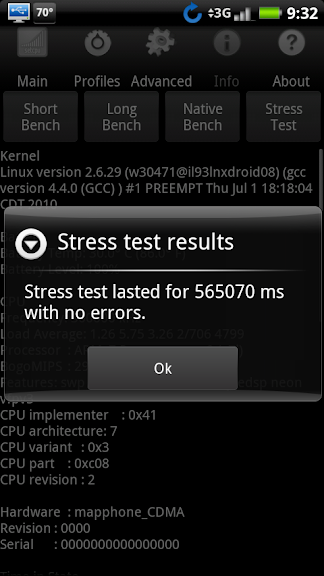
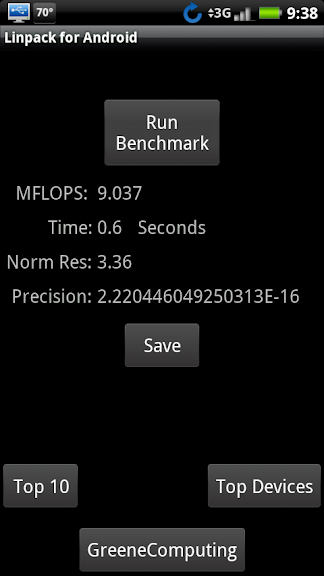
Screenshots
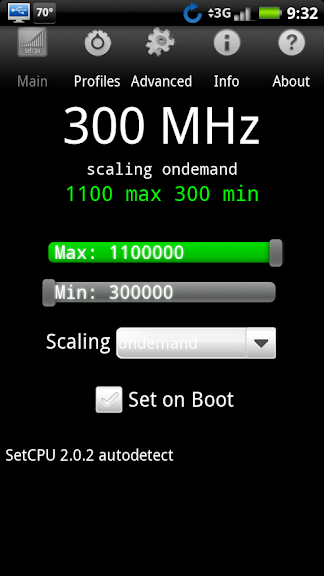
dxoverclock.png
stable1-1ghz.png


linpack1-1.png
 

Attachments

Thanks!!!

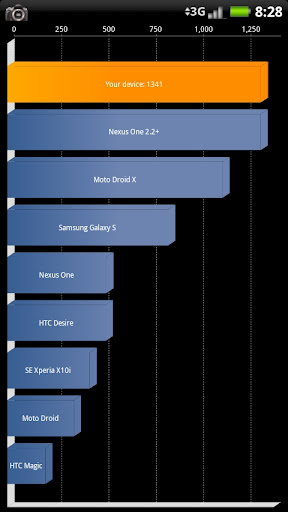
Quick question, how do we know if this worked? I'm running a quadrant now to see if I see any gains.

1254, up from around 1150/1200
 
lol maybe this is the source of the odd benchmarking results that some people were seeing. There was one or two 1.1GHz test results on there. It confused a couple people into making a thread somewhere around here about it.

Glad to see this done. I'll have to try it and post back with my results once I have my phone.
 
Won't complete a quadrant at 1.2/66.

Rebooted.

EDIT****

1.1/88 gave me a quadrant of 1326

1150000 72 is giving me 1300 and it's stable. Staying there.
 
Just ran 1.15GHz/72, gave me a 9.82 Linpack and only 1280 quadrant, before the OC I was steady running 1325 to 1365. I wish I could reboot without losing it, just to see if the score would be any better.


Edit: A quick question, do we need to run everything over again after a reboot, or just "overclock.sh..."?
 
some one needs to get a big break-through in speed like they with the galaxy s because stock the x kills the s but with some simple mods the galaxy s can run a 1500 on quadrant we need to be the first to 2000
 
i can't get this to work /cry i think im doing everything right as to following the way that it shows lol
 
Here is my setscaling.sh file that'll use low voltages across the board and is stable for me. Also uses 1.15ghz @ 34 vsel (stock is 66!) and swaps the 800mhz clock for 900mhz since that is more logical.

Drop it in /system/bin, chmod to 755. To load the kernel module do "insmod /system/lib/modules/overclock.ko" first, then execute the below setscaling.sh script.

echo 34 > /proc/overclock/max_vsel
echo 1150000 > /proc/overclock/max_rate
echo 1 300000000 22 > /proc/overclock/mpu_opps
echo 2 600000000 26 > /proc/overclock/mpu_opps
echo 3 900000000 30 > /proc/overclock/mpu_opps
echo 4 1150000000 34 > /proc/overclock/mpu_opps
echo 0 1150000 > /proc/overclock/freq_table
echo 1 900000 > /proc/overclock/freq_table
echo 2 600000 > /proc/overclock/freq_table
echo 3 300000 > /proc/overclock/freq_table
 
Here is my setscaling.sh file that'll use low voltages across the board and is stable for me. Also uses 1.15ghz @ 34 vsel (stock is 66!) and swaps the 800mhz clock for 900mhz since that is more logical.

Drop it in /system/bin, chmod to 755. To load the kernel module do "insmod /system/lib/modules/overclock.ko" first, then execute the below setscaling.sh script.

Thats seriously stable? Awesome
 
Here is my setscaling.sh file that'll use low voltages across the board and is stable for me. Also uses 1.15ghz @ 34 vsel (stock is 66!) and swaps the 800mhz clock for 900mhz since that is more logical.

Drop it in /system/bin, chmod to 755. To load the kernel module do "insmod /system/lib/modules/overclock.ko" first, then execute the below setscaling.sh script.

Thanks for this. Unfortunately, I can't seem to get it to work. I can overclock using commands like:

su
overclock.sh 1150000 36

but I can't seem to get your setscaling file going. I copied it to /system/bin, chmod 755'd it, I think. (I changed permissions with Root Explorer so that User has R/W/E, Group has R/E, and Other has R/E). Next, I run:

su
insmod /system/lib/modules/overclock.ko

and it gets me back to #

then I try to run:

setscaling.sh

and I get:

setscaling.shUX
: not found

:not found
setscaling.sh: 6: Syntax error: ")" unexpected

I'm uncertain what I'm doing wrong.

EDIT: Fixed. Instead of unzipping setscaling.sh.zip, I'd just renamed it to setscaling.sh. Worked now. Thanks.
 
For some strange reason, my Droid just slows down to a crawl if I set the OC higher than 1.1ghz, regardless of the voltage, though admittedly, the highest I tried was 75 for 1.2GHz.

But I modified Hilbe's setscaling script to do 1.1 at 34 and everything has been stable so far (cross my fingers).

Got a pretty nice Quadrant bench too, and it survived an Asphalt HD gaming session.

CAP201008090828.jpg
 
For some strange reason, my Droid just slows down to a crawl if I set the OC higher than 1.1ghz, regardless of the voltage, though admittedly, the highest I tried was 75 for 1.2GHz.

But I modified Hilbe's setscaling script to do 1.1 at 34 and everything has been stable so far (cross my fingers).

Got a pretty nice Quadrant bench too, and it survived an Asphalt HD gaming session.

CAP201008090828.jpg

We noticed on the other forums, if you set your speed/voltage too high it'll go into a safe mode (turtle speed) of sorts. Basically making the phone so slow it is unusable. I was getting 0.5 linpacks when in turtle mode!

I tested my phone in 10mhz increments all the way up to 1.2 ghz, and the highest I could get non-turtle was 1160mhz. However, I did get reboots at 1160mhz though and did not have any reboots at 1150mhz.
 
ok i got it to work, i didn't know when i ran the code that i had to click the allow button on the phone for the super user ninja lol
 
Back
Top Bottom