SimsDelt
Android Expert
*** Warning. this WILL wipe your phone. Make a backup prior to doing this and of course im not responsible, blah blah blah  ***
***
Don't be an idiot either, you must be on Froyo 2.2 to restore an image of 2.2. So, to the question (Can I use this to update my 2.1 and have root)... NO.
I've noticed that most people that CAN'T run it (MD5 error) are people that did a factory reset. What i would suggest to anyone else reading this, is if you know you have factory reset on 2.2, this probably will not work (by all means try). BUT if you WANT to run it that bad, do a data wipe, and THEN sbf. Root 2.1, update to 2.2, install koush's bootstrapper and try again. that will probably work.
Credits to krayzee1 on alldroid for posting this.
Thanks to Mike919 we now have a clockwork recovery backup that you can recover to your phone.
What does this give me? well it gives you a way to restore your phone to its default state but it has already been rooted and deodexed.
If you dont know what root or deodexed are then please search around the forums. I'm sorry but i simply dont have the time to answer a thousand questions.
How do i use this?
Well it's very simple.
PROTIP: use an advanced restore to only restore system. This allows you to preserve your apps and data - Thanks Fabolous
I can this tell you that this does work. I have done it myself. I also know of one other person that has done it with no problems.
Please grab the file while you can, who knows how long this will stay up.
oh, also it has a black bar with transparency. Other versions will follow i'm sure you can always replace your framework-res.apk and services.jar if you don't like it.
again search alldroid if you need help with this.
Multi Upload Link
-Peace- KraYzeE
Credits:
Xeudoxus over at DroidForums.net for his amazing - xUltimate 2.2. All credit for deodexed system goes to him.
Mike919 for giving us this file and all the other crap he's gone through today to get this to us (don't ask lol)
Teenfaces at XDA Forums for the framework mod.
rainabba for putting up with Mikes crap
Screenshot of my homescreen:
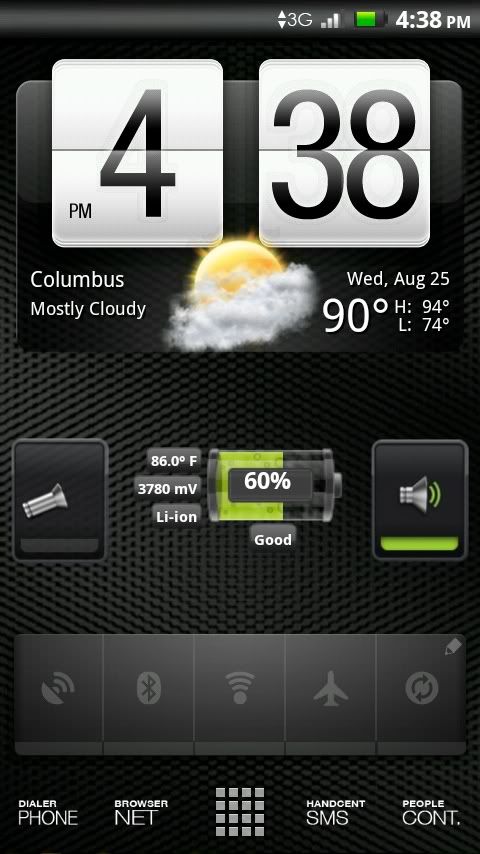
P.S. I think I have one sick looking droid x using this nandroid image and Launcher Pro Plus.
***Don't be an idiot either, you must be on Froyo 2.2 to restore an image of 2.2. So, to the question (Can I use this to update my 2.1 and have root)... NO.
I've noticed that most people that CAN'T run it (MD5 error) are people that did a factory reset. What i would suggest to anyone else reading this, is if you know you have factory reset on 2.2, this probably will not work (by all means try). BUT if you WANT to run it that bad, do a data wipe, and THEN sbf. Root 2.1, update to 2.2, install koush's bootstrapper and try again. that will probably work.
Credits to krayzee1 on alldroid for posting this.
Thanks to Mike919 we now have a clockwork recovery backup that you can recover to your phone.
What does this give me? well it gives you a way to restore your phone to its default state but it has already been rooted and deodexed.
If you dont know what root or deodexed are then please search around the forums. I'm sorry but i simply dont have the time to answer a thousand questions.
How do i use this?
Well it's very simple.
- Unzip the file
- On your sdcard make a folder in sdcard\clockworkmod\backup with todays date on it like \sdcard\clockworkmod\backup\2010-08-23.23.30.41
- Extract the contents of This File into that folder. There should be 5 files inside when you are done.
- Install Koush's Clockwork recovery (if you haven't already)
- Boot into Koush's recovery
- Choose restore, then navigate to the folder you created earlier
- Choose restore. Then follow the instructions on the screen.
PROTIP: use an advanced restore to only restore system. This allows you to preserve your apps and data
- Thanks FabolousI can this tell you that this does work. I have done it myself. I also know of one other person that has done it with no problems.
Please grab the file while you can, who knows how long this will stay up.
oh, also it has a black bar with transparency. Other versions will follow i'm sure
you can always replace your framework-res.apk and services.jar if you don't like it.again search alldroid if you need help with this.
Multi Upload Link
-Peace- KraYzeE
Credits:
Xeudoxus over at DroidForums.net for his amazing - xUltimate 2.2. All credit for deodexed system goes to him.
Mike919 for giving us this file and all the other crap he's gone through today to get this to us (don't ask lol)
Teenfaces at XDA Forums for the framework mod.
rainabba for putting up with Mikes crap
Screenshot of my homescreen:
P.S. I think I have one sick looking droid x using this nandroid image and Launcher Pro Plus.