• After 15+ years, we've made a big change: Android Forums is now Early Bird Club. Learn more here.

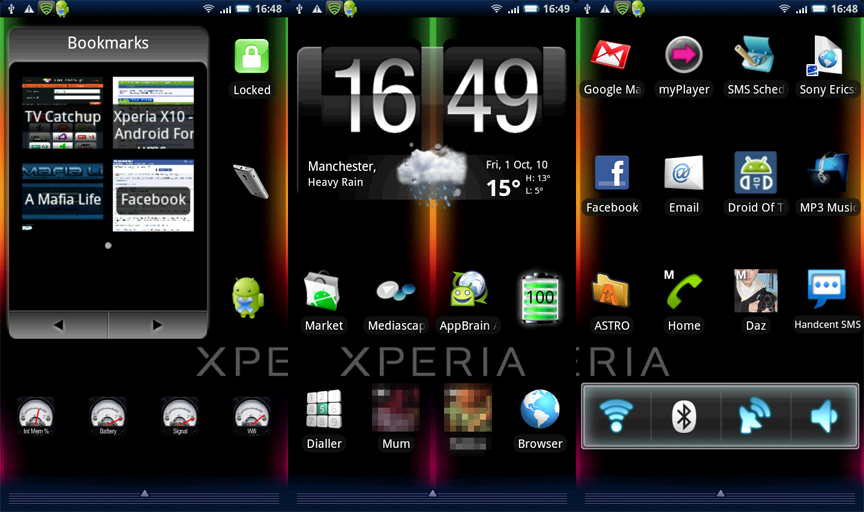
Show Us Your X10 Homescreen...

That doesn't sound good, my phone runs great with it on. The other one I heard good things about was Helix launcher, which was going to be second on my list if I didn't like ADW.
 
Ok so I think I finally have a homescreen worth keeping. The setup I had before was, well, bland and somewhat boring to me (NOT Olivia.. lol) So I tinkered a bit and came up with this new setup. I usually run it with the status bar and apps button hidden unless I need them. :D

X10%20final.png

HazardWaste, I know this should be PhotoShop 101, but how the heck do you block your contacts like the facebook and the Handcent widgets? Don't exactly know what to search for on Google...lol thanks in advance.
 
HazardWaste, I know this should be PhotoShop 101, but how the heck do you block your contacts like the facebook and the Handcent widgets? Don't exactly know what to search for on Google...lol thanks in advance.

Plus 1 on that, I tried using the edit function in Photobucket to block out my location which it did perfectly, great I thought.... until I loaded it up on here to find that it was still showing. Not that it matters that its on here... its just other UK dwellers may have a preformed idea of what people are like from here (and no I don't own any burberry or large gold earrings) For the rest of the world if you know who Vicki Pollard is then you will have an idea of the general population of my esteemed town! Can I just say that I live on the outskirts where life is much more civilised :D
 
HazardWaste, I know this should be PhotoShop 101, but how the heck do you block your contacts like the facebook and the Handcent widgets? Don't exactly know what to search for on Google...lol thanks in advance.

Here's what I did...

1. Put all phone screen shots on one layer
2. Duplicate layer
3. While the Duplicated layer is selected, Click Filter-> Pixelate -> Mosaic
4. Choose your preferred cell size for each Pixel, then click OK
5. Delete all parts of the duplicated image, that you don't want pixelated
6. Save and Upload :)

Hope that helped
 
Thanks for the mini tutorial Cubz, but i couldn't replicate what Hazardwaste did. His pixelated squares are too nice haha. Maybe someone can give me a few pointers on how to make it look neater.

Anyways, here are my homescreens and text screen. Been using this for awhile now and I seem the have the best balance between what I need as widgets while not hogging up too much RAM causing the phone to lag like a mofo. I think I'll keep it this way till the 2.1 update. Keep in mind my phone is not rooted.
1.jpg2.jpg3.jpg4.jpg5.jpg

Edit: uploaded updated screenshots, thanks again to Cubz for the help~

Edit 2:
My widgets from left screen to middle screen (keep in mind NOT all of them are free):

Left Screen:
Pure Grid Calendar
MeContacts

2nd Screen:
Animated Analog Clock (Sense UI pack)
Tajm
WW (by Thomware)
SwitchPro
Agenda widget
Advanced Task Killer Free
Touch Calendar Beta
Market

Middle Screen:
People/Contact (by A. Sagrebin)
Calendar Widget 2
Tajm
LED Light
Handcent SMS widget
 
Thanks for the mini tutorial Cubz, but i couldn't replicate what Hazardwaste did. His pixelated squares are too nice haha. Maybe someone can give me a few pointers on how to make it look neater.

Anyways, here are my homescreens and text screen. Been using this for awhile now and I seem the have the best balance between what I need as widgets while not hogging up too much RAM causing the phone to lag like a mofo. I think I'll keep it this way till the 2.1 update. Keep in mind my phone is not rooted.

View attachment 11814View attachment 11815View attachment 11816View attachment 11818View attachment 11817

Just select the area you want to pixelate using the marquee tool, right click and choose 'Layer via Copy' then do the filter -> pixelate -> mosaic, as I mentioned earlier :)
 
Very nice, CuBz.

I changed mine as well, the wallpaper is one of the ones from my BB9700, I was pleasantly surprised to see it fit and look so good on the X10.

20101001110903.png
20101001111029.png
 
I see almost everyone has 5 screens or more and almost all are full of icons, files, or something else.. How in the world are your phones running without running out of RAM? I have NO where near any of these and my RAM sits at about 18-24% with free RAM memory sitting at about 105 at startup and quickly drops down into the 20's to 30's..

So what is the secret??:confused:
 
Hey there Gunny, how you doing?!

Go on the market and search bar code scanner... there are quite a few so hopefully AT&T will let you have one of them. Then you just open the app, it gives you a camera type view with a red line in the middle, look at the QR code, it reads it and then finds the app for you on the market. Just a quicker way to share than everyone having to search.

I wonder if something AT&T put on eats your RAM cos I never get that low. Maybe Charlyee can tell us what hers is now she's rooted cos she has plenty of stuff running.
 
To all of the folks using ADW, how are you getting the wallpaper with some of the themes to strecth from top to bottom? Many of them have a great wallpaper, but there is about an 1" of blank space on top and bottom. When I put the phone in landscape mode, it fits perfect, but not in Portrait mode. So, who can share their GURU skills?????????????
 
This here guru(!?) is just using a stock wallpaper and the basic ADW, no themes. So no clue I'm afraid!
 
Hey there Gunny, how you doing?!

Go on the market and search bar code scanner... there are quite a few so hopefully AT&T will let you have one of them. Then you just open the app, it gives you a camera type view with a red line in the middle, look at the QR code, it reads it and then finds the app for you on the market. Just a quicker way to share than everyone having to search.

I wonder if something AT&T put on eats your RAM cos I never get that low. Maybe Charlyee can tell us what hers is now she's rooted cos she has plenty of stuff running.
At&T has graciously allowed me to have the app called Barcode scanner, it is in the Marketplace.

I have 335 MB free, it used to 351 but all the custom keyboards that I loaded and don't know how to find them, brought it down

gunny, even before rooting and deleting bloatware, I still had around 70% free, I wonder why yours is so low.
 
Oh right it would be awesome if i could change the colour.

Really? I don't think it needs to be bigger.

I was about to ask the same question. Reason being I see so many pictures in the Market of screens, where the top bar is "White" and it looks pretty cool... So, what is their secret, rooting???
 
Hey there Gunny, how you doing?!

Go on the market and search bar code scanner... there are quite a few so hopefully AT&T will let you have one of them. Then you just open the app, it gives you a camera type view with a red line in the middle, look at the QR code, it reads it and then finds the app for you on the market. Just a quicker way to share than everyone having to search.

I wonder if something AT&T put on eats your RAM cos I never get that low. Maybe Charlyee can tell us what hers is now she's rooted cos she has plenty of stuff running.


Hey Rosered, yeah I cannot figure it out either. I may have to root just to get rid of the AT&T stuff, mayne that will resolve my problem. Anone else on here using AT&T? If so, how is your RAM reading and the RAM memory???
 
At&T has graciously allowed me to have the app called Barcode scanner, it is in the Marketplace.

I have 335 MB free, it used to 351 but all the custom keyboards that I loaded and don't know how to find them, brought it down

gunny, even before rooting and deleting bloatware, I still had around 70% free, I wonder why yours is so low.

Are you referring to Internal Memory, or RAM memory?? Glad to see another AT&T user..
 
Gunny, not sure if you're using it, but I realized that using Desktop Visualizer will eat a lot of RAM on the phone, so I decided to ditch it altogether.

I get about 140MB on start up with what I got on my homescreen at the top of the page. I usually hover around 90's - 130's.
 
Have a question, on your 2nd screen in from the left, what are the names of the widgets your using status info :confused:

I'm assuming you mean the memory and 3g widgets ?

From left to right they are:

SD Card Memory Widget - 3G Watchdog - Internal Memory Widget
SDCardWidget.png
3GWatchdogWidget.png
InternalStorageWidget.png


And just for good measure if you follow the QR codes then AT&T should allow you to install them

Toodles
 
Thanks for the mini tutorial Cubz, but i couldn't replicate what Hazardwaste did. His pixelated squares are too nice haha. Maybe someone can give me a few pointers on how to make it look neater.

Anyways, here are my homescreens and text screen. Been using this for awhile now and I seem the have the best balance between what I need as widgets while not hogging up too much RAM causing the phone to lag like a mofo. I think I'll keep it this way till the 2.1 update. Keep in mind my phone is not rooted.

Edit: uploaded updated screenshots, thanks again to Cubz for the help~

May i ask what widgets you are using on pages 1, 2 & 3

Bottom on pages 1 & 2 and top widget on page 3

Many thanks
 
Back
Top Bottom