• After 15+ years, we've made a big change: Android Forums is now Early Bird Club. Learn more here.

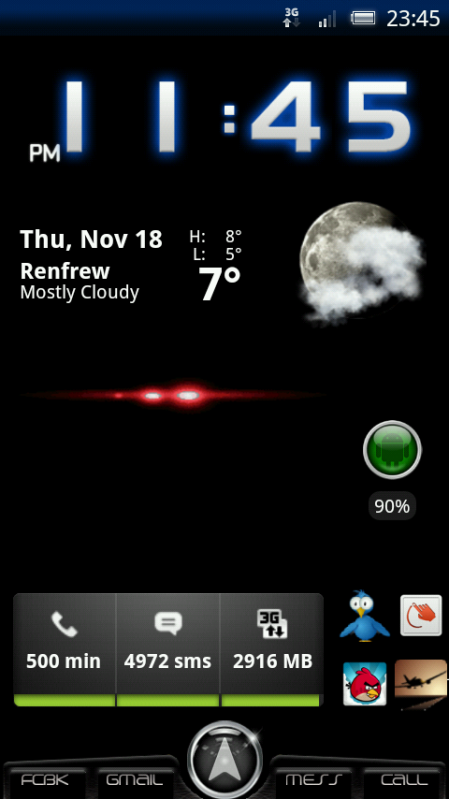
Show Us Your X10 Homescreen...

Just a test I'm trying to do this on my phone lol
ww2


Can't seem to be able to upload from photobucket can't get full location address for photos will do it from laptop when I get home
ric
 
Thank you! That's exactly what I was looking for! Funny, I don't recall seeing this in the update notes. Maybe I didn't read close enough.

Yeah I never seen it in the update notes either, only found it because I was curious about the new 'Edit' button that was showing :)
 
That particular change happened a good while ago and caught yours truly out too. Fortunately someone had read the change notes and could put me straight too. Gotta love the forums, someone somewhere has the info you need (we hope!).
 
Ah but you do get a shed load of downloadable skins for free - with previews before you download - to set it up how you want

open BW from the APP drawer - MENU > CLOCK SKINS > DOWNLOAD SKINS


I purchased and downloaded this application..I set up the weather skin but can't see the BW in my application menu anymore..how do I get the icon on my menu screen back..
 
gona ask this again,.. what are the cool looking little green android guy icons on the homescreen called? like instead of regular icons they are the little adroid guys..

thanks!
 
gona ask this again,.. what are the cool looking little green android guy icons on the homescreen called? like instead of regular icons they are the little adroid guys..

thanks!

They used to be in a pack called idroid but when I updated to 2.1i had to dld them again and the pack had changed to a pack with iphone like icons I managed to track them down to the xda site and dld the pack there's 105 icons in the pack and you can use better cut to alter any icons you want manually easy once you've done the first one but a bit time consuming doing this on my phone so don't know how to add link to post or display bigger pics so you can see what ones I've changed
ric
 
Are they apart of a theme? Cause I don't have a clue on how to put them on my phone similar as to how you did it.

ahh okay. u need desktop visualizer and launcher pro to do this
first use launcher pro to change ur homescreen rows to 6 and columns 4. after that use desktop visualizer to change the icon of ur apps. u can choose the size with it too. but i prefer n i suggest u use launcher pro plus to determine the size cz it will make it easier for u to set the homescreen apps icon sizes. ;)

p/s- use folder organizer to bundle up apps in 1 icons it will b so useful ;)
 
tried using img code but it showed a small symbol that looked broken. other one seems the same size as iv already posted
ric
 
may be a tad off topic but didnt want to start a new thread...
when my x10 starts to lag a bit and you can feel it being slower than usual, what do you do to fix that? leave it sit for 10 min? reboot? app killer?
 
I am new to smartphones and I'm terrified at the thought of rooting my phone and exploring ADW (whatever that is!!) even though there are some pretty good reasons on this forum as to why it is being done by so many people. So I am just proud of myself coz I managed to convert a photo into wallpaper!!
 

Attachments

  • phone.JPG
    phone.JPG
    93.9 KB · Views: 113
Back
Top Bottom