• After 15+ years, we've made a big change: Android Forums is now Early Bird Club. Learn more here.

Root [ROM] ApeX 1.3.1 for Droid X - Running, running, as fast as it can (12/16/10)

Fab, first of all the rom is running great. I just updated everything from 1.0.2 today. However, can we remove the same amount of blur that was removed in V1? I have no need for the built in Social Networking widget and app or the contact quick tasks and etc. Well I have removed most of the stuff that I am comfortable removing without first asking you. This includes the BlurSNMessagingEngine.apk, but I can't seem to find the apk that is connected to the Social Networking, Messages, and Contact Quick Tasks. Is that the BlurHome.apk?

Sorry if I am being nitpicky, but I would just like to remove most of the things that I do not need.

Thanks again and I will be donating a few bucks to the beer fund come January when I get a refund check because apparently I took out too much money in student loans haha. I am a poor college student too!
 
The theme looks amazing on my DroidX. What widget are you using for the HTC Sense clock/weather in the screenshot below? Also, how do you get the temperature to display in the status bar?

Thanks for your help!


Screenshots

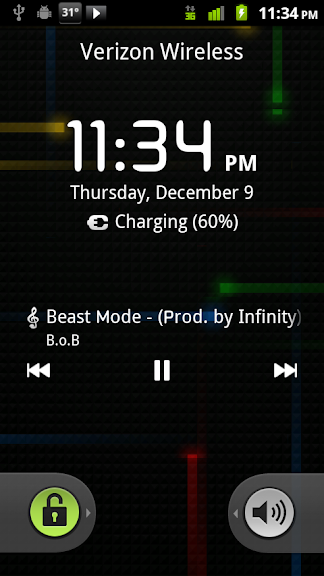
lockscreenmusic.png
home.png
 
The theme looks amazing on my DroidX. What widget are you using for the HTC Sense clock/weather in the screenshot below? Also, how do you get the temperature to display in the status bar?

Thanks for your help!


Screenshots

lockscreenmusic.png
home.png
its beautiful widgets with airportone clock skin and boca weather,temp in notification is able to be set through the settings through the app /widget,its in the market and well worth the 2 bucks
 
i did the kernal update.. and now i try to boot and it says

bootloader
30.01
err:a5,70,00,0023

battery OK
OK to program
transfer mode:
USB


... please help
 
I did the su fabadw in the terminal for fun but I now cant change the number of screens my droid has which I was able to do before I punched in fabadw
 
You are booting into the bootloader. That happens on every boot?
no you manually do it to check ,when the phone starts to turn on tou have to hold powe,vlume down and home to get into bootloader mode ,this is generally the method for flashing sbf but is also used to see what bootloader version your on as well
 
Thanks any suggestions as to which setting? I want a bit better performance but still good battery levels.
test this out for you ...im not meaning to sound rude lol as i know i kind of does but i say this since every x has different reaction to different settings so start with a frequence then try each voltage setting start with lowest and if you are unstable bump it up and if nothing else switch frequence and start over ...whatever you do do not set your settings on boot unless you know they are stable because if they are unstable it can throw your x into a mass bootloop and not leave you enough time to get back into the app to take it off boot .
 
Anybody else having trouble getting downloaded images or video to show up in the 3d gallery? I cannot get them to show unless I reboot the X. Also, I cannot get my SD card to unmount, it just reverts back to mounted.

Other than that, I'm loving this rom, especially the black notification bar and keyboard.
 
Anybody else having trouble getting downloaded images or video to show up in the 3d gallery? I cannot get them to show unless I reboot the X. Also, I cannot get my SD card to unmount, it just reverts back to mounted.

Other than that, I'm loving this rom, especially the black notification bar and keyboard.

How do we know if the SD Card is mounted or not?... I saw this applies to updating the "goodies file" and I wasn't sure if this was a reference to mounting with a PC or to the phone. Clarification would be helpful plz

Mike
 
How do we know if the SD Card is mounted or not?... I saw this applies to updating the "goodies file" and I wasn't sure if this was a reference to mounting with a PC or to the phone. Clarification would be helpful plz

Mike

Mike, when I go to settings, then SD card, then unmount, it won't unmount. I meant on the phone directly, sorry if I wasn't clear.
 
Back
Top Bottom