• After 15+ years, we've made a big change: Android Forums is now Early Bird Club. Learn more here.

Help Ergonomics

Xenon

Well-Known Member
This is not a rant. I'm a programmer so I tend to notice details and here are
some issues I've noticed with the design of Galaxy's hardware, presented
without malice.

1. The [Back] button is wrongly positioned on the right side of the dialpad.
It's the most used button. It should be the easiest one to reach with the
thumb, which at the very least means it should be on the left side. Ideally all
buttons should be arranged so that the phone is easy to use when lying on
the palm which is not the case now. In the extreme this would mean different
phones for left-handed people, but it's not necessary. Even having navigation
buttons on top of the touchscreen instead of below would improve
ergonomics.

2. Volume rocker makes it difficult to balance the phone on its left side. This
is a problem when you take pictures outside and want to stabilize the camera
by pressing it against a road sign, a fence, car roof or something similar.

3. If you turn the phone face down and push the back with your finger you
will discover a spot just southwest of the camera lens where the cover
doesn't fit well and produces a creaking sound.

4. The lock key is without exception the worst thing about the phone! I had
to put an exclamation mark there. Due to the fact that the phone is waking
up from different states, it wakes up with different speed. This is extremely
disorienting for the user, who does not know whether the press registered or
not. This button absolutely has to be a switch with two discrete states: ON
and OFF. Upon putting it in the ON position the user could then wait for the
wake-up knowing it will eventually happen.

Add your own, if you wish, or comment mine.
 
I agree with you on all points. The back button is a major annoyance indeed - my palms are too small and fingers are too short to be able to operate the phone with a single hand. I mean I can, but it is uncomfortable and I have to change my grip in order to either comfortably reach the back button or to comfortably reach any point on the screen.

I guess iPhone has a better ergonomics having back button in the interface, as indeed it is used a lot. Or even Hero with its bended bottom side is much more ergonomic in this sense - I did not have such problems with Hero.
 
Here are some images I found online with which I'll try to illustrate my point.

This is something like the natural grip of the phone. As you can see, two buttons
are at the root of the thumb (one of them is back) which makes them very hard to
reach.

samsung-galaxy-gt-i7500-cell-phone-09.jpg


In order to use them, you are forced to adopt something like the following position.
It enables you to reach everything, however the grip is not strong now, you can drop
your phone, and it's not comfortable either.

3551421406_98e2c43a17.jpg
 
Yes, that is exactly what I meant. Neither of these two grips allow reaching both top of the screen and the bottom buttons such as menu, home and back.
 
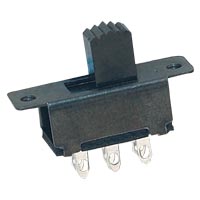
Here's an example of a switch with two discrete states:

Slide%20Switch.jpg


If you're worried that it would turn itself on accidentally, build a safety switch
of some kind. There are already proven solutions out there. For example:

plsw26.jpg

Interior%20Safety%20Switch.jpg


Think. Solve. Deliver :)
 
I would say Hero's "double tap the menu button to unlock" would work just fine for me )

BTW switch lock buttons - I believe some Pocket PCs had those, I dunno why manufacturers stopped using them.

E.g. laptops (some) have a hardware WiFi switch - very handy.
 
Yes, that is exactly what I meant. Neither of these two grips allow reaching both top of the screen and the bottom buttons such as menu, home and back.

Yeah. The best layout would have to be determined by experimenting, but
even something like this would, for a right-handed person, be superior to
the current design (messy I know, I did it in mspaint):

samsunggalaxyi7500o2ger.jpg
 
Here's an example of a switch with two discrete states:

Slide%20Switch.jpg


Think. Solve. Deliver :)

For example, one like the above can be made very difficult to accidentally
switch on by building it so that you need to press it downwards to be able
to move it to the left, similar to how they do for the reverse gear on cars.
 
Good point ) But as long as the screen is capacitive you're unlikely to do much harm when it's unlocked in the pocket.
 
True. I didn't think of that. I assumed that preventing accidental activation was the
main reason behind the push-and-hold mechanism but perhaps it was something else.
I can't imagine what though, it's clearly an inferior design for a button that is used
frequently for switching the screen on and off.
 
Well, I never had a Samsung phone before, but I would assume this is just the way Samsung does phones. Like Nokia always had its key combo of "Left softkey then star", which then changed slightly to "center softkey then star".
 
I just noticed that Nexus One has the back button on the left. It's a step forward.
But they also made a step back by using those fake non-depressable buttons. I
really don't understand how these things pass quality control. People want immediate
feedback
on what they have done.

Google_Nexus_One.JPG
 
the reason why companies avoid lock switches is because of the high failure rate when the component for the phone is so small and for that reason fragile.

it causes a high return rate.

as for the flush non-depressable buttons.
some people actually like those and as for QC its got nothing to do with it.
lots of TV's, dvd's, media systems have this style of design.
the main function of the phone is touch and haptic so having defined touch buttons isnt really an issue at all, if anything it avoids further hardware issues

also for the creaking case, i dont get any of that at all for the galaxy. i do know not all cases are flush though as my mates at work is slightly dodgy and a bit loose in comparison to mine

all the other points you make are completely valid though about the galaxy and i agree 100% with the button position complaint
 
the main function of the phone is touch and haptic

Why does it has the bloody back button then? ) Rhetorical question, I know, but I'm actually tired of reaching for it. If it is a touch interface, you should be able to do everything using the touchscreen! So thumbs up to the iPhone, really!

A phone running Android can never get as aesthetic as an iPhone until the OS requires the phone to have more than one button on the front.
 
Why does it has the bloody back button then? ) Rhetorical question, I know, but I'm actually tired of reaching for it. If it is a touch interface, you should be able to do everything using the touchscreen! So thumbs up to the iPhone, really!

A phone running Android can never get as aesthetic as an iPhone until the OS requires the phone to have more than one button on the front.

its different, things have to be different.
the iphone is annoying that menu is used for everything and kinda messes up the multitasking.
back on android exits from an application and home keeps it open while you move to another

its how android is. point being is theres nothing wrong with the touch feedback buttons of the nexus in my opinion
 
Xenon said:
1. The [Back] button is wrongly positioned on the right side of the dialpad.

The Back button is wrongly positioned for you. As a left-hander, pretty much every phone ever made has been ass-backwards for me. You might well be right, but really, as a southpaw in a right-handed world I'm finding it hard to muster any sympathy. Think yourself lucky it's one device rather than all of them.

I do appreciate that it's simply not cost-effective to produce expensive consumer products that only have a target market of maybe 15% of your demographic rather than 85%, but I'd welcome more hand-agnostic designs in products.


Xenon said:
Even having navigation buttons on top of the touchscreen instead of below would improve ergonomics.

I'm not sure that'd be a step forward; I don't want to have to reach across the screen, covering it up and possibly mis-selecting something with my palm, to get to buttons. Perhaps what's actually needed is the ability to reconfigure the hardware buttons like you can with controllers on console games. Or maybe softkeys.

Xenon said:
2. Volume rocker makes it difficult to balance the phone on its left side.

Not something I've ever come across personally, but yeah, I can see how that would be a problem. TBH though, if I'm taking a photo that necessitates stabilising a camera, I'd probably want to be using a real camera. I have a little IXUS that lives in my jacket pocket and takes far superior pictures to anything I've ever seen come out of any camera phone. I'm no photographer but I guess I've only ever considered phone cameras to be novelties.

Xenon said:
3. If you turn the phone face down and push the back with your finger

Uh, do you do this a lot? I can't imagine "being laid face down and prodded without creaking" being fairly high on Samsung's design brief. Actually, I can count on the fingers of one foot the number of times I've laid it face down at all, I value my screen too much.

Regardless, I've just tried as you suggest and it doesn't do it on mine, so it's prossibly a problem with your specific handset or a batch issue.

Xenon said:
4. The lock key is without exception the worst thing about the phone!

The lock key is gash, but I think my issues with it are firmware-related rather than physical. as documented elsewhere on here, it's not always easy to unlock it on a first attempt and combined with the PIN pattern can be fiddly at best.

I'm not convinced that it has to be a double-throw switch though. Plenty of other phones have managed to implement a sensible keylock without resorting to slides and rockers.

So yeah. I take your points and partly agree with some of them. I do think though that you're perhaps nit-picking, there's a lot of worse designs out there than the Sammy. The Hero for starters, it might be an arguably better phone with the bundled social software and the Sense UI, but it's got a face only a mother could love.
 
You missed something on your mspaint mockup. I've corrected it for you.
 

Attachments

  • samsunggalaxyi7500o2ger.jpg
    samsunggalaxyi7500o2ger.jpg
    39.4 KB · Views: 76
This is not a rant. I'm a programmer so I tend to notice details and here are
some issues I've noticed with the design of Galaxy's hardware, presented
without malice.

1. The [Back] button is wrongly positioned on the right side of the dialpad.

2. Volume rocker makes it difficult to balance the phone on its left side.

3. If you turn the phone face down and push the back with your finger you
will discover a spot just southwest of the camera lens where the cover
doesn't fit well and produces a creaking sound.

4. The lock key is without exception the worst thing about the phone!


Well, im a programmer too but even my father noticed some things :D
Here are my toughts

1- absolutely YES! It is a nonsense like informale said :/ A complete touch interface with a hardware back button! I dont get it. Plus It is phisically uncomfortable!!

2- I think it is in the wrong side. It should be on the right side and used with the right thumb! (placing it on surfaces is a minor problem for me)
If you take it with right hand when talking is really difficult to change volume!

3- I did'nt notice that!

4- In dont hate the way this phone lokcs and unlocks! I kinda like it....
Just assure you do this when unlocking: press once, and when the screen turns on press as long as is needed to unlock. It works much better than simply keep pressing from the beginning! It needs less time and you dont break your thumb :)
 
Just assure you do this when unlocking: press once, and when the screen turns on press as long as is needed to unlock. It works much better than simply keep pressing from the beginning! It needs less time and you dont break your thumb

Good tip, it does unlock a bit faster with this double stage procedure )

But you can take it even further.

Don't wait for the screen. Just double tap the lock button and hold the second tap! Even faster!
 
btw, mustymod doesn't use lock button at all,
hangup key brings screen with slide to unlock.

it's faster, more convenient and looks nicer.
 
btw, mustymod doesn't use lock button at all,
hangup key brings screen with slide to unlock.

it's faster, more convenient and looks nicer.

Give it up, man, some people wouldn't install mustymod even if it made you breakfast and massage ;)

Actually, seriously, why don't you make a separate thread about mustymod's advantages over stock ROMs and Galaxo. So far your efforts are somewhat randomly scattered among different threads. I guess people wan tot know this stuff, just like they wanted to know what rooting and custom fw does.
_
 
Give it up, man, some people wouldn't install mustymod even if it made you breakfast and massage ;)

Actually, seriously, why don't you make a separate thread about mustymod's advantages over stock ROMs and Galaxo. So far your efforts are somewhat randomly scattered among different threads. I guess people wan tot know this stuff, just like they wanted to know what rooting and custom fw does.
_

Why, because you're the only one asking me to do it :) If you have time, you can compile my answers inside sticky thread, sorry, but I don't feel like do it by myself again..
 
Back
Top Bottom