
Install the app
How to install the app on iOS
Follow along with the video below to see how to install our site as a web app on your home screen.
Note: This feature may not be available in some browsers.
-
After 15+ years, we've made a big change: Android Forums is now Early Bird Club. Learn more here.
You are using an out of date browser. It may not display this or other websites correctly.
You should upgrade or use an alternative browser.
You should upgrade or use an alternative browser.
Root New "Bugless" 2.01+2.1 apps ROM...
- Thread starter Redflea
- Start date
-
- Tags
- motorola droid

PerCompLLC
Android Enthusiast
Already been confirmed...just a couple posts above yours.
Cool. Just confirming the steps. Thanks!
Edit: Handcent fix for BB can be found on alldroid
http://alldroid.org/viewtopic.php?f=309&t=1830

GirLuvsDroid
Android Expert
Apparently, fixes for the Handcent issues and a couple of others were posted yesterday: AllDroid - View topic - Handcent, VideoRecording, & Music Isses Fix (3mb update.zip)

nader2013
Android Enthusiast
Just to be sure we understand each other when I unzip the rar I get a folder called BDS-20100119-0608 and inside that folder is another folder called BDS-20100119-0608 and inside that are the image files, hence double BDS folders. Make sure you have extracted the downloaded rar, that you dont have double folders and that you have the BDS folder placed inside the nandroid folder. Then follow Petes step by step instuctions including wiping before installation.
When I unzip i get 4 separate files that are placed in my nandroid folder. I get system.tar
boot.img
data.tar
nandroid.md5
I think this is wrong how do I go from unzipping the .rar on my desktop to having a ROM in my nandroid folder?

Needsdecaf
Android Expert
When I unzip i get 4 separate files that are placed in my nandroid folder. I get system.tar
boot.img
data.tar
nandroid.md5
I think this is wrong how do I go from unzipping the .rar on my desktop to having a ROM in my nandroid folder?
I had an issue with this with one of the downloads. I think it comes down to the way pete zips the files up.
I just looked at the name of the ROM File and created a folder with that name on it (see fabolous's examples above for what it should be similar to) and put all four files in it, then just moved that folder over and it found it when doing the nandroid backup.
If you go in the nandroid folder of your phone using root explorer or astro, you'll see that they're all named as such.
Needsdecaf
Android Expert
Thanks for the info...but I ain't buyin' in.
I should clarify what I was asking...
1. Start a new message in Handcent (tap the new message icon at the top of the conversation list). Then tap the + icon to the right of the "To field" right on the following screen, to display your contacts list. Do your contacts all display in the scrollable list? Didn't work on 8.3, doesn't work on 8.4 either, for me. Contacts tab is empty, Groups and Recent are populated.
2. If your contacts have facebook pictures sync'd to them, do the facebook pics display in Handcent? Didn't work on 8.3, doesn't work on 8.4 either, for me.
In Handcent I get proper display of my contacts w/pics, facebook sync'd ones show up as expected...
Thanks for confirming...
I'm also still having intermittent problems w/auto-brightness...
1. I have that same behavior. I don't consider it an issue, because I just start typing a name in the to field and it comes up with the matches.
2. It does link the facebook pictures once you send a message.
Never had an issue with #2 on any of my Pete Roms. Never looked for issue 1 before.
GirLuvsDroid
Android Expert
Apparently, fixes for the Handcent issues and a couple of others were posted yesterday: AllDroid - View topic - Handcent, VideoRecording, & Music Isses Fix (3mb update.zip)
I can confirm that this update fixes the Handcent contacts issue.
nader2013
Android Enthusiast
I had an issue with this with one of the downloads. I think it comes down to the way pete zips the files up.
I just looked at the name of the ROM File and created a folder with that name on it (see fabolous's examples above for what it should be similar to) and put all four files in it, then just moved that folder over and it found it when doing the nandroid backup.
If you go in the nandroid folder of your phone using root explorer or astro, you'll see that they're all named as such.
I have no idea on how to go about what you just said to do. You looked at the name of what ROM File?
PerCompLLC
Android Enthusiast
I can confirm that this update fixes the Handcent contacts issue.
Worked for me as well... However it did flash my overclock back to 800Mhz, so i had to re-flash my boot partition to move back to 1Ghz.

Fabolous
Superuser
In a way, I'm grateful that BB had these Handcent issues, because when they first started showing up, I switched to Chomp and haven't looked back.
I like how customizable it is, and I feel it is slightly quicker overall (though it makes little difference at 1GHz). Also, I don't find the pop up notification any less useful than Handcent's.
But I'm glad everyone got their Handcent issues sorted out.
I like how customizable it is, and I feel it is slightly quicker overall (though it makes little difference at 1GHz). Also, I don't find the pop up notification any less useful than Handcent's.
But I'm glad everyone got their Handcent issues sorted out.
GirLuvsDroid
Android Expert
Worked for me as well... However it did flash my overclock back to 800Mhz, so i had to re-flash my boot partition to move back to 1Ghz.
Dammit, me too! So I just finished flashing 1Ghz again.
Needsdecaf
Android Expert
I have no idea on how to go about what you just said to do. You looked at the name of what ROM File?
Roll your mouse over the nandroid backup file before you download it.
It will be: BDS-20100130-1833.rar
When you unzip the .rar file you should have a folder called BDS-20100130-1833.rar with the 4 files you described in it. If not, just create a folder with that name, and move the 4 files in it.
It's just a quirk of how he packs the .rar file,

esocid
Well-Known Member
Why is the browser and gallery not pinch to zoom like it says on his page?
The browser is for me. The 2.1 gallery is not, but the media gallery is. Although I installed the 2.1 gallery apk myself. Maybe I should have removed it before flashing to 0.8.4.
Fabolous
Superuser
Why is the browser and gallery not pinch to zoom like it says on his page?
Are you visiting a mobile version of a site? Because if so, you can't zoom in.
Try a full site such as these forums.
If it still isn't working, then you didn't do it right


Redflea
Android Expert
In a way, I'm grateful that BB had these Handcent issues, because when they first started showing up, I switched to Chomp and haven't looked back.
I like how customizable it is, and I feel it is slightly quicker overall (though it makes little difference at 1GHz). Also, I don't find the pop up notification any less useful than Handcent's.
But I'm glad everyone got their Handcent issues sorted out.
Same here...I've flipped back and forth a few times and Chomp has been consistently quicker for me than Handcent.
Fabolous
Superuser
Same here...I've flipped back and forth a few times and Chomp has been consistently quicker for me than Handcent.
And the bubbles look so much nicer! lol

Fabolous
Superuser
Any chance it has EQ?
Damn, I didn't even think of that. You got my hopes up though. No EQ...for the time being.
GirLuvsDroid
Android Expert
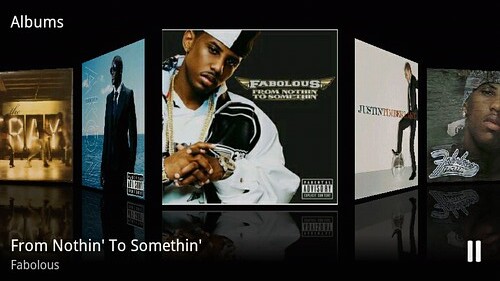
Check out the Pete's new update.zip w/ Milestone's 3D music app.
Coverflow anyone?
Update killed my OC, had to reflash image. Did not have to re-fix wifi though.
It is VERY VERY cool -- but just know that you have to select "Artists" or "Albums" and turn to landscape mode to see the 3D effects. Otherwise, it looks almost exactly like the 2.0.1 player.
It is VERY VERY cool -- but just know that you have to select "Artists" or "Albums" and turn to landscape mode to see the 3D effects. Otherwise, it looks almost exactly like the 2.0.1 player.
I must have done something wrong. I updated to 0.8.4, but I do not get the coverflow effect when I turn to landscape.

Nate

meekrab
Android Enthusiast
Update killed my OC, had to reflash image. Did not have to re-fix wifi though.
Good to know. I just ran a nandroid on beast 7.2, I was hesitant to run the update for the music app but I might give it a shot now. This rom seems pretty sweet.
GirLuvsDroid
Android Expert
I must have done something wrong. I updated to 0.8.4, but I do not get the coverflow effect when I turn to landscape.
Nate
There's ANOTHER update.zip for the 3D music player and Handcent fixes here: AllDroid - View topic - Milestone 3D Music Player!. You have to install that, as well as 0.8.4.