• After 15+ years, we've made a big change: Android Forums is now Early Bird Club. Learn more here.

Root well it happened to me today! BRICKED

crap. i cant get adb to recognize my phone while in hboot!

did you press power to get to fastboot?

you need to be in FASTBOOT not HBOOT ;)

if you are in fastboot, and it wont find it and youve tried the usual switching ports and cables,are you sure you still have fastboot drivers? you could download these fastboot drivers from revoloutionarys page
 
That is about the same as I've heard but they may notice the "Unlocked" when going into hboot if that is the only thing you can do with the phone.

Glad scotty got here :D he should be able to get it back to a returnable condition (see scotty when we aren't discussing kernels and the like you are a very valuable asset ;))

lol glad im good for something ;) in all seriousness,this is EXACTLY why i do all the crazy stuff i do to my poor phone... so i know how to react when needed :)
 
did you press power to get to fastboot?

you need to be in FASTBOOT not HBOOT ;)

if you are in fastboot, and it wont find it and youve tried the usual switching ports and cables,are you sure you still have fastboot drivers? you could download these fastboot drivers from revoloutionarys page

i will try those drivers. yea im in fastboot but under show devices/ nothing.

my phone shows fastboot usb. im sure my computer said drivers installed. idk why it isnt showing up in adb.
 
i will try those drivers. yea im in fastboot but under show devices/ nothing.

i installed them on my laptop... worked fine for adb seeing my phone in fastboot on it. all i did was click on the download and let the wizard install them.
 
Scary. What if you file an insurance claim instead of sending it back to Verizon? Does it matter if it's rooted then?
 
Scary. What if you file an insurance claim instead of sending it back to Verizon? Does it matter if it's rooted then?

no,it wont matter then. but in this particular scenario,i dont feel he should have to do that. i do agree if rooting had effed it up,then he should have to pay the deductable.

but this is a case of EMMC failure,its happend to stock phones,and not the result of being rooted.
 
still a no go. i installed drivers and it wont recognize my phone.
im wondering is since my phone crashed in a rom install is the reason:eek:
 
still a no go. i installed drivers and it wont recognize my phone.
im wondering is since my phone crashed in a rom install is the reason:eek:

If that were the case if you could get into recovery long enough for a wipe it seems like it should resolve the issue.
 
still a no go. i installed drivers and it wont recognize my phone.
im wondering is since my phone crashed in a rom install is the reason:eek:

no... that wont have anything to do with it. if your phone is in fastboot,you just need drivers in place for ADB to see it.

you are typing "fastboot devices" and not "adb devices" correct?

see if this thread helps get them installed and working.
http://androidforums.com/incredible...ivers-adb-bootloader-disk-drive-htc-sync.html

edit: youll waNT the phone in fastboot,not hboot when trying to update the drivers with device manager.
 
:Dscottie you are a genius! thanks so much.

finally got it. im not sure what was wrong i just had to set it down for a while to keep from smashing it lol. repeated the steps and it worked for some reason:D

it says mecha xd eng s-off
most importantly/ hboot-1.04.2000:D

now i gotta dig to find a stock ruu to get rid of my s-off.
 
Okay, I believe with the eng bootloader you can use the RUU.exe I posted earlier. If you want the flashable MR2 RUU I can dig it up quickly.

Glad you got it fixed, props to scotty
 
Okay, I believe with the eng bootloader you can use the RUU.exe I posted earlier. If you want the flashable MR2 RUU I can dig it up quickly.

Glad you got it fixed, props to scotty


thanks yeahh im gonna download the one you posted to earlier. this should get rid of my s-off and get me back completely fubar'd stock lol.
 
Yeah I was thinking that may be the best course of action, if you have CWM or TWRP installed the PG05IMG.zip would cause a bootloop I believe, the exe shouldn't be affected by that.
 
That is about the same as I've heard but they may notice the "Unlocked" when going into hboot if that is the only thing you can do with the phone.

Glad scotty got here :D he should be able to get it back to a returnable condition (see scotty when we aren't discussing kernels and the like you are a very valuable asset ;))

Dig were you undervolting below what you would have as normal? Also did you have the set on boot option set on setCPU? The file not found error you had was that when trying to get into recovery or when in recovery and trying to get to a nandroid to restore? I'm asking because I am wondering if this corrupted part of your SD as well.


nope not terribly undervolted i have hit those voltages before.
set on boot option was enabled in setcpu - though i dont think setcpu was to blame either
the error i had was when in recovery trying to flash a nandroid. it said file not found
i dont think it corrupted my sd card either. the only thing seemingly missing was my nandroids. only thing is i found them on my laptop. not sure why my phone couldnt find them.

i tried going to the thunderbolt irc to ask if anyone wanted my phones info but got no reply :rolleyes:
 
nope not terribly undervolted i have hit those voltages before.
set on boot option was enabled in setcpu - though i dont think setcpu was to blame either
the error i had was when in recovery trying to flash a nandroid. it said file not found
i dont think it corrupted my sd card either. the only thing seemingly missing was my nandroids. only thing is i found them on my laptop. not sure why my phone couldnt find them.

i tried going to the thunderbolt irc to ask if anyone wanted my phones info but got no reply :rolleyes:

That is odd. I've had issues with OC/voltage and set at boot before that caused weird things to happen, I wasn't sure if setCPU's set at boot option would include undervolting choices.

Unless you can boot up again with a fully functionable phone once you return to stock I am thinking this was hardware failure (if you can boot up then I am more lost than I currently think I am)

I've been on the TB irc once before, was told within 20 seconds that I was a homosexual and enjoy certian acts with my mother (in not so nice terms ;)) so I don't even bother with irc anymore
 
Woah look at all this drama that happened while I was away today, pretty scary stuff dig :eek:. Glad it's working for you though! Also reading Scotty's posts is scarily informative (as usual) :p
 
sorry i disappeared,guys :( i kept checking this on my phone,but accidentally fell asleep on the couch :eek:

glad you got it working.

pretty much any RUU at this poing would get you s-on,but would also get you old radios if it was mr1 or older. i doubt theyd check that hard,but since mr2 is available id use it-its what a stock phone should have.

i think that the .exe format would work,as i beleive the installer will find the phone in fastboot to start the process,but when the .exe is running,it puts the phone into RUU mode(not usually seen by most folks) and i dont know how this mode is affected by the EMMC failure.

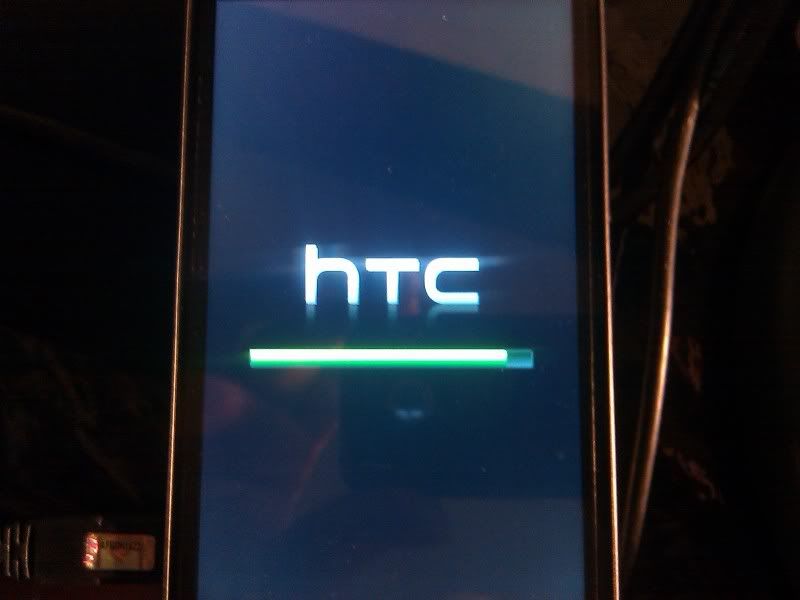
also keep in mind,that were not 100% sure what the phone is doing during its update,as all you see going on the entire process is this:

IMG_20110819_232452.jpg


we can assume that things are updated similarly to how they are when we can visually watch a PG05IMG update,so if the .exe fails halfway thru,the battery dies,etc. that you theoretically should be back to s-on 1.04.0000,as the bootloader should have been the first thing to flash.

if you are certain that the battery charged back up,there is prolly no harm in trying the .exe. file. if it doesnt work,youll have batttery,or can recharge to run the PG05IMG file. but i guess what im getting at is that if time and/or battery are getting low, the 100% most foolproof way to get your phone back to returnable condition is to flash the mr2 PG05IMG file in hboot. i know that will work.

as for yeahhas concerns about a custom recovery being installed,that is not an issue. the SECURITY WARNING will pop up when certain hboots are flashed overtop of custom firmware(thats why the back to stock directions say to falsh the hboot second). the custom recovery is no big deal,and will happily just be overwritten with the stock one.

if you try the .exe,defiantely report what happens. if you want to just go the normal PG05IMG route,download it from here:
[RUU LEAK] Froyo 1.70.605.0 Radio 1.39.00.0627r - xda-developers.

if you have enuff battery you can use thes directions from the rooting methods thread(but since you are bricked allready i dont think its neccessary):
_________________________________________________________________________________
Putting current stock firmware and s-on back onto the phone

after getting the bootloader back to the original s-off,engineering 1.04.2000 hboot download these 2 files:
1)PG05IMG_1.70.605.0_nohboot.zip
md5: c2c61df561e8a74cd103f0b9b89d81d6
and
2)PG05IMG_hboot_only_1.04.0000
md5: 584a4cdc12658835cb2a7885e8e44fd2

rename PG05IMG_1.70.605.0_nohboot.zip to "PG05IMG",move to your sd card,and flash in hboot.

this is important! you must flash the PG05IMG_1.70.605.0_nohboot.zip first

after successfully flashing that,you will be on unrooted mr2 with an eng s-off bootloader. delete the PG05IMG file from your sd card. now place the PG05IMG_hboot_only_1.04.0000 on your sd card. check the md5. once youve verified it matches,you can rename PG05IMG and flash it.

again, only flash the hboot file after you have successfully flashed the rom.

now you are 100% stock on latest firmware. unrooted MR2(1.70.605.0),with s-on 1.04.0000 bootloader.

as always,be as cautious as possible doing hboot flashes,and follow directions in the http://androidforums.com/thunderbolt-all-things-root/353591-how-some-root-terminology.html to flash these files if youre unfamiliar with hboot flashing.

*please start a new thread before attempting this if any part of this confuses you. without a bootloader your phone is a paperweight,so we want to help you prior to making any mistakes ;)
_________________________________________________________________________________

but if battery is a concern,you should just try and flash the entire RUU. i am 95% sure you can just flash the unmodified mr2 without worry of the SECURITY WARNING popping up.

also props for going to andirc and trying to share your info. i guess at this point no one cares what actually happened. prolly most of the phones from those lots have been bricked and sent back so its not a huge deal anymore.

IIRC my serial # was just a few off from yours and ibricks. still waiting for my turn :eek: keep my jacket and cigar handy,lol :D
 
ok idk what the hell is going on here. i flashed the exe and guess what... the hone booted up!!! i have no idea what could have given me the issues above then work after the flash process today.
i also dont know what cs will think when i send my phone back tomorrow lol.
 
You could act like scotty and send back the replacement. VZW has never gotten much praise for the quality of it's refirbs.

And now all we need to do is figure out why your phone messed up to begin with. I don't think we can say hardware failure at this point. Perhaps the lowered voltage was being set at boot and causing the issue, when you flashed the exe it went back to stock, but that wouldn't explain the failures you had in recover
 
Back
Top Bottom