
Install the app
How to install the app on iOS
Follow along with the video below to see how to install our site as a web app on your home screen.
Note: This feature may not be available in some browsers.
-
After 15+ years, we've made a big change: Android Forums is now Early Bird Club. Learn more here.
You are using an out of date browser. It may not display this or other websites correctly.
You should upgrade or use an alternative browser.
You should upgrade or use an alternative browser.
Root [Root] One Click Root for Samsung Admire (SCH-R720) :: Windows/Mac/Linux :: 9/12/2011
- Thread starter k0nane
- Start date
-
- Tags
- samsung admire
olekirkrocks
Lurker
is USB debugging on
I don't think you read it very carefully...
So, I installed the USB drivers, downloaded the root files, hooked my phone up to the computer (Mass storage disabled, USB Debugging enabled) and ran the batch file.
I get the following on my screen:
*daemon not running. starting it now*
*deamon started successfully*
"[*] Triggering core dump..."
error: device not found
error: device not found
error: device not found
error: device not found
error: device not found
"[*] Rebooting phone. It may buzz a lot and loop on boot. Don't panic."
What am I doing wrong?

NiNi
G1/Cliq Guide
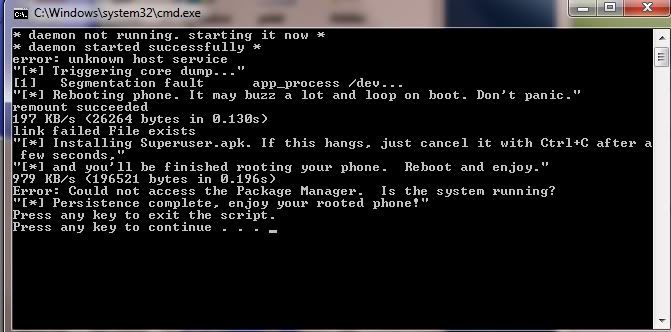
This is my second time rooting this same phone and the first time went smooth. This time, not so much.... This is what I got (with no root)
* daemon not running. starting it now *
* daemon started successfully *
error: unknown host service
"[*] Triggering core dump..."
[1] Segmentation fault app_process /dev...
"[*] Rebooting phone. It may buzz a lot and loop on boot. Don't panic."
remount succeeded
217 KB/s (26264 bytes in 0.118s)
link failed File exists
"[*] Installing Superuser.apk. If this hangs, just cancel it with Ctrl+C after a
few seconds,"
"[*] and you'll be finished rooting your phone. Reboot and enjoy."
1054 KB/s (196521 bytes in 0.182s)
Error: Could not access the Package Manager. Is the system running?
"[*] Persistence complete, enjoy your rooted phone!"
Press any key to exit the script.
Press any key to continue . . .
Any help from anyone?
* daemon not running. starting it now *
* daemon started successfully *
error: unknown host service
"[*] Triggering core dump..."
[1] Segmentation fault app_process /dev...
"[*] Rebooting phone. It may buzz a lot and loop on boot. Don't panic."
remount succeeded
217 KB/s (26264 bytes in 0.118s)
link failed File exists
"[*] Installing Superuser.apk. If this hangs, just cancel it with Ctrl+C after a
few seconds,"
"[*] and you'll be finished rooting your phone. Reboot and enjoy."
1054 KB/s (196521 bytes in 0.182s)
Error: Could not access the Package Manager. Is the system running?
"[*] Persistence complete, enjoy your rooted phone!"
Press any key to exit the script.
Press any key to continue . . .
Any help from anyone?
i have this pos phone n i rooted it i installed busybox n everything ive done roots before but not on this phone n like its stuck at the load up screen when i turn it on it just says metropcs now before i go get a new phone is there anyway i can reboot it or like anything at all??? or am i f**ked? if you can reply back o me on my email tacklebo.57@gmil.com
should read more threads under Samsung Admire - All things Root. Theres a thread called http://androidforums.com/admire-all-things-root/487754-acs-odin-thread-return-stock.html
Country Dad
Well-Known Member
OK, I have the Metro Pcs Samsung Admire Gingerbread 2.3.4.... I want to root this phone, but I don't think I understand how to do this. from what it looks like i download this to my computer then plug my phone it, or do I download this to my phone? I am a little confused. please help
Spart4n 029
Newbie
Ok sooo... I'm rooted, everything went down perfect, now I'm trying to turn on Mobile AP (Hotspot). Anyone know how? This probably isn't the appropriate place to ask this or it may have been asked, IDK. Any help would be much appreaciated though. ;-)
Country Dad
Well-Known Member
OK, here is my question. Does this root work with the Metro PCS Samsong Admire with the Gingerbread 2.3.4 processor? IF so please tell me how to do this, Yes I have been reading the forums, and it seems to be just jumping around, and as much as I would like to do this, I see all the issue and that gets me a little worried. Also if you do root your phone, can you still run reg aps from the Android market, or can you only run root aps? Any help is better then none. Thanks

Tokenpoke
Android Expert
OK, here is my question. Does this root work with the Metro PCS Samsong Admire with the Gingerbread 2.3.4 processor? IF so please tell me how to do this, Yes I have been reading the forums, and it seems to be just jumping around, and as much as I would like to do this, I see all the issue and that gets me a little worried. Also if you do root your phone, can you still run reg aps from the Android market, or can you only run root aps? Any help is better then none. Thanks
Ginger bread is the os version (like windows 95 or me or ios cheetah and lion) not processor.
Yes it is for 2.3.4
All apps work too

Country Dad
Well-Known Member
Ginger bread is the os version (like windows 95 or me or ios cheetah and lion) not processor.
Yes it is for 2.3.4
All apps work too
Thank you very much
Tokenpoke
Android Expert
Im not sure why I wrote processor after that, My error. My second question is will I still be able to run normal stuff off of the android market, or do they have to be rooted only to work on the phone?
All apps from market will work and many non market apps work too.
Country Dad
Well-Known Member
OK, this is my last question. What are the benifits of doing this. Will I trully see a difference in my phone, and will it still work normal. I do not want to loose anything as far speed, or being able to get 3g. if there is no gain then there is no point right, ( I am sorry for asking this here, Im sure its somewhere, but this is just a follow up on my last post) Thanks again for your help!
Tokenpoke
Android Expert
It allows you to remove unwanted stock apps you normally can't (aka bloatware)
It allows you to edit the user interface (ui), meaning the look and feel, to a greater degree than nonrooted.
It allows for limited performance increases to stock roms through system editing.
It allows you to edit certain thresholds for performance reasons (like increasing read speed on the SD card to shorten media scanning.
I'm sure there's more but I think that's most of it thatcwould matter to most people.
The only way to mess something up is by messing with stuff you haven't googled
It allows you to edit the user interface (ui), meaning the look and feel, to a greater degree than nonrooted.
It allows for limited performance increases to stock roms through system editing.
It allows you to edit certain thresholds for performance reasons (like increasing read speed on the SD card to shorten media scanning.
I'm sure there's more but I think that's most of it thatcwould matter to most people.
The only way to mess something up is by messing with stuff you haven't googled
Country Dad
Well-Known Member
@djrbliss, @MikesToolz, and @k0nane present...
One Click Root for SCH-R720
About
Welcome, Admirers! Without the headaches of the package blocking that got in the way on the Samsung Galaxy Indulge, the crew over at the #admire channel have successfully rooted your device.
Actually, @djrbliss (Dan Rosenberg, bliss in #admire) did. Almost all of the credit belongs to him - he discovered the exploit that gives us root, and wrote the Linux/Mac one-click script. Technical info on the exploit can be found here. Enjoy the fruits of his hard work!
How to Install
Your device must be in USB Debugging mode. To turn it on, go to Settings > Applications > Development and check the box.
Linux/Mac: Connect your device to your PC, unpack the archive, and run run.sh. You may need to chmod 755 run.sh.
Windows: Install the Samsung USB drivers (download), unpack the archive, and open run.bat.
Downloads
We do not use file hosts with waiting times or CAPTCHAs!
Windows Download (Direct) | Mirrors :: Direct #2 - Mediafire
Linux/Mac Download (Direct) | Mirrors :: Direct #2 - Direct #3
Credits
All credit for the exploit goes to @djrbliss!
- Windows one-click originally by me (@k0nane)
- Port to Admire by @MikesToolz
- Hosting by @Shabbypenguin, @djrbliss, @k0nane

ok so Im ready to do this.
First: Do I need to install superuser first, then root?
Second: when installing the samsung usb drivers should the phone be connected?
Third: When I do the windows download do I need to have the phone plugged in?
Fourth: The sims card need to be in or out of the phone?
That is all I have, once I get these answered im going to root my phone. Once again, that you for all your help.
kristyn417
Lurker
I did everything as instructed. My phone sat and buzzed for over 30 mins so I hit ctrl+C and canceled it and now my phone is bricked.
No idea what to do now.
when i turn it on it does the metropcs hello thing and then just stays on the samsung screen.
No idea what to do now.
when i turn it on it does the metropcs hello thing and then just stays on the samsung screen.
Country Dad
Well-Known Member
Holy Shit, Sorry for my speach.. But this was the easiest thing I have every done, I did what the directions said. My phone did the up date. Turn off, turn on, (no buzzing at all) and then worked. took less then 2 min. Now I have busy box, superuser and titanuim running on the phone.
Country Dad
Well-Known Member
So now that I rooted my phone with eaze.. What aps should I download to get the best performace and the most use?
greasemonky
Well-Known Member
why i can't still see the system folder to the file manager and titanium said that my phone still haven't rooted yet.. help me please..
So now that I rooted my phone with eaze.. What aps should I download to get the best performace and the most use?
Go to the market and download superuser and download busybox too. Once you download both, open busybox and follow the steps it tells you to do and after that your phone will be recognized as rooted.
Country Dad
Well-Known Member
That was the first thing I did. Im just curious if there are other aps that I should do as well. Im in the middle of getting rid of the metro crap now. One more question, when back up with titanium, does it auto back up to phone or sd card. I do not want to back up to phone, just sd card.
If for some reason I back to the phone, how do I remove the back up?
If for some reason I back to the phone, how do I remove the back up?
Country Dad
Well-Known Member
OK im using titanium ro remove the metro crap, I hit un-install to remove it, then I restart my phone, now I no longer see it in the phone itself, but when I go to the titanium app I see it in there with a line through it.. what does that mean? is it removed from my phone?
Also how do I lower my system Rom it say: 187mb (21.9 free)
internal: 206mb (87.1 free)
sd card: 4.12 (3.88 free)
Also how do I lower my system Rom it say: 187mb (21.9 free)
internal: 206mb (87.1 free)
sd card: 4.12 (3.88 free)
Country Dad
Well-Known Member
OK, so I took off the MMS that came with metro, added a different one. I uninstalled it, but it had a line going through it, so then I hit delete, still has a line going through it, with a little yellow triangle next to it, how can I get rid of that forever. the little triangle bugs me. lol
Tokenpoke
Android Expert
ok so Im ready to do this.
First: Do I need to install superuser first, then root?
Second: when installing the samsung usb drivers should the phone be connected?
Third: When I do the windows download do I need to have the phone plugged in?
Fourth: The sims card need to be in or out of the phone?
That is all I have, once I get these answered im going to root my phone. Once again, that you for all your help.
1. No superuser is installed durring the process
2. Doesn't matter
3. Doesn't matter
4. SD card? I left mine in.
Tokenpoke
Android Expert
On my samsung admire I tried updating the prl and tried through*228 and still no 3g and yes before you ask I am rooted can someone please help
You are not in a 3g coverage area.
Sometimes manually updating with qpst to a higher prl can get a signal but it won't be strong.
PS. There is a thread for this...