• After 15+ years, we've made a big change: Android Forums is now Early Bird Club. Learn more here.

Root [Root] One Click Root for Samsung Admire (SCH-R720) :: Windows/Mac/Linux :: 9/12/2011

Make sure you have a good USB cord(sounds like that is part of your problem) or your charger connection at the phone is faulty.
Your best best is to proceed here http://androidforums.com/admire-all...t-compatible-rom-manager-yet.html#post3847129

I've removed my SD card from the phone, but should this procedure succeed, will the phone retain my phone number and other user specific data that was programmed by MetroPCS so my phone would be operable?

Oh, and the three-button diagnostic mode is accessible. Should I try restoring the factory defaults first and will it affect my phone number, etc.
 
I've removed my SD card from the phone, but should this procedure succeed, will the phone retain my phone number and other user specific data that was programmed by MetroPCS so my phone would be operable?

Yes..you will lose all your data-apps/contacts/ect.
You will just have to set up your Gmail to access the Gplay(market).
Make sure you have a good USB cord though.
 
Yes..you will lose all your data-apps/contacts/ect.
You will just have to set up your Gmail to access the Gplay(market).
Make sure you have a good USB cord though.

Okay, but will it remove the phone number assigned to the phone or anything else that MetroPCS programmed the phone with to make it work initially?

And before I forget, thanks for you help. I hope my newb questions aren't upsetting you.
 
Okay, but will it remove the phone number assigned to the phone or anything else that MetroPCS programmed the phone with to make it work initially?

And before I forget, thanks fo.r you help. I hope my newb questions aren't upsetting you.

Your # will remain-and the phone will be operable after you're done. Just a pain to set it back up again:(
NP on the questions-we all had to start somewhere:D
 
Your # will remain-and the phone will be operable after you're done. Just a pain to set it back up again:(
NP on the questions-we all had to start somewhere:D

Well, I used the diagnostic mode (3-button) and did a factory reset. My contacts and apps are gone, but at least it is a phone again. Will try to root it again using the one-click app.

I will wait until your reply before attempting to do this, but let me review the steps.

1. I have already correct the misspelling of device in the run.bat file.
2. Turn on USB debugging.
3. Connect phone to a working USB port with a working USB cable.
4. Execute run.bat.

That's as far as I got last time. Is there anything I'm missing in the previous steps and what else will I need to do once the phone reboots? Something about superuser.apk if I recall correctly?

Rich
 
You installed the drivers for the phone:confused:
https://www.box.com/shared/03bbc43c9ec48c42320a-unzip/install
If you have yeah should be good to go.
That's how I had got it done..installed superuser from GPlay.

Okay, I installed the drivers. The one step missing from the procedure was that once a notification is received that a connection is made, I had to acknowledge the notification and activate the USB storage.

I also downloaded superuser.apk from GPlay and installed it.

Finally, I ran run.bat from the script and got the following:

*daemon not running, starting it now *
*daemon started successfully *
"[*] Triggering core dump..."
[1] Segmentation fault app process/dev...
"[*] Rebooting phone. It may buzz a lot and loop on boot. Don't panic."
remount succeeded
410KB/s <0 bytes in 26264.000s>
link failed File exists
"[*] Installing Superuser.apk If this hangs, just cancel it out with Ctrl-C after a few seconds."
"[*] and you'll be finished rooting your phone. Reboot and enjoy."
682 KB/s <0 bytes in 196521.000s>
Error: Could not access the Package Manager, Is the system running?
"[*] Persistence complete, enjoy your rooted phone."
Press any key to exit the script.
Press any key to continue . . .

I haven't rebooted the phone yet. Is that it? Did it work?
 

Okay, I enabled USB debugging on the phone, connected phone to USB port, activated SD card via notification prompt on phone. Unzipped files from link provided, ran ADB.EXE, then ran RUN.BAT. Got the following:

* daemon not running, starting it now *
* daemon started successfully *
error: unknown host service
"[*] Triggering core dump..."
[1] Segmentation fault app_process /dev...
"[*] Rebooting phone. It may buzz a lot and loop on boot. Don't panic."
91 KB/s <0 bytes in 26264.000s>
Link failed file exists.
"[*] Installing Superuser.apk If this hangs, just cancel it out with Ctrl-C after a few seconds."
"[*] and you'll be finished rooting your phone. Reboot and enjoy."
682 KB/s <0 bytes in 196521.000s>
Error: Could not access the Package Manager, Is the system running?
"[*] Persistence complete, enjoy your rooted phone."
Press any key to exit the script.
Press any key to continue . . .

Looks like it failed again. :confused: On a side note, I can see the SD card as a removable drive on my computer and can explore the folders, so I would assume that this eliminates the USB port and cable as a problem.
 
The file I provided does not have the
[*] Installing Superuser.apk If this hangs, just cancel it out with Ctrl-C after a few seconds."

Perhaps delete the Superuser app from your phone-uninstall the two zip files that you downloaded for root including the one I provided.
Run a disk cleanup- run the setup for the drivers I provided again-redownload this for the root admire-root-windows.zip - Box

Do all this without the phone plugged in. Prior to running the "run.bat." make sure your phone is seen by your CPU. The errors you have posted indicate that your CPU does not see your phone.:(
 
The file I provided does not have the

Perhaps delete the Superuser app from your phone-uninstall the two zip files that you downloaded for root including the one I provided.
Run a disk cleanup- run the setup for the drivers I provided again-redownload this for the root admire-root-windows.zip - Box

Do all this without the phone plugged in. Prior to running the "run.bat." make sure your phone is seen by your CPU. The errors you have posted indicate that your CPU does not see your phone.:(

Okay. Here's what I did:

1. Uninstalled superuser.apk from phone.
2. Uninstalled Android USB driver from computer.
3. Deleted prior packages from computer.
4. Ran disk cleanup.
5. Disabled anti-virus protection on computer (just in case).
6. Downloaded and installed USB drivers from your link above (box.com). Noticed install went a lot faster, probably because no AV running.
7. Downloaded Admire package from your link above (box.com).
8. Corrected run.bat file to correctly spell "device".
9. Connected phone to native USB 2.0 port. Was connecting it to hub, wanted to eliminate all extraneous factors.
10. Verified USB debugging was on.
11. Enabled SD card access on phone.
12. Verified SD card was visible to computer through "My Computer".
13. Ran run.bat.

Got the following:

* daemon not running, starting it now *
* daemon started successfully *
"[*] Triggering core dump..."
[1] Segmentation fault app_process /dev...
"[*] Rebooting phone. It may buzz a lot and loop on boot. Don't panic."
Link failed file exists
"[*] Installing supervisor.apk. If this hangs, just cancel it with Ctrl+C after a few seconds."
"[*] and you'll be finished rooting your phone. Reboot and enjoy."
285 KB/s <0 bytes in 196521.000s>
Error: Could not access the Package Manager. Is the system running?
"[*] Persistence complete, enjoy your rooted phone!"
Press any key to exit the script.
Press any key to continue..."

I'm going to try it on my son's laptop. :confused:
 
:cool:

Watch it will work then. Why:confused: Don't know:(
Same thing with a few threads up(she changed CPU's and walla) DONE.:rolleyes:

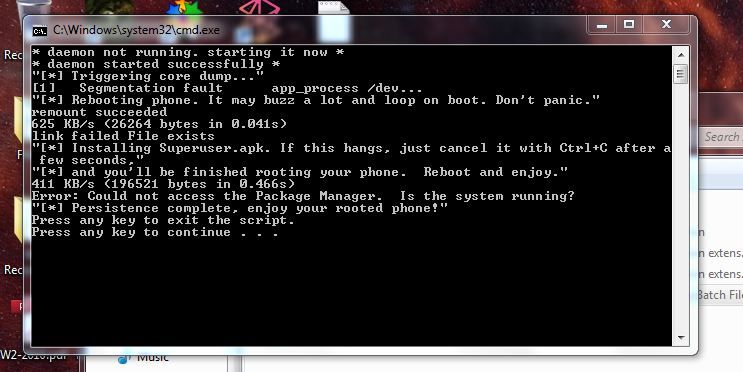
Capture.jpg


Does this mean it worked? Should I reboot the phone? (Waiting with baited breath!)
 
Capture.jpg


Does this mean it worked? Should I reboot the phone? (Waiting with baited breath!)

It worked for her yes.
Phone should have rebooted at least three times while going through the process.
Try the other root from the link I provided. Grrr
 
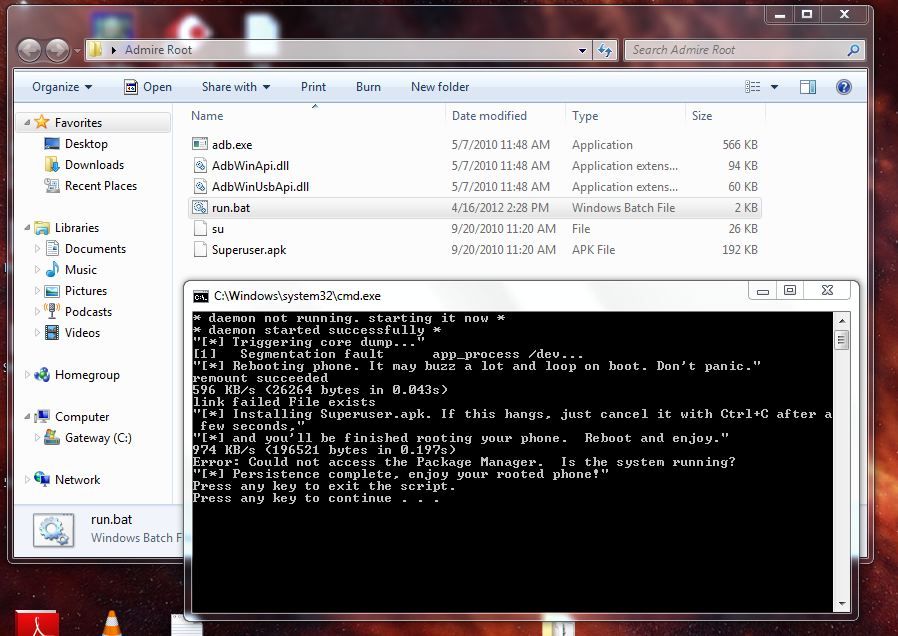
Okay, tried it again with the root link you supplied. Phone rebooted twice, got this report on terminal, and Root Check still reports phone doesn't have proper root access.

Capture2.jpg


Have to run out for a couple of hours. Will get with you then if you're available.
 
Okay, tried it again with the root link you supplied. Phone rebooted twice, got this report on terminal, and Root Check still reports phone doesn't have proper root access.

Capture2.jpg


Have to run out for a couple of hours. Will get with you then if you're available.

K..download superuser from GPlay(if it is not in your app drawer already ) -reboot and check again.
 
K..download superuser from GPlay(if it is not in your app drawer already ) -reboot and check again.

Done! Root Check Basic now reports: Congratulations! This device has root access! :D

Now all I have to do is figure out what to do with it!

A big THANK YOU!!!
 
Sweet:D:thumbup:
Just click a few more thanks and we'll call it even;):cool:

:D So how do I get rid of or move MetroPCS bloatware to the SD card? I looked at "manage apps" for the IM and Social app, but the uninstall and move to SD card buttons are greyed out. I only use Facebook, and their app is much more flexible than the MetroPCS bundled app.

By the way, I now have 3G as well!!!
 
Ok.i rooted a admire with this.n it bricked it.it just keep vibrating n.keep boot looping for hours.how can I fix it
 
Back
Top Bottom