
Install the app
How to install the app on iOS
Follow along with the video below to see how to install our site as a web app on your home screen.
Note: This feature may not be available in some browsers.
-
After 15+ years, we've made a big change: Android Forums is now Early Bird Club. Learn more here.
You are using an out of date browser. It may not display this or other websites correctly.
You should upgrade or use an alternative browser.
You should upgrade or use an alternative browser.
Lets see your UI layout!
- Thread starter GrdLock
- Start date
-
- Tags
- htc droid eris
my stock music app widget doesnt look like that on mine the album art is over the play button
There are two versions of the HTC music widget, There is the larger one you are describing and then the one that gridbug has on their screen.
Which operating system are you running on your PC? I was having that problem with the 64-bit version of Windows 7. I had to update my JDK to the Windows 7 64-bit version. Java SE Downloads - Sun Developer Network (SDN)
Also, make sure you installed the USB driver.
Sorry for the bump, but I'm trying to take a photo of my layout on 2.1...
I get stuck at the step "- Run ddms.bat in the /tools/ directory of the Android SDK with your phone plugged in".
I "run" it by double clicking (?) and all that happens is a command windows blinks open and then immediately closes without being able to read anything. Repeated all steps, and not sure why it does that. Maybe I'm not "running" it properly?
Please, any assistance? Thanks,
I had this problem on Windows 7 64 bit. If I set the path in the command prompt, then run ddms, it works without a problem, so I added the path in the batch file. After the last REM in the first block I put:
path c:\"program files (x86)"\java\jre6\bin\
You will need to use the path to your version of java's bin directory, but then after you put this in, you can double click the batch file and it will run without a problem.

adrenalinerush12
Well-Known Member
You know what? Freak screen shots. Haha. That's too complicated. Breaking out the camera. Here's my Eris Home screens and keyboard:


GrdLock
Android Enthusiast
Sorry for the bump, but I'm trying to take a photo of my layout on 2.1...
I get stuck at the step "- Run ddms.bat in the /tools/ directory of the Android SDK with your phone plugged in".
I "run" it by double clicking (?) and all that happens is a command windows blinks open and then immediately closes without being able to read anything. Repeated all steps, and not sure why it does that. Maybe I'm not "running" it properly?
Please, any assistance? Thanks,
You most likely don't have Java installed, or Java isn't in your path.
Download the latest version of Java from java.com: Java + You and install it.
Try running ddms.bat again. If it doesn't work, right-click on My Computer, go to Properties. On the Advanced tab, click Environment Variables. Under System variables, find "Path" and click Edit.
Now find the path to your java bin directory. Should be something like "C:\Program Files (x86)\Java\jre1_6\bin\" or something similar. At the end of the line of stuff in the Path, add that directory with quotes. Separate it from what's already there with a semi-colon ;
Now try again and it should work.
how do you get the swype onto the eris?Took me awhile but thanks so much for the reinforcement, That details about java path was good... and had no idea how to "install" the usb driver, but it works! Thanks!


Pretty basic standard Sense layout.Love HTC phones.
Thanks again!

RubberDucker
Well-Known Member
Anyone know how to do Eris Screen Caps on a Mac?
iLoveAndroid
Newbie
You know what? Freak screen shots. Haha. That's too complicated. Breaking out the camera. Here's my Eris Home screens and keyboard:
Ok first of all how did you get the Vanilla Browser, SMS, Phone, and what keyboard is that???
Ok first of all how did you get the Vanilla Browser, SMS, Phone, and what keyboard is that???
Would like to know what keyboard that is also?...

W4LLY
Android Enthusiast
Anyone know how to do Eris Screen Caps on a Mac?
read back a few pages, I had a whole discovery with this process. It's actually REALLY easy.


N
NefariousAryq
Guest
Working on customizing my own rom. Here's my current home screen... took two images to show off the live wallpaper

That's pretty sharp... will you be releasing it at some point? BTW if you are in a location where the temperature drops 10 degrees in 1 minute, I'd be pretty scared
hehehe
GrdLock
Android Enthusiast
That's pretty sharp... will you be releasing it at some point? BTW if you are in a location where the temperature drops 10 degrees in 1 minute, I'd be pretty scared
It's more tailored to just look how I want it to look, but yeah, I'm sure at some point I'll release a rom just for kicks.
And yeah I saw the temp change lol, guess in the few seconds it took me to snap those two shots, Beautiful Widgets did an update.

jkmailley
Well-Known Member
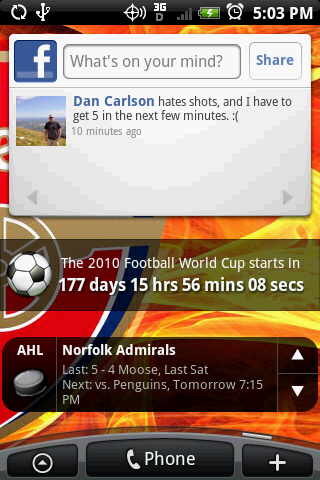
Does anyone know what widget is being used for the Hockey?

OfTheDamned
The Friendly Undead
Does anyone know what widget is being used for the Hockey?
+1 that looks pretty nice.

OfTheDamned
The Friendly Undead
SportsTap
No, I have SportsTap and that isn't the widget.
It is Scoreboard


Phoenix3193
Newbie

platattack
Lurker
Newbie here. Just got my screenshot to work 
From left to right starting with my charging lock screen.


my lockscreen when not on the charger.

From left to right starting with my charging lock screen.
my lockscreen when not on the charger.

walkinonthesun
Newbie
Pplatattac, what lock screen is that? Looks awesome.
+1


