
?? in menu/settings/about phone. Does it list a baseband version? Or is it blank?
it says unknown
Follow along with the video below to see how to install our site as a web app on your home screen.
Note: This feature may not be available in some browsers.
?? in menu/settings/about phone. Does it list a baseband version? Or is it blank?

Can I ask do you have any numbers in the imei spot . Dont put the numbers on the web just say yes numbers or no numbers . and do you have signal to make a call text or use the web

I can only assume, but not for certain, you have no baseband listed because there is no modem installed, or the device cannot find it.hi again im sorry for bothering you guys so much i just have this vibrations on the phone since i install tweakwiz and idk what to do. if my baseband says unknown its that bad?

I can only assume, but not for certain, you have no baseband listed because there is no modem installed, or the device cannot find it.
Are you planning on activating this in the future or just planning on using it deactivated (on wifi)?
About that rom, like I said before, you can try it, and if you don't like it, you can flash another
and if i unroot could i in the future root again?
and how can i unroot?
Model: SGH-T989
Model name: GALAXY S II
Country: USA (T-Mobile)
Version: Android 4.1.2
Changelist: N/A
Build date: Thu, 01 Jan 1970 00:00:00 +0000
Product Code: TMB
PDA: T989UVMC6
CSC: T989TMBMC6
MODEM: T989UVMC6
Instructions
Extract (unzip) the firmware file
Download Odin v3.09
Extract Odin zip-file
Open Odin v3.09
Reboot phone in Download Mode (press and hold Home + Power + Volume Down buttons)
Connect phone and wait until you get a blue sign in Odin
Add the firmware file to AP / PDA
Make sure re-partition is NOT ticked
Click the start button, sit back and wait a few minutes
alright i found this Firmwares | SamMobile | Page 3
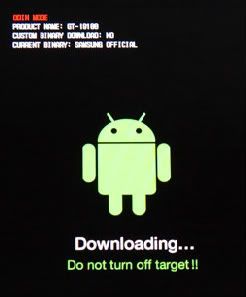
For getting into download mode?the thing is i dont have a home button

i download it but it gets a error and i can open it the error is in chinesse
ok i did it bu t cant get into download mode
and how can i make sure re-partition is NOT ticked

just hold the two volume buttons right?
I wish I had the same device to tell you for sure, but yes