
Install the app
How to install the app on iOS
Follow along with the video below to see how to install our site as a web app on your home screen.
Note: This feature may not be available in some browsers.
-
After 15+ years, we've made a big change: Android Forums is now Early Bird Club. Learn more here.
You are using an out of date browser. It may not display this or other websites correctly.
You should upgrade or use an alternative browser.
You should upgrade or use an alternative browser.
Root [MetroPCS] New tethering bypass
- Thread starter jay2nice000
- Start date
-
- Tags
- lg optimus f6

TheEmpathicEar
Android Enthusiast
@Trevor
Me too, did you use Elixir?
Me too, did you use Elixir?
jay2nice000
Newbie
please if your gonna spam my thread with other methods, which i dont have problem with AS LONG AS IT WORKS!!!! next time test your own method before posting it!!!I have the best solution to this thread... are you ready for it. The stock tether app works just fine it does exactly what it is suppose to do and all you have to do to bypass the verification check is to install the app called elixir 2 from the play store, create a status bar widget with a tethering option if you don't want a new status bar then simply create a widget for your home screen using the other elixir 2 apps on the play store. When you activate the button it wont ask metro pcs if you've paid and simply turns on the hotspot. ENJOY
@ Trevor try to connect with the ps3 again but before you do go into settings and check MTU in setting and run the test again.
if it still doesnt go threw try freezing lgupsell ( using titanuim Pro) and try with and without the MTU checking in the wifi settings. please let me know the results
Well for starters I have tested it and it does work on the LG F6 that I have for some reason and I don't think 1 post is spamming.... what do you need as proof I will do my best to help you figure out why it worked for me and not you getting rude about it is hardly the way to go about it though.
jay2nice000
Newbie
Well for starters I have tested it and it does work on the LG F6 that I have for some reason and I don't think 1 post is spamming.... what do you need as proof I will do my best to help you figure out why it worked for me and not you getting rude about it is hardly the way to go about it though.
sorry if i sounded rude, was trying to be. and yes you are spamming noticed the same post in about 3 other threads....spamming.....anyways. we need facts here. are you with metro or tmobile?... what software verison are you using? stock or custom rom ( which rom is any). screen shots? tested download speeds with other devices? laptop? ps3? xbox? are you running any certian settings? or any other apps at the same time. details details details

The phone is with metro pcs on 12b stock rom rooted by downgrading to 10i rooted upgraded to 12b used voodoo ota to restore root then installed custom recovery I am going to take some screen shots and even will upload a video showing the connection to prove it to you just so you can eat your words
jay2nice000
Newbie
please do im hungryThe phone is with metro pcs on 12b stock rom rooted by downgrading to 10i rooted upgraded to 12b used voodoo ota to restore root then installed custom recovery I am going to take some screen shots and even will upload a video showing the connection to prove it to you just so you can eat your words


Trevor Philips
Android Enthusiast
@ Trevor try to connect with the ps3 again but before you do go into settings and check MTU in setting and run the test again.
if it still doesnt go threw try freezing lgupsell ( using titanuim Pro) and try with and without the MTU checking in the wifi settings. please let me know the results
Still a no go, i looked up the error code that it gives me when the test fails (80028e06) and it says "Open your Internet Browser on the system (PS3 or PSP system) and see if there is a message from your ISP or a log in page. Follow the instructions or enter your username and password for your ISP.
".. so im guessing that the tmetro upsell page is whats blocking the internet
screen shots to come in a few gonna smoke then gonna make the video showing the connection being made and then playing a video on youtube to prove the connection plus I found one small thing that had changed but its not to much of a change and you will still love the outcome... after I smoke
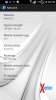
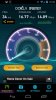
Ok the thing I didnt know was that my friend had changed the OS to the Xperion ROM all is in the pics one of the speedtest pics is with my galaxy nexus and the other is with my galaxy s4 does that help? cguru::car:
cguru::car:Attachments



Trevor Philips
Android Enthusiast
Ok the thing I didnt know was that my friend had changed the OS to the Xperion ROM all is in the pics one of the speedtest pics is with my galaxy nexus and the other is with my galaxy s4 does that help?
I can turn on mobile hotspot as well, what are your results when actually tethering onto a pc?
Trevor Philips
Android Enthusiast
:hmmmm2
lol, all good


Xieon
Well-Known Member
Using this method I was able to get it to enable my wifi hotspot once, bypassing metro.
After that can't get it to work. Nothing shows up when searching for the SSID using Linux. Also, I tried Elixer 2, maybe some instructions on how to make a tether widget, because I can't figure that out.
Really a pain, I had tether working on my past 2 phones, just can't get this damn one, and I've tried several methods
After that can't get it to work. Nothing shows up when searching for the SSID using Linux. Also, I tried Elixer 2, maybe some instructions on how to make a tether widget, because I can't figure that out.
Really a pain, I had tether working on my past 2 phones, just can't get this damn one, and I've tried several methods
Using this method I was able to get it to enable my wifi hotspot once, bypassing metro.
After that can't get it to work. Nothing shows up when searching for the SSID using Linux. Also, I tried Elixer 2, maybe some instructions on how to make a tether widget, because I can't figure that out.
Really a pain, I had tether working on my past 2 phones, just can't get this damn one, and I've tried several methods
Make sure your WiFi is turned ON before activating the app. Thats my two cents :smokingsomb:
FB
This JB Wifi Tether just appears to turn on the router in settings. It does work, but I'm not sure that's what I want to stay off the carriers radar.This works, I tested it today with my Xbox 360 and my wifes lg l9 and it worked great. Haven't tried to play games yet, just watched netflix.
jay2nice000
Newbie
i have used well over 50 gigs of data in the past 2 months ( netflix, hbo go, torrenting and online gaming) and im still going strong!!This JB Wifi Tether just appears to turn on the router in settings. It does work, but I'm not sure that's what I want to stay off the carriers radar.


Maine Coon
Android Expert
WiFi Tether router does not work on the hroark13 port of 4.4.2 KK.
At least for me.
At least for me.
jay2nice000
Newbie
WiFi Tether router does not work on the hroark13 port of 4.4.2 KK.
At least for me.
I have yet to flash any of his roms yet.... I will. Once some of the bugs get fixed
Works for me. The way I do it is enable the WiFi tether router and then I open up 3rd party hotspot app. Now I do leavebit open with same said because of the other stock ROM tethering says that open is only way it works. I know leaving open is dangerous to personal shit, but I live at the end of a road and I always chexk to make sure that only what I'm tethering oa connected.WiFi Tether router does not work on the hroark13 port of 4.4.2 KK.
At least for me.