• After 15+ years, we've made a big change: Android Forums is now Early Bird Club. Learn more here.

Root Boot/Shutdown Animations

bg4m3r

Android Expert
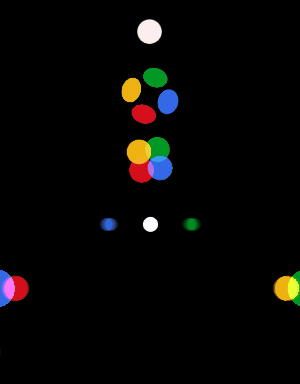
Hey, I thought we could make a boot/shutdown animations thread. To kick off the thread, here's a quick mod of an animation that can be found in the ROM Manager Boot Animation app, the Google Play animation. It bothered me that the dots only rotated half a circle, so I added in the other half. I also made a shutdown animation to go along with it. Below are GIFs showing the animations and download links. The startup GIF only shows the circling dots, but the full animation (dots zooming in from the side) is in the download.

I am working on making a Volt optimized version that is only 540px wide (the current one is 1080, to support larger screens, resulting in the outer parts of the animation to be cut off). I will add them as well when I get them done.

To install these without an app, just copy them to /data/local/ and name them bootanimation.zip and shutdownanimation.zip respectively and make sure the permissions are set to rwx r-x r-x.
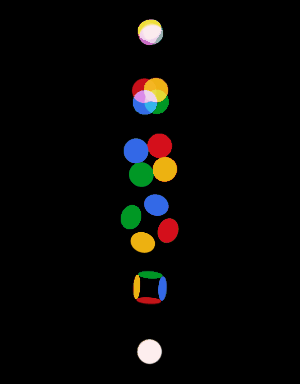
startup.gif
shutdown.gif


Looking forward to see everyone's animations! :D

Second animation thread:
http://androidforums.com/index.php?threads/964704/
 

Attachments

Last edited:
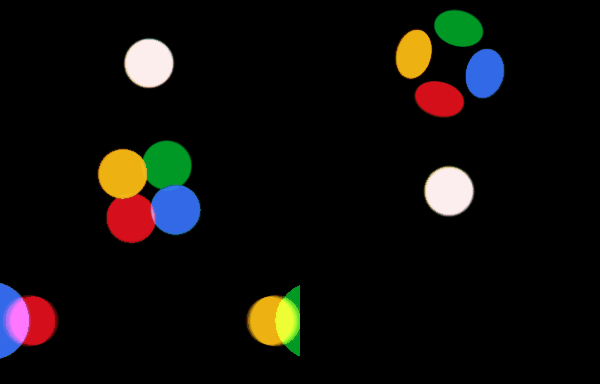
Here's the 540px animations. They came out nicely.
For some reason, when I cropped them down it added a color index, resulting in these being no smaller than the 1080 ones. They work fine, and at 2MB, it's not huge, but if someone knows a batch method of getting rid of the color index, they should be half the size of the bigger ones.
shutdown540.gif
 

Attachments

Last edited:
To install these without an app, just copy them to /data/local/ and name them bootanimation.zip and shutdownanimation.zip respectively and make sure the permissions are set to rwx r-x r-x.

startup.gif
shutdown.gif


Looking forward to see everyone's animations! :D

This may seem like a silly question but: Why place them in folder "/data/local/"? Shouldn't they be placed in "/system/media/" where the original bootanimation.zip and shutdownanimation.zip are located?

Spunky168
"The Original Taepo Dong"
 
To install these without an app, just copy them to /data/local/ and name them bootanimation.zip and shutdownanimation.zip respectively and make sure the permissions are set to rwx r-x r-x.

startup.gif
shutdown.gif


Looking forward to see everyone's animations! :D

This may seem like a silly question but: Why place them in folder "/data/local/"? Shouldn't they be placed in "/system/media/" where the original bootanimation.zip and shutdownanimation.zip are located?

Spunky168
"The Original Taepo Dong"
 
This may seem like a silly question but: Why place them in folder "/data/local/"? Shouldn't they be placed in "/system/media/" where the original bootanimation.zip and shutdownanimation.zip are located?
The system looks in /data/local/ first. If it finds nothing there, then it goes on to /system/media/. By putting your custom animations in /data/local/, you trump the other location and don't have to worry about overwriting the stock animations. :)
 
Last edited:
I For anyone who wants the Android L boot animation on their device, use THIS APP to install the boot animation found HERE ON GOOGLE DRIVE or HERE ON MEGA

Or

You can download the animation, navigate to "/system/media/", find "bootanimation.zip", change the extension from .zip to .bak, then copy over the new "bootanimation.zip". The process is the same if you want it to be your shut down animation as well, except you will rename "bootanimation.zip" to "shutdownanimation.zip" and copy it over after you rename the original "shutdownanimation.zip" to "shutdownanimation.bak" first.
 
Last edited:
I For anyone who wants the Android L boot animation on their device, use THIS APP to install the boot animation found HERE ON GOOGLE DRIVE or HERE ON MEGA

Or

You can download the animation, navigate to "/system/media/", find "bootanimation.zip", change the extension from .zip to .bak, then copy over the new "bootanimation.zip". The process is the same if you want it to be your shut down animation as well, except you will rename "bootanimation.zip" to "shutdownanimation.zip" and copy it over after you rename the original "shutdownanimation.zip" to "shutdownanimation.bak" first.

Made a shutdown animation to go with this. :)
lshutdown.gif
 

Attachments

Last edited:
I thought about having the android disassemble, but didn't know if it would fit within the shutdown time.
 
I am working on making a Volt optimized version that is only 540px wide (the current one is 1080, to support larger screens, resulting in the outer parts of the animation to be cut off). I will add them as well when I get them done.
I just wanted to let you know that you can just change the Desc.txt file to be the same dimensions as the LG volt. and they will play at those dimensions.

http://www.addictivetips.com/mobile/how-to-change-customize-create-android-boot-animation-guide/
 
NEW POST: It has been fixed.

OLD POST:Well i am trying to get my bootanimation to work but with no avail.
i just want it to be a shutdown animation or a boot one.

can anyone help me with this one?
its a running wolf.
with my username having a glow after.

this is actually from a gif file. so if anyone wants to use it or modify what i have done go ahead.

Update: This one is the New Zip File
 
Last edited:
Well i am trying to get my bootanimation to work but with no avail.
i just want it to be a shutdown animation or a boot one.

can anyone help me with this one?
its a running wolf.
Your zip file is compressed, and a boot animation cannot be compressed. take your files put them into a zip and do no compression, some programs refer to it as store only.
 
Last edited:
Your zip file is compressed, and a boot animation cannot be compressed. take your files put them into a zip and do no compression, some programs refer to it as store only.
Thanks sir i shall try this soon. So i can backup and restore easily.
 
Your zip file is compressed, and a boot animation cannot be compressed. take your files put them into a zip and do no compression, some programs refer to it as store only.
Alright so i tried making a non compressed zip of my animation. But it did not work.
It was done using jrummys root browser, i think it is jrummy.
 
Hey, I thought we could make a boot/shutdown animations thread. To kick off the thread, here's a quick mod of an animation that can be found in the ROM Manager Boot Animation app, the Google Play animation. It bothered me that the dots only rotated half a circle, so I added in the other half. I also made a shutdown animation to go along with it. Below are GIFs showing the animations and download links. The startup GIF only shows the circling dots, but the full animation (dots zooming in from the side) is in the download.

I am working on making a Volt optimized version that is only 540px wide (the current one is 1080, to support larger screens, resulting in the outer parts of the animation to be cut off). I will add them as well when I get them done.

To install these without an app, just copy them to /data/local/ and name them bootanimation.zip and shutdownanimation.zip respectively and make sure the permissions are set to rwx r-x r-x.

startup.gif
shutdown.gif


Looking forward to see everyone's animations! :D


Just to be clear.....

Do I move the renamed zip files into the data/local folder and then unzip them in that folder?
 
Back
Top Bottom