
Install the app
How to install the app on iOS
Follow along with the video below to see how to install our site as a web app on your home screen.
Note: This feature may not be available in some browsers.
-
After 15+ years, we've made a big change: Android Forums is now Early Bird Club. Learn more here.
You are using an out of date browser. It may not display this or other websites correctly.
You should upgrade or use an alternative browser.
You should upgrade or use an alternative browser.
Root [ROM] Android 2.2 FroYo - Brought to you by MDW (OC & Flash 10.1!)
- Thread starter Fabolous
- Start date
-
- Tags
- motorola droid

bp328i
Android Enthusiast
@Fab...Thanks for including installation instructions on the first post (not for me, but for others). Have you seen the 2.2 thread at DF? OMG...Crazy easy questions about installation...Hopefully your instructions will help avoid some of that..
Pretty funny, I was just reading some of them and one was "Whats the Sp and clockwork options. How do I know which one I need to assure a proper install."
Wow, I know you have to start somewhere but really...

UBRocked
VZW Nexus Please!!!
When I noticed that ATK didn't kill itself, I just uninstalled it.
Haven't even looked at my free memory since. I figure, if it's not slowing down, why bother
True...seems that my phone is running like your phone....butter!
For people having problems, did you wipe data/cache before installing? Also, formatting your DATA, SYSTEM, BOOT, & CACHE partitions is HIGHLY recommended before installing this ROM (at least by me
).This is a new OS with lots of new files in the system partition. Not formatting these could lead to fragments of your past ROM installations. This is why I format the partitions mentioned above EVERY time I update to a new ROM.
Just food for thought...



johnlgalt
Antidisestablishmentarian
go into root explorer and go to system/ app find the maps apk and select and install
Good answer - since my phone is synchronizing most of my apps, I have to wait until those are done - I'd hate to reboot in the middle of an app install and cause all sorts of confusion....
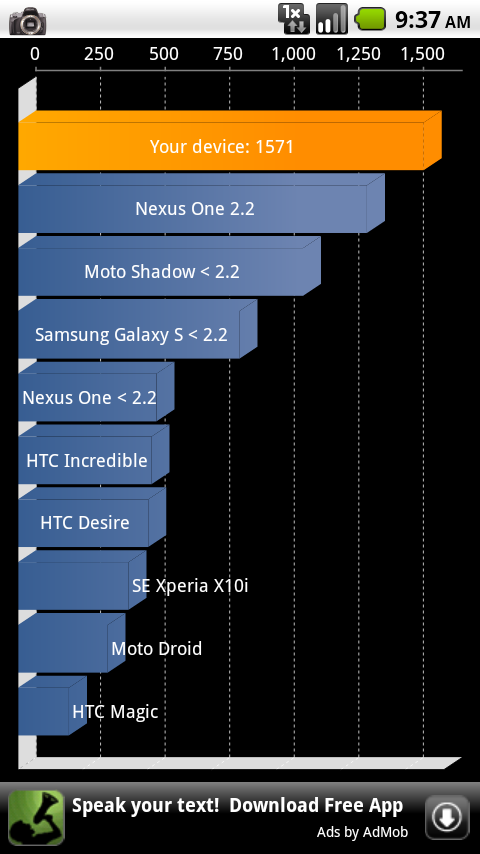
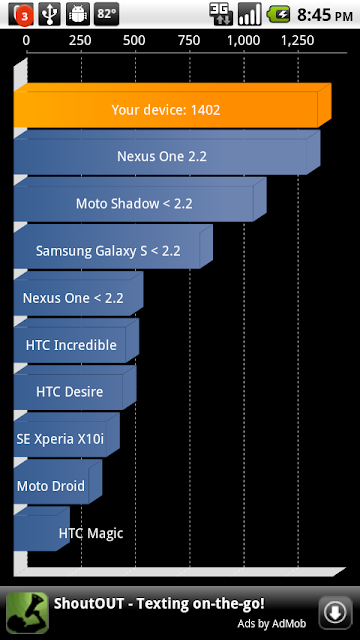
Well I decided to give it another try since the kernels are out and so is the Wifi fix. But there are still a few bugs. The big one I can see is with task killer. As said before it will not kill itself. Also, the phone is still running a big sluggish and hesitates on screen presses before it executes. I sill claim that my 2.1 setup was faster. But with my CPU benchmark program, Im running a 823ms test OC'd to 1ghz, compared to 927ms OC'd to 1ghz on 2.1. So it seems to be running the CPU just a hair more effeciently, but I still dont understand why its so sluggish. I will run with it until it pisses me off, then I will go back to stock 2.1 until the real 2.2 for Droid goes live.
How long has it been on your phone? Mine is currently synchronizing all my apps, so it is obviously going to be slow. After that is done, a couple of people have suggested rebooting a few times (one said even do battery pulls) to get it working in a good way.
Of course, YMMV, since each phone is going to be unique in terms of # of apps installed....
i went back to my backup of cm 5.0.7.1. i had similar results. it just ran like crap on my phone even with the updated kernels. i will probably just wait to see what pet and koush come up with.
How long did you run it? even just a couple of hours isn't, IMO, long enough to really get the feel of the OS...and that is especially true if you had a lot of apps previously installed.
I noticed that too. Also, it seems that auto memory manager isn't working for me. I set it to have 50mb free at all times and I checked at one point and it was down to 20. Hopefully pete will work his magic and get some of his BB features into this 2.2 rom
When I noticed that ATK didn't kill itself, I just uninstalled it.
Haven't even looked at my free memory since. I figure, if it's not slowing down, why bother
+500 - stop with the whole app killing nonsense and see how the phone responds natively for a day - an hour is not a test, it barely scratches the surface.
Doesn't it affect the battery life though?
What, leaving apps on? No, b/c unless the apps are *actively* performing tasks they are only resident in memory, which is always being used by the system anyway, so whether you have apps loaded in memory or not will not affect battery usage so much as *actively loading and unloading* them.
@Fab...Thanks for including installation instructions on the first post (not for me, but for others). Have you seen the 2.2 thread at DF? OMG...Crazy easy questions about installation...Hopefully your instructions will help avoid some of that..
Hopefully. however, see my response below....bp328i;872782]Pretty funny, I was just reading some of them and one was "Whats the Sp and clockwork options. How do I know which one I need to assure a proper install."
Wow, I know you have to start somewhere but really...[/QUOTE]
There are a lot of DROID owners that are new to the game - I have seen places advertising the DROID for $20 now - a lot cheaper than the $200 I paid for mine. It goes without saying that there are gonna be n00bs that haven't even rooted their phones yet....
How long did it take you to get out of the boot loop?
Goes on forever lol. Boot looping means something is wrong.
johnlgalt
Antidisestablishmentarian
True...seems that my phone is running like your phone....butter!
For people having problems, did you wipe data/cache before installing? Also, formatting your DATA, SYSTEM, BOOT, & CACHE partitions is HIGHLY recommended before installing this ROM (at least by me
This is a new OS with lots of new files in the system partition. Not formatting these could lead to fragments of your past ROM installations. This is why I format the partitions mentioned above EVERY time I update to a new ROM.
Just food for thought...
+5 - Being an older hand at this I knew to do that right away - makes life a lot easier.
The really good thing is that all my apps from Market have synced automagically, so I am only gonna need TiBu to do a few apps that I got from elsewhere.
How long did it take you to get out of the boot loop?
Who are you asking, cruud, everyone? I never experienced a boot loop myself, just a stupid "no connection" the first time I booted the phone....
Finally got FroYo installed! My problem was that I was placing my CW install folder in the /nandroid directory instead of the /clockwork/backup directory. 2.2 is up and syncing now, and I still need to install Flash and update the kernel, but on a side note, did anyone else see the following in their recovery log after install:
That is how my install wrapped up just prior to me rebooting phone. Everything "appears" to be working, but is that something I can fix or should I not be concerned about it?
Yeah I got that error but after it rebooted, everything was fine. I've been on it for over 8 hours and its stable. Just anxiously waiting for FAB's theme
Okay this a new one. Running Froyo 2.2 on Motorola Droid with no issues so far (except the one below) and new 1.0 kernel. Came from NexBeast 1.1 (Fab rocks) and did complete wipe X 3 and also format of cache, data, etc. My Facebook app is syncing me to my sons Facebook profile. Same last name but different email addresses, phone numbers, etc. I have Sync to existing contacts. His contact shows no link but mine is linking to his. I've tried clearing data, removing account and reinstalling. Also renamed Facebook.apk to Facebook.apk.bak in System/Apps w/ Root Explorer and downloaded from market. Didn't fix and also tried removing him as a contact. Accessing Facebook on my computer is no issue so it's somehow tied to the syncing.
Any ideas?
Any ideas?
Mine has been up for a few hours now. Fully synced and all. Also before I installed this 2.2, I did format this thing down to nothing, SD card and all. Reinstalled a fresh copy of 2.1 that was not rooted or OC'd. I then rooted it, without installing any apps or personal stuff. Then I installed the 2.2 image. It has moments where it runs smooth, but most of my apps run like shit and the phone is still sluggish.
Mine has been up for a few hours now. Fully synced and all. Also before I installed this 2.2, I did format this thing down to nothing, SD card and all. Reinstalled a fresh copy of 2.1 that was not rooted or OC'd. I then rooted it, without installing any apps or personal stuff. Then I installed the 2.2 image. It has moments where it runs smooth, but most of my apps run like shit and the phone is still sluggish.
I agree. it is a little sluggish. I think pete's bugless with nexbeast theme runs smoother. I think Pete and FAB will hook us up soon.

esmith818
Android Enthusiast
Ryjabo's solution for hulu (quoted in OP) results in an error for me stating that I am trying to access Hulu through an anonymous proxy tool. I'm connected to my home wi-fi signal. Any idea why I would have this issue, and can I fix anything on my end to circumvent? If so, what do I need to do?
ROM, wifi fix, benchmarks, overclocking and flash::: all here this is a good summary of everything with instructions pulled from some sites
Android 2.2 Froyo on Motorola Droid » BriefMobile
Android 2.2 Froyo on Motorola Droid » BriefMobile
I agree. it is a little sluggish. I think pete's bugless with nexbeast theme runs smoother. I think Pete and FAB will hook us up soon.
Yeah, Im going to keep 2.2 for a while. I've been messing with my Droid so much in the last month, I could reload it to stock 2.1, root it and OC it in minutes with my eyes closed. Plus, google did such a great job with setting up the system to let you back up all your stuff, I dont have anything that I can replace very easily. Lets get those ROMs going.
johnlgalt
Antidisestablishmentarian
@ johnlgalt
I did not mean any disrespect to new Droid users I just know when I rooted I read all I could so I knew what I was doing. I also paid $200 for my Droid and did not feel like paying that much for a brick.
No worries - I knew you didn't mean disrespect, but if you think about this then it makes it more sense that some of those questions are being asked.
Also, no matter how much we'd like to have it otherwise, some people are just ... lacking intelligence. At any level.
UBRocked
VZW Nexus Please!!!
Fab, are you working on a theme for this, or are you going to wait until Pete does BB and then theme that? Just curious
I think we will have to wait a little while for themes for this. I think it's a little different than 2.1.
My temporary fix...I used LauncherPro's ability to hide the taskbar...that takes care of the grey notification bar which is stock's biggest eyesore IMO. All you have to do is press the menu key and the notification bar pops back up.
I also am running Flyscreen and what this enables you to do is have access to commonly used widgets from your lockscreen as well as giving you access to your notification panel from the lockscreen. I have only played with the app for about a day now but it is working fine for me (some of you might have issues with the Android lockscreen not being disabled (essentially leaving you with 2 lock screens).
@ johnlgalt
I did not mean any disrespect to new Droid users I just know when I rooted I read all I could so I knew what I was doing. I also paid $200 for my Droid and did not feel like paying that much for a brick.
Good luck bricking your Droid...I suppose it's theoretically possible, but I have never seen or heard of it happening (except for a few devs who where working on specific roms in the creation process)...

Predator04
Newbie
go into root explorer and go to system/ app find the maps apk and select and installI followed the instructions and everything is working great. Wifi, 1.2Ghz, flash, etc. thanks so much for posting this here.. Only thing not working is Google Maps, I cant get it to install for some reason, any suggestions?
this worked for me