
Install the app
How to install the app on iOS
Follow along with the video below to see how to install our site as a web app on your home screen.
Note: This feature may not be available in some browsers.
-
After 15+ years, we've made a big change: Android Forums is now Early Bird Club. Learn more here.
You are using an out of date browser. It may not display this or other websites correctly.
You should upgrade or use an alternative browser.
You should upgrade or use an alternative browser.
Root [ROM] Android 2.2 FroYo - Brought to you by MDW (OC & Flash 10.1!)
- Thread starter Fabolous
- Start date
-
- Tags
- motorola droid

Can you email me at mypenneys@hotmail.com
I am not sure what to do I have a Motorola Droid with Verision 2.1 with update 1 the latest firmware for my droid. The most important thing for me is how to backup the orginal firmware before I change anything. Can you help me out. Downloaded all the files I no how to unzip and put in folders and no what the root folder is. Also i think but am not sure the Clock Work downloads may be easier to use. Can I call and talk mybe easy my mind of what I have to do.
I am not sure what to do I have a Motorola Droid with Verision 2.1 with update 1 the latest firmware for my droid. The most important thing for me is how to backup the orginal firmware before I change anything. Can you help me out. Downloaded all the files I no how to unzip and put in folders and no what the root folder is. Also i think but am not sure the Clock Work downloads may be easier to use. Can I call and talk mybe easy my mind of what I have to do.

inssane
Android Expert
Can you email me at mypenneys@hotmail.com
I am not sure what to do I have a Motorola Droid with Verision 2.1 with update 1 the latest firmware for my droid. The most important thing for me is how to backup the orginal firmware before I change anything. Can you help me out. Downloaded all the files I no how to unzip and put in folders and no what the root folder is. Also i think but am not sure the Clock Work downloads may be easier to use. Can I call and talk mybe easy my mind of what I have to do.
You might wanna watch it. Your first post asks people to call you - I smell SPAM.
What Update 1 on 2.1? You mean root or root on sd card folder?

nstallion
Android Expert
Can you email me at mypenneys@hotmail.com
I am not sure what to do I have a Motorola Droid with Verision 2.1 with update 1 the latest firmware for my droid. The most important thing for me is how to backup the orginal firmware before I change anything. Can you help me out. Downloaded all the files I no how to unzip and put in folders and no what the root folder is. Also i think but am not sure the Clock Work downloads may be easier to use. Can I call and talk mybe easy my mind of what I have to do.
You can't back everything up unless you are already rooted and you can use Titanium Backup. The first time you root you will lose some stuff. I think there are apps that will back up things like text messages though.


Redflea
Android Expert
Have you tried stopping it from syncing your apps? Download any app right away and that should stop it from syncing them all. Then it will just have to sync gmail and contacts ect
Or, you could factory reset. This time, instead of hitting the Droid, tap the four corners in a clockwise manner starting with the top left.
Then, mess around with Froyo for a bit, before you sign in. Also, I think if you do this delayed sign in, it doesn't sync your apps (not sure though).
Thanks very much for the suggestions...
i rebooted after it shut down/locked up the first time after installing Birdman v.2, hooked it up to power and set it aside. Checked a few minutes later and it hadn't died, and was actually trying to download/install my apps, but getting stuck at the "download starting" stage for about 10 apps.
I cancelled one and then selected install and it downloaded and installed, did that for a couple more and then the log jam seemed to break and the remainder installed normally.
Since then (10 minutes or so?) it's been seeming like it might actually work...too soon to tell, but it goes to sleep and lets me wake it up again.
Just did a quandrant benchmark w/CPU set to 700MHz max, and got 996... below Shadow and Nexus one. Linpacks are at 11.
Now I just have to see if this remains stable...had the Miami ROM looking like it was working and it went south. Going to keep it at 700 MHz so I don't push things.
Fingers crossed, thanks for your support, much appreciated.


rogue_slc_vzw_rep
Android Enthusiast
has anyone else experienced amazing battery life with this rom? I have been very impressed with how great it has been since yesterday
Sent from my Droid using Tapatalk
Sent from my Droid using Tapatalk

rjoudrey
Android Expert
has anyone else experienced amazing battery life with this rom? I have been very impressed with how great it has been since yesterday
Sent from my Droid using Tapatalk
Seems to be running cooler than BB1.1.

ska.t73
Android Expert
I haven't had it on long enough to judge.
PS - JuiceDefender doesn't pass 2.2 on the compatibility test.
Are you using the latest beta version (the one that works on CDMA)? Cause from what I can tell that one will only work on Cyanogen... It is sad cause I was really enjoying it but it is a small price I'm will to pay for 2.2...
The only problem I'm having now its that I can't use fix permissions in Rom manager... I also can't seem to get into Jrummy's section on it either...
Sent from my Droid using Tapatalk
xsoulbrothax
Newbie
The only problem I'm having now its that I can't use fix permissions in Rom manager...k
Of the people that have mentioned it in this thread (including me!) it seems like nobody has been able to run it. I can get into Clockwork fine, but just fix permissions doesn't work.
Anybody have any contradictory experience?
xsoulbrothax
Newbie
anyone else experiencing immense battery drain with this ROM?
Either roughly on par with or slightly higher than CM 5.0.7.1, which was my last frame of reference.. I had the phone off charger for most of yesterday evening, came home and left it off the charger overnight. After around 18 hours it was at 40%, which is about on par with my normal usage. I'll see for sure in a couple of days.
nstallion
Android Expert
anyone else experiencing immense battery drain with this ROM?
Are you sure it isn't because you are playing with it (so to speak) more? Flash seems to be very CPU intensive so I'm sure that drains a lot of battery.

ballisticn8
Android Expert
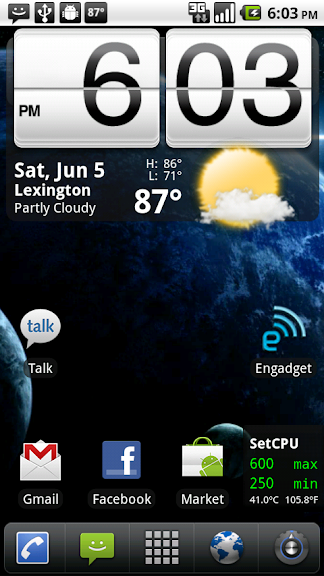
so, forgive my ignorance in asking but is this a custom launcher and if so what is it? Ive never really used any of the other launcher programs, just stuck with the default...


Fadelight
Android Expert
Are you sure it isn't because you are playing with it (so to speak) more? Flash seems to be very CPU intensive so I'm sure that drains a lot of battery.
Never got around to installing flash. I had it on the charger for. 2 hours this morning and only got 40% reverted, charged in 20 minutes.

OMJ
Bazinga
anyone else experiencing immense battery drain with this ROM?
edit new question cause I saw someone already asked the same thing.
have you had issue with p3droid kernels in the past?
That would be LauncherPro
I ended up figuring out how to root and then I installed Birdmans 2.2 rom. I have launcherpro but I really like the clock widget you have. Which one is that?