

So do I stop or continue doing this until both lights are green (and I turn blue in the face). lol
TS
TS
Follow along with the video below to see how to install our site as a web app on your home screen.
Note: This feature may not be available in some browsers.
no, it does not. unless you have some different network app from the one made by Philipp Mangelow. it takes you to network setting, or better known as "Phone info", hence the name of the app, network. that's not the battery info above. i'll be sure to add that app to one of my steps to saving battery (the step takes you to that screen).

this is also one of my steps to saving battery power. at some point, you are going to be in a bad area. Sprint doesn't blanket every last sq ft of land with coverage. changing it will help you in those instances when you don't get good reception. and, it doesn't hurt anything. shouldn't be on GSM any way. this is a CDMA phone.
edit: oh, and a lot of people with battery problems might be experiencing a weak signal and need to do this. i was one of 'em.
so far today this is what i've gotten. battery at 67%


This means you have a battery issue. I've been using my phone for the past 21 hours and have 49% left!
YOU DON'T NEED A HARD RESET EVEN. I CAN CONFIRM, ALL I DID WAS THIS:
press HOME, and bring up the dialer. Dial *#*#4636#*#* (Do not press "Call"). After a second, it should bring up the "Testing" menu.
Go into Phone Information, press MENU, and tap "select radio band." You should experience a Force Close, don't panic, this was supposed to happen. Scrolling down shows that the preferred network type is GSM auto (prl).
What this means is that even though you are connected to a CDMA network, your phone is trying to find a GSM network, preventing the radio from sleeping, and causing excessive battery drain.
Remedy this by tapping GSM auto (prl), and changing it to CDMA auto (prl).
Now your done, your TWS should drop dramatically, and you should experience much better battery life!
THE RESULTS SPEAK FOR ITSELF:
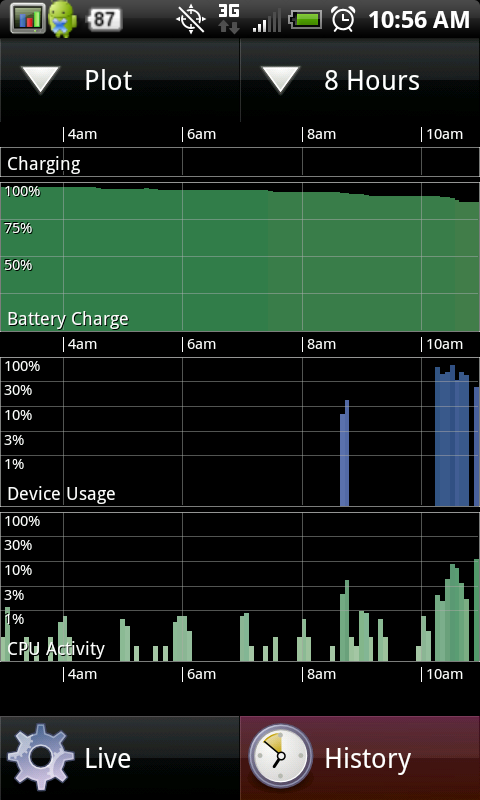
***NOW, WE JUST NEED TO GET THIS TO STICK AFTER A PHONE REBOOT!***
Im sorry, how do those results speak for anything? Your phone was off the charger between what, 2am ish to 10am? Let me guess, you were asleep too. Of course your battery hardly drained, you weren't using your phone and with no before screen shot this screen means nothing.
I am sorry but I don't believe half of the battery claims people post here just because there is never sufficient proof of it or they don't actually USE their phone for any length of time. The people that complain about short battery life are the users that actually heavily use there phone.
If you want your battery to last a long time, don't use your phone like the two posters above.
I apologize if I am way off base, but it just seems like people are giving other users false hopes of this battery lasting 15-24 hours on a regular basis. No matter what you do, if you regularly use the phone and have an AWAKE time of 5+ hours, I would say you have good battery life if the phone lasts 7-10 hours total.
Remember, it is awake time along with these other statistics that shows how long your battery lasts and how much you are actually using, or not using your device.
sorry, rant over.
EDIT:
I just want to make it clear that this is not an attack on the two posters that I quoted. I feel like I may have come off the wrong way a bit in my post and it is not my intention at all. Just looking for real statistics of battery usage that is useful and insightful. I apologize for taking this thread further off track. I did try this "trick" and the amount of time that my battery charged each time i powered on or off was insignificant. YMMV.
EDIT2:
I guess I should have said that the awake time is only really valid if you restart your phone once you have reached a full charge so that it resets to zero. I think that the people who have exceedingly long/short battery lives will be surprised at their awake time if they do this.
There are no "official fixes." It was an email the poster allegedly got from HTC. The only REAL fix is a spare battery or use your phone less. All the other stuff is fud not back by true "scientific" testing. It's all based on innuendo and unproven and unreliable statistics. If you feel it works and makes you feel better then go for it. It may not help, but it certainly can't hurt.Is ther a link from HTC on this fix i mean it supposed to be an offiical fix is ther a link to that affect.

This means you have a battery issue. I've been using my phone for the past 21 hours and have 49% left!
This alleged "trick" would ONLY help people who aren't in a good Sprint coverage area. My TWS is and has always been between zero and 2% because my "time without (Sprint) signal" is just about never. If (BIG IF) it really makes a difference it won't help everyone. Just those in lousy coverage areas.
I'm in NYC, and while coverage here is excellent, I also use the subway. As such, I lose signal frequently while underground. There are points in the subway system where a signal is possible, but it's brief on a moving train.
Would this trick make a difference in such a situation, where I would have no signal for the duration of a subway ride (10 mins ~ 30 mins on average)?
So do I stop or continue doing this until both lights are green (and I turn blue in the face). lol
TS
I'm in NYC, and while coverage here is excellent, I also use the subway. As such, I lose signal frequently while underground. There are points in the subway system where a signal is possible, but it's brief on a moving train.
Would this trick make a difference in such a situation, where I would have no signal for the duration of a subway ride (10 mins ~ 30 mins on average)?
I put mine on "airplane mode" while on subway trying to find a airplane mode widget or even shortcut.
I'm in NYC, and while coverage here is excellent, I also use the subway. As such, I lose signal frequently while underground. There are points in the subway system where a signal is possible, but it's brief on a moving train.
Would this trick make a difference in such a situation, where I would have no signal for the duration of a subway ride (10 mins ~ 30 mins on average)?
Doesn't Verizon have subway coverage, or is it AT&T? If so I would think it should roam on Verizon. If not then just turn off the phone since you can't use it anyway.If there is ZERO signal it will search for a signal and waste battery unless it's off.
Actually the post above this is a much better idea.


Geez man .. once again, read my message. I CLEARLY stated: This alleged "trick" would ONLY help people who aren't in a good Sprint coverage area." I have had the phone 6 days and my "TWS" was never more then 2% which means where I am IS blanketed by a Sprint signal. Some people will be and some won't. Maybe where you are in Virgina you have worse coverage than I do in NYC, NNJ, SNY, WNJ, & Philly which is where I am.
I put mine on "airplane mode" while on subway trying to find a airplane mode widget or even shortcut.
Cool, Airplane mode it is.
And I use my phone the most on the subway - music, read my news feeds, read/respond to my emails, etc.
I think there is an airplane mode widget under add widget > settings
who said i was in Virginia? Charlotte, NC
read your post. did you read mine? you are not going to have perfect coverage 100% of the time.
and who cares if the app takes you directly there or not? now you're talking about now many buttons you have to push in order to get to the same screen. great tip for those that want another way. i could also argue that the app takes up space on the phone whereas pushing some numbers doesn't. but it's really not that important.
anyway, hope i've helped some out.
 Anyway, you da man. Whatever you say. I have better things to do with my time than go back and forth over semantics with you. Just keep snapping those fingers, it will definitely keep the elephants away. It works every time. Even here in NY & NJ.
 How do you setup the shortcut to this?no need for a task killer, friend. there's one already built into the phone.
menu > settings > applications > running services.
i have a shortcut to that on my phone. exact same thing as atk imo.
OK, whatever, N.Carolina, VA, same difference. Maybe you should be mrnorthcarolina instead of mrvirginia. Sorry I said you lived in Virginia. Can't imagine why I thought that.
How do you setup the shortcut to this?


i use that too. but it just gets annoying having to do that all the time. every time i turned the screen on something else would start.no need for a task killer, friend. there's one already built into the phone.
menu > settings > applications > running services.
i have a shortcut to that on my phone. exact same thing as atk imo.
Complaining about the EVO's battery life is like having a Porsche, driving it at 100 mph, and complaining about it's gas mileage


