ahmedsalahh
Lurker
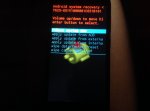
same ..encryption unsuccessful and can't reset cant update from rom img cant open my phone
Follow along with the video below to see how to install our site as a web app on your home screen.
Note: This feature may not be available in some browsers.

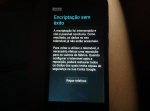
my cloudfone Geo 402q said that encryption unsuccessful I factory reset twice, I try all the options there but after it boot up it keeps showing that encryption unsuccessful, what shoud I do?What problem u have?


Better to get a different phoneI also have same problem with my XiaoMi Mi3 phone.
I already tried, all mentioned by DsyMnapTic.
Mi3 does not have SDcard slot. So I cannot try this one.
Have anyone try to change/replace the ROM chip inside the phone with new one?
Is it possible to do? And how much is the cost will be?
I just have this thought few days ago.


If u go to recovery wipe data and all cache and factory reset should take care of it what I had to do a couple times and might have to redownload file could b coruped
It worked on minesome solution for error encryption zte n800?
in the mine?It worked on mine
What?in the mine?
since there is no solution for zte n800 in encryption error?What?
Try my solution worked on my phone might have to re flash the recovery if u don't try it then it's on u it's what I did when I got the encryption errorsince there is no solution for zte n800 in encryption error?
Might guide and help is that I am beginner in these things,Try my solution worked on my phone might have to re flash the recovery if u don't try it then it's on u it's what I did when I got the encryption error
Hi all, I had this exact problem this morning. I was finally able to reinstall my ROM and get past the boot screens after going in to recovery, and ensuring that I formatted /data, /cache/ and /system. I noticed that /data was not being mounted (or something like that). I then formatted /data and /data/media (/sdcard).
I still have the encrypted /dev/block or whatever. At the moment, I just need a working phone, but here are some of the links I am looking at for later. Hope this helps!
http://www.bauer-power.net/2014/02/how-to-remove-encryption-on-your.html#.V-P7FsIrI8o
http://android.stackexchange.com/questions/98228/removing-encryption-from-recovery
did it solve?
help me please I am new to this and want my phone
Alcidious 25, I'm hoping you would help me with my inquiry, I'm facing the same is sure you faced. Phone is not going past the "encryption error" and tried every button available on the boot page or bios to no avail, been frustrated not knowing how to fix this and you're the first person I hear solve this, can I ask you for help?Sorry for the much delayed response. Yes, ny phone has been working since the post. It has some bugs b/c of the encrypted /dev/block I mentioned (haven't had time BC of work to fix).
The solution is exactly what roadkill42 mentioned, except there's two more steps (for me). First, wipe all data, then wipe the cache. I don't remember if I did factory reset, though. Second, now you need to reformat /data, then /cache, and then /system.
As I said, it still wouldn't get past the splash screen. So on my final attempt, I noted the command line output... /data was not being mounted due to the failed encryption. Thus, my third and final step, was to reformat both /data and /data/media (/sdcard).
Then I reinstalled my ROM, and it works (with some bugs) ... But I intend on removing that lingering encrypted /dev/block, and I suspect that will restore my phone to full working order.
I hope that helps (if not too late)! I am getting more technical understanding, but I don't fully comprehend all the filesystem stuff and how failed encryption affects it.