Install the app
How to install the app on iOS
Follow along with the video below to see how to install our site as a web app on your home screen.
Note: This feature may not be available in some browsers.
-
After 15+ years, we've made a big change: Android Forums is now Early Bird Club. Learn more here.
You are using an out of date browser. It may not display this or other websites correctly.
You should upgrade or use an alternative browser.
You should upgrade or use an alternative browser.
Root 2.37 Downgrade Issues
- Thread starter CdTDroiD
- Start date
-
- Tags
- htc desire hd

You'll need to create a goldcard first, did you do that?

CdTDroiD
Android Enthusiast
Yea i did but i just tried to the whole thing all over again and i noticed after using the hex editor it asks me to reformat the card again before i can use it any idea how to stop that?
EDIT: Flag that i believe i am mildly ******ed and didnt see the REVERSE part of the CID when making the gold card lol... what a twat. works now!!
EDIT: Flag that i believe i am mildly ******ed and didnt see the REVERSE part of the CID when making the gold card lol... what a twat. works now!!

CuBz
Android Expert
That also needed to be done. thanks alot dude worked well. i used THIS method to create the goldcard though, had issues with the otherone. but i changed the MMC1 to MMC2
Ok, well I used the one I posted, it seemed the easiest guide of them all, and I had been across the one you posted. Using the Goldcard Helper app from the market was great because it shows the mmc2 CID Reverse, and I emailed it from the app, then on my computer I went to the goldcard generator website, pasted the CID, my email and was emailed the image, was simple

Glad it worked for you anyway, I panicked a bit when I realised I missed some steps lol
Hi everyone,
Can anyone give me details regarding step 3.
When I have made a goldcard, there is no option of sd card, when I connect it my computer. Then how could I possibly put the PD98IMG.zip onto the root of my SDCard.
Thanks in advance,
Hope u would help me out.
Regards,
K.Sagar
Can anyone give me details regarding step 3.
When I have made a goldcard, there is no option of sd card, when I connect it my computer. Then how could I possibly put the PD98IMG.zip onto the root of my SDCard.
Thanks in advance,
Hope u would help me out.
Regards,
K.Sagar
ok dude,You didnt do the hex editor part right. Try the other method above or do it again and read it really good
But when I open the hex editor and select the removable disk option, it says the sd card may not be readable. Does it the say the same when you tried too. Need just a little more conformation. Thanks dude..
well i did the swap to the Chinese rom from vodafone 2.37 then tried to do the cmd thing and if i do it like this it does the dollar sign
adb push misc_version /data/local/tmp
adb push GingerBreak /data/local/tmp
adb shell chmod 777 /data/local/tmp/misc_version
adb shell chmod 777 /data/local/tmp/GingerBreak
adb shell
and then i tried this
adb push misc_version /data/local/tmp
adb push GingerBreak /data/local/tmp
adb shell chmod 777 /data/local/tmp/misc_version
adb shell chmod 777 /data/local/tmp/GingerBreak
adb shell /data/local/tmp/GingerBreak
and that comes up with cannot copy boomsh: permission denied so what am i doing wrong? is this the right way to write the commands? any help would be good thanks
adb push misc_version /data/local/tmp
adb push GingerBreak /data/local/tmp
adb shell chmod 777 /data/local/tmp/misc_version
adb shell chmod 777 /data/local/tmp/GingerBreak
adb shell
and then i tried this
adb push misc_version /data/local/tmp
adb push GingerBreak /data/local/tmp
adb shell chmod 777 /data/local/tmp/misc_version
adb shell chmod 777 /data/local/tmp/GingerBreak
adb shell /data/local/tmp/GingerBreak
and that comes up with cannot copy boomsh: permission denied so what am i doing wrong? is this the right way to write the commands? any help would be good thanks
just tried that and its the same problem can you tell me the way to write the commands?Did you open cmd with administrator privildges?
CdTDroiD
Android Enthusiast
The way in post 1 are correct, it worked fine for me... try it again  if you have issues still try start from the beginning with a different SD Card if you can, although if you got that far the SD Card wont make any difference to the push commands.
Just make sure you type EXACTLY as it says and take note of were there are spaces etc...
if you have issues still try start from the beginning with a different SD Card if you can, although if you got that far the SD Card wont make any difference to the push commands.Just make sure you type EXACTLY as it says and take note of were there are spaces etc...
CuBz
Android Expert
well i did the swap to the Chinese rom from vodafone 2.37 then tried to do the cmd thing and if i do it like this it does the dollar sign
adb push misc_version /data/local/tmp
adb push GingerBreak /data/local/tmp
adb shell chmod 777 /data/local/tmp/misc_version
adb shell chmod 777 /data/local/tmp/GingerBreak
adb shell
and then i tried this
adb push misc_version /data/local/tmp
adb push GingerBreak /data/local/tmp
adb shell chmod 777 /data/local/tmp/misc_version
adb shell chmod 777 /data/local/tmp/GingerBreak
adb shell /data/local/tmp/GingerBreak
and that comes up with cannot copy boomsh: permission denied so what am i doing wrong? is this the right way to write the commands? any help would be good thanks
make sure you do each line separately, pressing enter after each one
If you continue to get problems, please provide a screenshot
thanks mate well it turns out i didnt understand the commands and after the dollar sign you have to do this /data/local/tmp/GingerBreak without the dot. thanks for your help mate your doing a hell of a job!!!!! and can confirm this worksmake sure you do each line separately, pressing enter after each one
If you continue to get problems, please provide a screenshot
adb push misc_version /data/local/tmp
adb push GingerBreak /data/local/tmp
adb shell chmod 777 /data/local/tmp/misc_version
adb shell chmod 777 /data/local/tmp/GingerBreak
adb shell (press enter)
$ /data/local/tmp/GingerBreak
CuBz
Android Expert
thanks mate well it turns out i didnt understand the commands and after the dollar sign you have to do this /data/local/tmp/GingerBreak without the dot. thanks for your help mate your doing a hell of a job!!!!! and can confirm this works
adb push misc_version /data/local/tmp
adb push GingerBreak /data/local/tmp
adb shell chmod 777 /data/local/tmp/misc_version
adb shell chmod 777 /data/local/tmp/GingerBreak
adb shell (press enter)
$ /data/local/tmp/GingerBreak
Don't credit me, I just posted the guide
The possibility actually comes from a Chinese ROM with a hole in which enables us to downgrade, I just made a guide on how to do it, because one didn't exist
help mee..
I am stuck in step 9..
how can I go to downgrade folder after I open up CMD??
there is no option in CMD to open downgrade folder..
I don't understand..
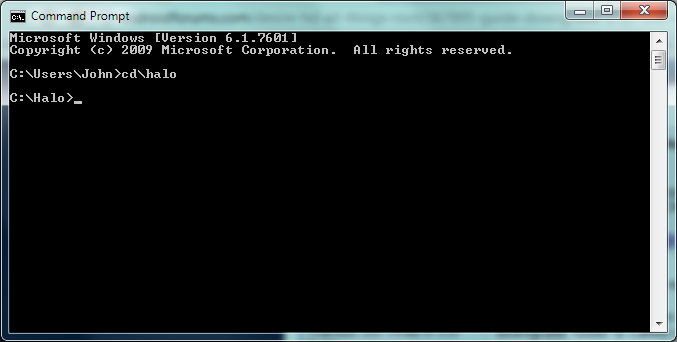
If your downgrade folder is c:\downgrade, you'll need to type "cd\downgrade" (minus the quotes). If your downgrade folder is called c:\desirehd\downgrade, you'll need to type "cd\desirehd\downgrade".
Make sense?
CuBz
Android Expert
help mee..
I am stuck in step 9..
how can I go to downgrade folder after I open up CMD??
there is no option in CMD to open downgrade folder..
I don't understand..
El Presidente is right, but made a slight mistake....
If your downgrade folder is c:\downgrade, you'll need to type "cd c:\downgrade" (minus the quotes). If your downgrade folder is called c:\desirehd\downgrade, you'll need to type "cd c:\desirehd\downgrade".
El Presidente is right, but made a slight mistake....
If your downgrade folder is c:\downgrade, you'll need to type "cd c:\downgrade" (minus the quotes). If your downgrade folder is called c:\desirehd\downgrade, you'll need to type "cd c:\desirehd\downgrade".
Either works