• After 15+ years, we've made a big change: Android Forums is now Early Bird Club. Learn more here.

Root ADB push help please

lennie paz

Member
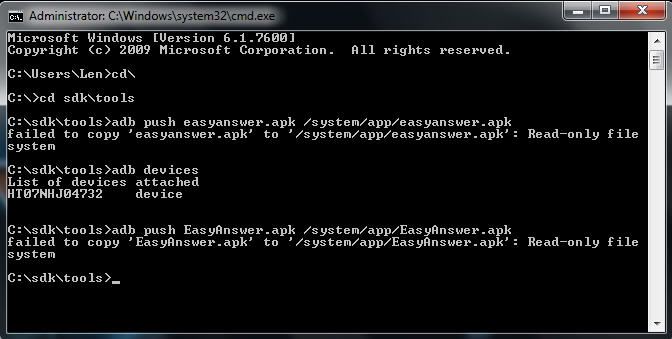
I am ready to blow a gasket trying to push an app to my phone. My phone is running in Debug mode and I open a cmd window and this is what I am doing:


Snap1-13.jpg


The apk doesn't get pushed and I do have the apk in the sdk/tools folder. As you can see, the phone is recognized when I type adb devices.

 
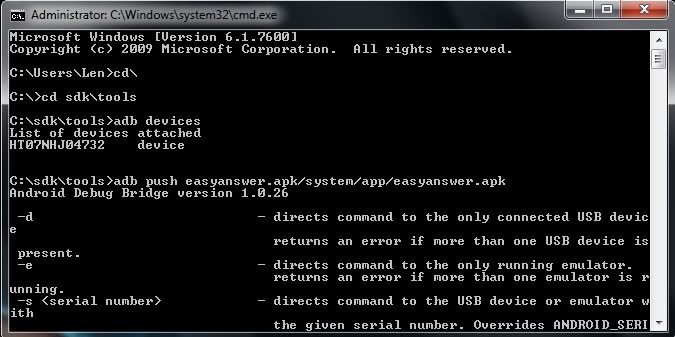
Try putting a space after the first easyanswer.apk in your command. Between it and the /

Not sure if that's enough to bork it but I've always put one there.
 
Did you adb shell first to verify root access? Sounds like it's not accepting your root status for write priviledge?

adb shell should yield #. If not...enter su.
 
Probably an easy answer here but I'm getting less and less affluent with adb as time goes on. I rely on Root Explorer for this work these days. Force write mode and copy and paste to source folder from SD. Sorry couldn't be more help man.
 
Are you pushing when the phone is on? ie at the home screen? Or are you in cwm? I've always had success by booting into recovery, mounts and storage>mount /system.

Then do your adb commands:

adb push EasyAnswer.apk /system/app/EasyAnswer.apk

adb reboot

This should work.

ps. I found this thread quite some time ago and it's been very helpful to me over the months. http://www.droidforums.net/forum/hacking-help/30464-how-adb-why-i-love-adb-commands-3-a.html
 
Are you pushing when the phone is on? ie at the home screen? Or are you in cwm? I've always had success by booting into recovery, mounts and storage>mount /system.

Then do your adb commands:

adb push EasyAnswer.apk /system/app/EasyAnswer.apk

adb reboot

This should work.

ps. I found this thread quite some time ago and it's been very helpful to me over the months. [ HOW TO ] ADB AND WHY I LOVE ADB commands <3 - Droid Forum - Verizon Droid & the Motorola Droid Forum

+1

Have to mount the /system people.
 
+1

Have to mount the /system people.
+2

I found this out last night while trying to install a custom boot animation. :) But I have yet to figure out why I wasn't able to use Terminal in OS X to do the adb push; I had to cmd in Windows 7 to push the zip file.
 
Are you pushing when the phone is on? ie at the home screen? Or are you in cwm? I've always had success by booting into recovery, mounts and storage>mount /system.

Then do your adb commands:

adb push EasyAnswer.apk /system/app/EasyAnswer.apk

adb reboot

This should work.

ps. I found this thread quite some time ago and it's been very helpful to me over the months. [ HOW TO ] ADB AND WHY I LOVE ADB commands <3 - Droid Forum - Verizon Droid & the Motorola Droid Forum

Bingo!, That worked.Thank you very much.
 
Back
Top Bottom