• After 15+ years, we've made a big change: Android Forums is now Early Bird Club. Learn more here.

All Things GPS

Just rebooted the phone and I was able to get a lock indoors in about a minute or so

snap20110118_135815.png


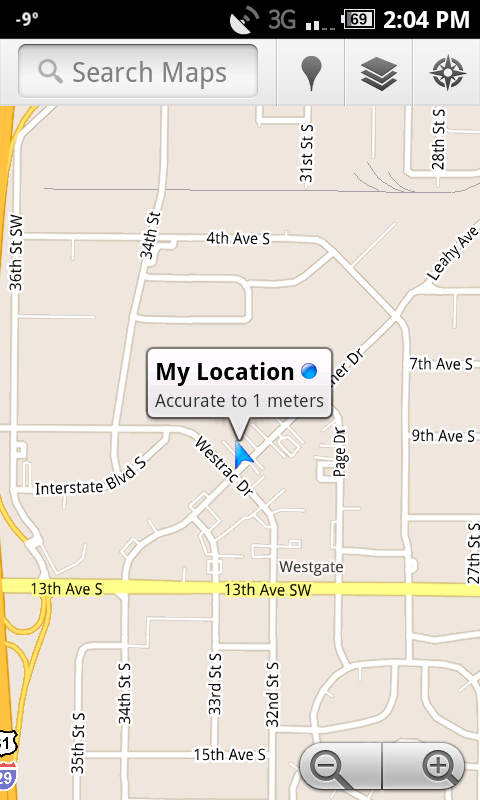
edit: Here is one in Maps

snap20110118_140414.png
 
I use the exact same app beenz and at times eithr maps or nav have difficulty locking. After I open this app, the map and Nav lock immediately. I wonder why this app is so much better than the bone stock nav/map.
 
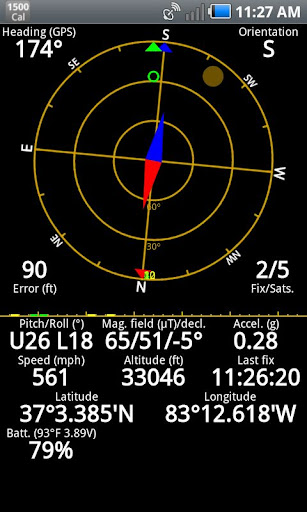
I love GPS Status and the new update... Check out the altitude and speed. Locked on in 15 seconds after startup was finished.

snap20110114_112720.jpg
 
After I got the update a few weeks ago, GPS was instantaneous. I loved this phone again. Now a few weeks later, my GPS is back to the same incosistent 10+ minute searching BS that it previously had. Am I the only one? I got yet another patch downloaded to my phone recently for that 911 fix, and it still doesn't work like it did right after the fix.
 
I just noticed my gps no longer knows where im at, it thinks im a couple of miles awayfrom my house, the only thing that is changed is the new update sent down. GPS worked fine out of box then even after the first update dl09, now with this one doesnt work anyway to fix this, as i need gps for road trip tomorrrow?

Any help, also can i back up to old update, dl09?
 
I just noticed my gps no longer knows where im at, it thinks im a couple of miles awayfrom my house, the only thing that is changed is the new update sent down. GPS worked fine out of box then even after the first update dl09, now with this one doesnt work anyway to fix this, as i need gps for road trip tomorrrow?

Any help, also can i back up to old update, dl09?


Have you turned on the Wi-Fi and BT to help the GPS try and find your location? I'm sure the GPS still works if you give it a clear line of site to the sky and just let it sit for a few mins (10+ mins sometimes).

Yes, you can go back to dl09 but you have to be rooted to do it.
 
Have you turned on the Wi-Fi and BT to help the GPS try and find your location? I'm sure the GPS still works if you give it a clear line of site to the sky and just let it sit for a few mins (10+ mins sometimes).

Yes, you can go back to dl09 but you have to be rooted to do it.

^^^
THIS.

The GPS on almost all Android devices (iPhone too) is A-GPS (Assisted GPS). It's meant to be used with network connections to speed lock on.

The GPS is NOT a stand-alone GPS device, although it can be used as such. However, initial lock will take quite a bit of time with no networks available.

Difference Between GPS and AGPS | Difference Between | GPS vs AGPS
 
I find this method to be a bit more effective then the manual setting switch. This method changes settings the in GPS itself.


I would like to begin by saying my phone is stock 2.1 and rooted.

Go into the Dialer and enter *#83786633 ~do not press send~
Press the Home key
Go back into the phone dialer and enter *#22745927
A box will come up asking for the SPC code.
Enter 000000 ~6 zeros~
Tap the Hidden menu Enable button.

Enter
*#1472365#
to enter GPS SETUP menu

Tap Setup
Tap Position Mode
Tap Operating Mode
Change value to Standalone

Press back

Tap Starting Mode
Change value to 'Cold Start'
Press the Back key until you are back to you Home Screen

Reboot


GPS Test app previously showed 1 satellites in use after a wait. After this change, I now get 10.
 
Hi All. I have 2 questions.
1. I use my SF in my car and use the GPS. However, I notice it sits there trying to acquire GPS for over 5 minutes before I switch over to GPS Status, it generally gets a fix within 20 seconds. Then I go back to NAV and it is fine. Has anyone else noticed this ? I have a stock EA28 SF. This is happening consistently. I do leave my GPS on all the time but am now thinking about turing it on & off on demand, but that also doesn't seem to solve the lack of GPS fix while in Google NAV.

2. My SF has been freezing lately. Today while I was using my GPS in the car I tanked up. Then started driving again and noticed it was completely frozen. Had to pull the battery. Is this a common thing ?

Thanks in advance for the feedback! Joe...
 
:confused:Hi there fellas, every one keeps saying turn "OFF GOOGLE GPS" and turn "ON STAND ALONE GPS". On my FASCINATE there is also a check box for" VERIZON LOCATION SERVICES". Does this have to be on or off or does it matter? My phone takes forever sometimes to find me and also it many times is right on and then tells me I'm like over a mile away from were I actually am standing. I GEO-CACHE a lot and I don't bother to even use my GPS on my phone any more.
Anyone else have the "Your here and now your a mile away thing to? :confused:

Thanks for any replies.
 
:confused:Hi there fellas, every one keeps saying turn "OFF GOOGLE GPS" and turn "ON STAND ALONE GPS". On my FASCINATE there is also a check box for" VERIZON LOCATION SERVICES". Does this have to be on or off or does it matter? My phone takes forever sometimes to find me and also it many times is right on and then tells me I'm like over a mile away from were I actually am standing. I GEO-CACHE a lot and I don't bother to even use my GPS on my phone any more.
Anyone else have the "Your here and now your a mile away thing to? :confused:

Thanks for any replies.

usually you just have them all checked. I just came across this app:
https://market.android.com/details?id=com.Double.FasterFix

maybe it will work for some people?
 
I've read through (most of) these replies and didn't see anyone with my specific problem, so I'm wondering if any of you guys can help.

I'm stock with the most recent OTA update (phone purchased in Sept. of 2010) and have been having GPS nightmares since day 1, but this issue has really sent me over the top:

I'll be using Google Maps Navigation to get somewhere and I'll receive a phone call or have to use mobile data in the browser or a similar application. When I return to Navigation, it'll say I'm hundreds and hundreds of miles from where I actually am, and will have a precise GPS lock. I'll exit Navigation and go into regular Maps to see my location marker speeding through cornfields and lakes in a neighboring state at the same speed I'm doing. I use GPS Test to double-check my connectivity and when this happens it'll always show that I'm connected to three of three available satellites instead of the regular 7 or 8 out of 10 available satellites. In addition, it'll show coordinates for said location hundreds and hundreds of miles from where I actually am---the phone is convinced I'm there, and the only remedy is to shut down the phone and boot it up again.

Has anyone experienced anything like this?

 
:confused:Hi there fellas, every one keeps saying turn "OFF GOOGLE GPS" and turn "ON STAND ALONE GPS". On my FASCINATE there is also a check box for" VERIZON LOCATION SERVICES". Does this have to be on or off or does it matter? My phone takes forever sometimes to find me and also it many times is right on and then tells me I'm like over a mile away from were I actually am standing. I GEO-CACHE a lot and I don't bother to even use my GPS on my phone any more.
Anyone else have the "Your here and now your a mile away thing to? :confused:

Thanks for any replies.

I use the other 2, i never use the verizon location services, works great for me.
 
I've read through (most of) these replies and didn't see anyone with my specific problem, so I'm wondering if any of you guys can help.

I'm stock with the most recent OTA update (phone purchased in Sept. of 2010) and have been having GPS nightmares since day 1, but this issue has really sent me over the top:

I'll be using Google Maps Navigation to get somewhere and I'll receive a phone call or have to use mobile data in the browser or a similar application. When I return to Navigation, it'll say I'm hundreds and hundreds of miles from where I actually am, and will have a precise GPS lock. I'll exit Navigation and go into regular Maps to see my location marker speeding through cornfields and lakes in a neighboring state at the same speed I'm doing. I use GPS Test to double-check my connectivity and when this happens it'll always show that I'm connected to three of three available satellites instead of the regular 7 or 8 out of 10 available satellites. In addition, it'll show coordinates for said location hundreds and hundreds of miles from where I actually am---the phone is convinced I'm there, and the only remedy is to shut down the phone and boot it up again.

Has anyone experienced anything like this?

Are you using VzW nav or Google nav?
 
Back
Top Bottom