
I didn't do any quadrant tests, but I noticed a couple hours after I rooted that my battery had been hammered. A little bit of inspection showed that the 'exploid' process was still running and pegging the cpu. I killed the process from adb shell and things seem like they might be better now.
Install the app
How to install the app on iOS
Follow along with the video below to see how to install our site as a web app on your home screen.
Note: This feature may not be available in some browsers.
-
After 15+ years, we've made a big change: Android Forums is now Early Bird Club. Learn more here.
You are using an out of date browser. It may not display this or other websites correctly.
You should upgrade or use an alternative browser.
You should upgrade or use an alternative browser.
Root Anyone noticing some slowness after root?
- Thread starter HalfFrozen
- Start date
-
- Tags
- motorola droid x
Not sure I am new to all this, sorry to hear . Try this thread as it seems someone else had their phone go dead on them & they were helping him out. I would ask someone there. Good luck.
http://androidforums.com/all-things-root-droid-x/130369-help-needed-asap.html
Birdman said you it would "near brick" your phone. Sounds like he may have done it and ,maybe, knows how to correct it. But I'm just guessing.

Airmaxx23
Android Expert
I didn't do any quadrant tests, but I noticed a couple hours after I rooted that my battery had been hammered. A little bit of inspection showed that the 'exploid' process was still running and pegging the cpu. I killed the process from adb shell and things seem like they might be better now.
Where can I see if it's running and what command do you use to kill it?

PerCompLLC
Android Enthusiast
I didn't do any quadrant tests, but I noticed a couple hours after I rooted that my battery had been hammered. A little bit of inspection showed that the 'exploid' process was still running and pegging the cpu. I killed the process from adb shell and things seem like they might be better now.
Good call! That is exactly why the reboot is so important after rooting...


irishpride
Android Enthusiast
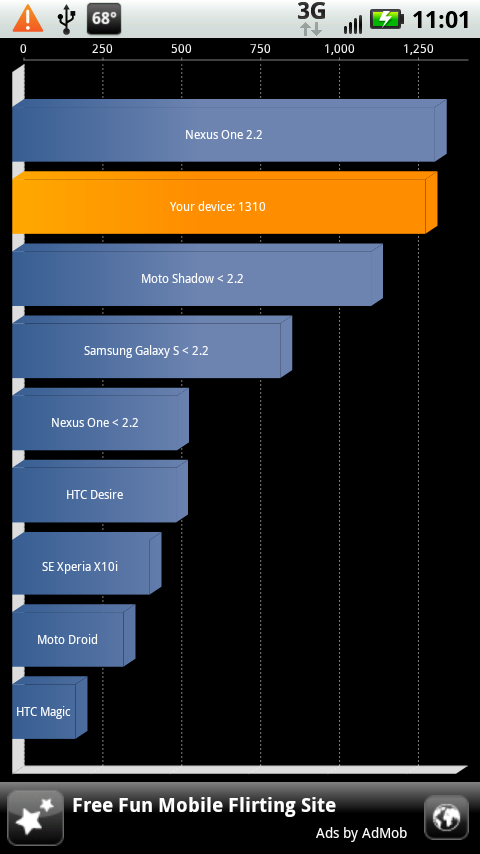
After root and removing quite a bit of the bloatware, I'm running much quicker than before. Got a 1297 on my last quadrant.
Airmaxx23
Android Expert
After root and removing quite a bit of the bloatware, I'm running much quicker than before. Got a 1297 on my last quadrant.
Would you mind listing what you've removed?
Here's what I've uninstalled so far:
Kindle
Amazon MP3
City ID
Blockbuster
Weather 2.1
Emergency Alert
Corporate Directory
3G Mobile Hotspot
Home Screen Tips
Skype Mobile
Swype
My Verizon


Where can I see if it's running and what command do you use to kill it?
Use ps to see your processes, or top. "kill <PID>" worked for me without passing any other arguments to it. PID being the process ID number.
Good call! That is exactly why the reboot is so important after rooting...
Yeah.. I almost said ' a reboot would do the same thing ' but then it was unclear to me if the root survived reboot since I took the lazy unrevoked route on my Evo. (And didn't reboot the X to find out for myself. Again: lazy)
But I guess it does!
Airmaxx23
Android Expert
Use ps to see your processes, or top. "kill <PID>" worked for me without passing any other arguments to it. PID being the process ID number.
This is all new to me so I need a little more information or instruction, please. I used the ps command and exploid is not there so I guess I'm all set.
irishpride
Android Enthusiast
Would you mind listing what you've removed?
Here's what I've uninstalled so far:
Kindle
Amazon MP3
City ID
Blockbuster
Weather 2.1
Emergency Alert
Corporate Directory
3G Mobile Hotspot
Home Screen Tips
Skype Mobile
Swype
My Verizon
I removed Amazon, Blockbuster, MyVerizon, Visual VM, Skype Mobile & NFS Shift. After running it for a full day, I'm steadily getting 1300
D
Deleted User
Guest
How did you all remove bloat ware? Its not in downloads (of course), not found in my uninstaller program.
Bench marks same before and after root, no issues on mine.
Bench marks same before and after root, no issues on mine.
I did notice that. I restarted my phone and it seems to be beving normally now.
Mine was the same way but once i restarted it it was back to normal

colchiro
Extreme Android User
Mine was the same way but once i restarted it it was back to normal
+1

I can't say it seems any slower, but my phone has had horrible battery life since I rooted two days ago. I had it die on my after 5 hours today and I didn't use it except to listen to music in the car... on a charger.
I guess since it died, it's like rebooting, but I'll do a battery pull anyway when it's done charging.
I guess since it died, it's like rebooting, but I'll do a battery pull anyway when it's done charging.
irishpride
Android Enthusiast
How did you all remove bloat ware? Its not in downloads (of course), not found in my uninstaller program.
Bench marks same before and after root, no issues on mine.
I removed the programs using the ADB method, it's fairly easy, just make sure that you don't remove anything with "blur" in the title or the Backup program.
http://androidforums.com/all-things-root-droid-x/129953-remove-bloatware.html

sethgoldstein
Well-Known Member
Hey all. My Droid X is getting very sluggish. Especially when coming out of Car Mode, going to SMS (like pulling teeth), and looking through my contacts. I did root the device with the one click root tool. What am I doing wrong? Any ideas? Please help.