• After 15+ years, we've made a big change: Android Forums is now Early Bird Club. Learn more here.

Root [Boost Mobile] [Dev] Working AOSP Mms app

USB tethering from stock without extra apps works! Check it out!

Saw your thread, very cool... it doesn't work with jet's modified settings menu, I don't know what he built that off of through...

Pattf, you are onto something great here, I have been looking into using aosp apks and wasn't sure what steps needed to be done to make them work... don't underestimate how incredible it is that you brought this over, keep up the great work!
 
ok, still seeing this issue, can you guys post a couple pictures to show me I am crazy:

I am attaching these to a message by going to attach then capture picture.

If I take the picture with the phone upright it looks like this:
ruyXOrXz
(192x320)

If I take it in landscape (phone on it's side) it looks like this:
v4rvgf4r
(640x384)

Landscape is pretty good but still pretty compressed and Portrait is only slightly better than stock. The sizes they get re sized to are next to the images.
 
Nice find. What xml are you talking about? The apns-config.xml is essential but if you hadn't I'd consider dropping the mms_config.xml into the /res/xml folder of the apk since it contains our device profile which lets the system know our specific capabilities as well as setting the email gateway number.

Speaking of profiles, I noticed setting "ro.build.display.id" in the build prop actually screws up the browsers UA Profile. For example, mine was "http://device.sprintpcs.com/ZTE/ZTEN860ABC-BST/SimpleROM 0.1.6.rdf" instead of the expected "http://device.sprintpcs.com/ZTE/ZTEN860ABC-BST/N860V1.0.0B08c.rdf".

The browser however still gets an android page served up so I don't think it matters all that much. Have you found the UA being used elsewhere where it might matter, it's almost universal that ROMs use that ID so the ROM names show up in the settings menu, not just for the warp but custom roms for almost every phone I have seen.
 
Figured it out, just open up the xml in the res/xml and change the max height and width to HD settings: 1920 for both h and w max.
 
An aosp settings menu would be cool with all options. I don't know if its possible but having tethering options visible would be neat. Its in there on our phones but you can't see it unless you access the activity with a launcher that supports shortcuts to activities. Check it out ;)

I have the menu added to my rom its actually quite simple i will post a tutorial for everyone if they would like to add it to their settings menu.
 
Okay I've flashed it now how do I set it as my mms I set permission do I need to extract or remove noobs ics keyboard omg I'm lost lol
 
Okay I've flashed it now how do I set it as my mms I set permission do I need to extract or remove noobs ics keyboard omg I'm lost lol

Wait what?
When you flash this you shouldn't need to set permissions, it should be the main messaging app on your phone unless you have another from the market.
And what are you talking about a keyboard? Im so confused what your after.
 
I'm running noob rom I just want my text to look like your keyboard when I flashed it didn't change anything
 
This isn't a keyboard, it's the messaging app. That would be why.
 
The keyboard I use is Swype. You can get it from their website for free.
 
It's the plain Mms straight from Google. Most carriers or phone companies tweak things and usually take out features or introduce bugs. This is just a solid "vanilla" base for us devs to play with. That's why the thread was marked as dev.
 
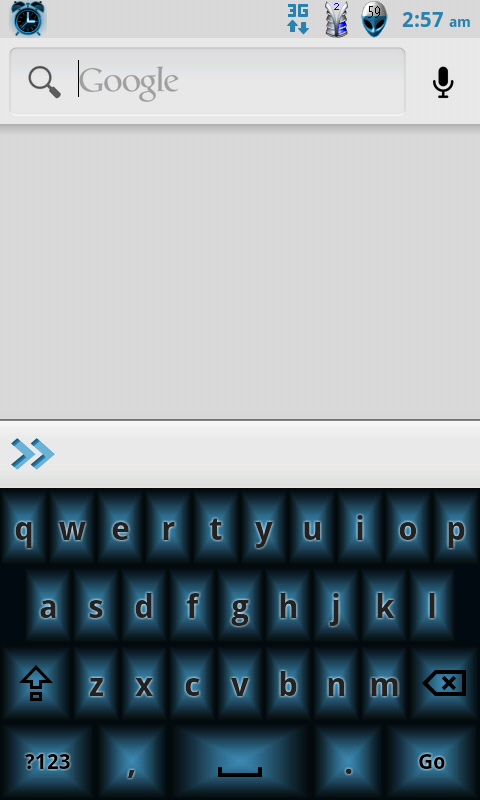
Yeah it was a misunderstanding I wanted my keyboard to look like this but instead of blue grey or white to match noob rom we all just got confused with aosp

ScreenShot-5.png
 
Yeah that's a bad a** keyboard its the best I've seen and I piad for the ics keyboard this one catches the eye tiger u out did your self
 
I use SwiftKey keyboard, it's got a bad ass white keyboard and is one of the best predictive keyboards out there
 
Back
Top Bottom