
Install the app
How to install the app on iOS
Follow along with the video below to see how to install our site as a web app on your home screen.
Note: This feature may not be available in some browsers.
-
After 15+ years, we've made a big change: Android Forums is now Early Bird Club. Learn more here.
You are using an out of date browser. It may not display this or other websites correctly.
You should upgrade or use an alternative browser.
You should upgrade or use an alternative browser.
Boost with no throttle?
- Thread starter Rarewolf
- Start date

Rarewolf
Android Expert
Not me. Mine is showing 0 usage with no throttle. I just re-Boosted so it'll be interesting to see if the data usage #'s actually start changing.
Mine shows up as zero as well.
Im just wondering if its a final preperation. Or if they are giving the older people/ people that have been paying on time for quite a while (like me?), some throttless service.

Kaiser17
Android Enthusiast
From what I understood, the throttle will only affect 4G users. It says that speeds will be cut back to 3g speeds after the limit has been reached.
Yes, that is what will happen. MetroPCS does the same when they throttle your 4G. 3G stays unlimited, thats just how it works.
Rarewolf
Android Expert
From what I understood, the throttle will only affect 4G users. It says that speeds will be cut back to 3g speeds after the limit has been reached.
WE WERE WRONG! ive already been throttled 2 months. because ive gone over two times. XP
good thing i got wifi now. xD
from the neighbours.. BOOYAH!
lolz

wetbiker7
Extreme Android User
WE WERE WRONG! ive already been throttled 2 months. because ive gone over two times. XP
good thing i got wifi now. xD
from the neighbours.. BOOYAH!
lolz
I've got wifi here at the house so it really doesn't affect me either but it REALLY sux for those people using it as a primary internet.
wetbiker7
Extreme Android User
Odd, I'm not seeing anything about being throttled...
You can see how much data you've used via your online Boost account.

You can see how much data you've used via your online Boost account.
That's just it: I don't see anything on there (even on mobile)
wetbiker7
Extreme Android User
That's just it: I don't see anything on there (even on mobile)
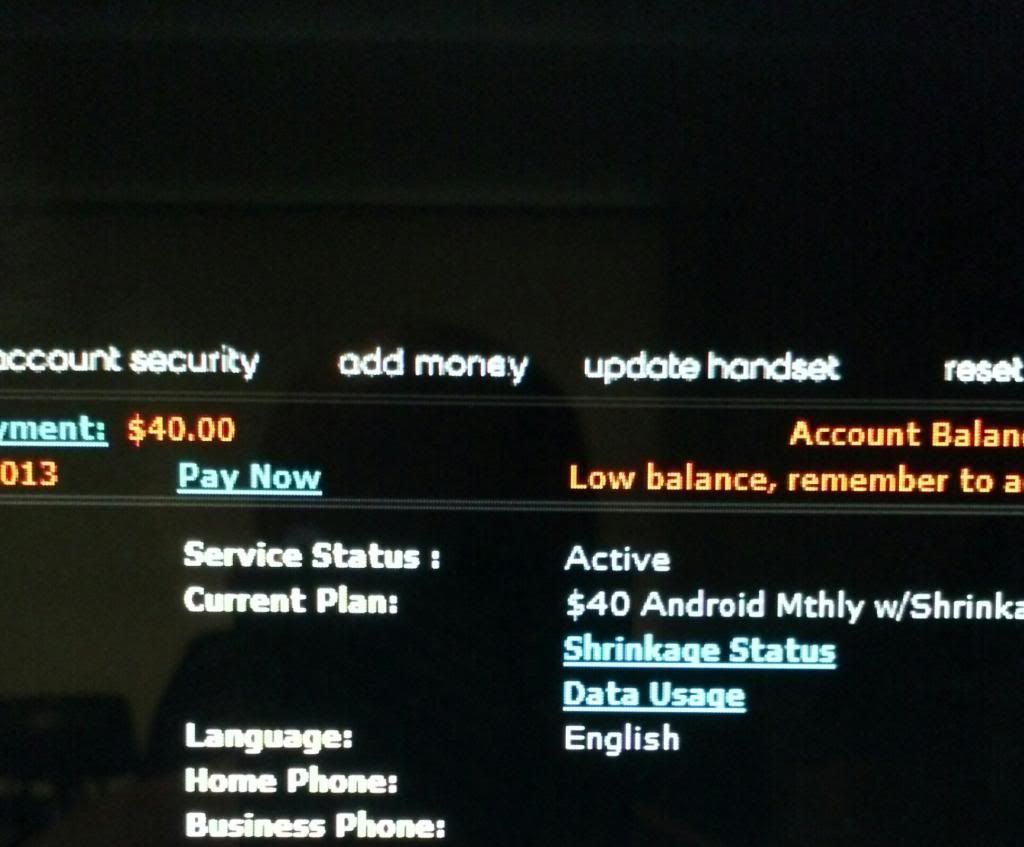
On a PC, when you sign in to your account you'll see two columns of info. The 1st will start with your name. The 2nd will start with service status. Below it will be current plan. Under it will be shrinkage status and data usage. Click on the data usage link and a little window will pop up with the info you're looking for.

On a PC, when you sign in to your account you'll see two columns of info. The 1st will start with your name. The 2nd will start with service status. Below it will be current plan. Under it will be shrinkage status and data usage. Click on the data usage link and a little window will pop up with the info you're looking for.
Interesting, I don't have that
I will say I'm not really complaining though
wetbiker7
Extreme Android User
Interesting, I don't have that
I will say I'm not really complaining though
Here's a shot of it.
wetbiker7
Extreme Android User
Yeah, I don't have that. Perhaps it's because I'm still on the $35 plan? Idk, I'm not really complaining
Lol, i don't blame you. I wouldn't complain about either.

DWILSON48625
Android Enthusiast
I use alot, I mean ALOT of data... No throttle yet... Perhaps one day....
I seen a story on a blog today, the guy claims straight talk closed his account because of pdanet... He claims he talked to them and promised "not to use it as much".. That was a red flag to me.. Their (and boost) policy is no tethering (without paying)... They wont just say "ok, as long as you dont use it as much...."
I have Boost, the GF has ST, both tether, Netflix, etc, both use 6+ a month, no issues in 3 years. NO 4G, just 3G on her precedent and my Evo3d (flashed).
Just chiming in......
I seen a story on a blog today, the guy claims straight talk closed his account because of pdanet... He claims he talked to them and promised "not to use it as much".. That was a red flag to me.. Their (and boost) policy is no tethering (without paying)... They wont just say "ok, as long as you dont use it as much...."
I have Boost, the GF has ST, both tether, Netflix, etc, both use 6+ a month, no issues in 3 years. NO 4G, just 3G on her precedent and my Evo3d (flashed).
Just chiming in......
DWILSON48625
Android Enthusiast
March of this year, they clamped me lol.
Miss usin 20 gig unclamped... oh well.
On $55/mo 10 gig plan now.
Miss usin 20 gig unclamped... oh well.
On $55/mo 10 gig plan now.