
Install the app
How to install the app on iOS
Follow along with the video below to see how to install our site as a web app on your home screen.
Note: This feature may not be available in some browsers.
-
After 15+ years, we've made a big change: Android Forums is now Early Bird Club. Learn more here.
You are using an out of date browser. It may not display this or other websites correctly.
You should upgrade or use an alternative browser.
You should upgrade or use an alternative browser.
Help Changing APN values
- Thread starter SupremePeter
- Start date
Might try this
xda-developers - View Single Post - Help...Deleted APN settings.
A factory reset might be the easiest way to resolve this. :dunno:
xda-developers - View Single Post - Help...Deleted APN settings.
A factory reset might be the easiest way to resolve this. :dunno:

Might try this
xda-developers - View Single Post - Help...Deleted APN settings.
A factory reset might be the easiest way to resolve this. :dunno:
I found referenced to this on the Internet for other devices that reported that a Factory Data Reset did not correct the problem. I could not find a reference for the Bionic.
... Thom
SupremePeter
Newbie
Might try this
xda-developers - View Single Post - Help...Deleted APN settings.
A factory reset might be the easiest way to resolve this. :dunno:
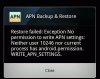
I tried it and I got this error:/
Attachments
First, have you tried pulling the SIM card, restarting the phone without the SIM, shutting down the phone, and then restarting with the SIM? I wonder if re-authenticating with the SIM will restore the default APNs? (I don't know...)
Second, you are not rooted; this is clearly an issue that should be available for a warranty replacement.
One more thing: it may be that the Data Switch widget may be able to toggle LTE back on. It's 99 cents. https://play.google.com/store/apps/details?id=com.tomatox.dataswitchpro
I'm not sure it will help, though.
I'd have to say that I would be furious with the Onavo app people if I were you. I know that I tried that app a while ago on my D3 but it didn't stay on my phone for long.
Second, you are not rooted; this is clearly an issue that should be available for a warranty replacement.
One more thing: it may be that the Data Switch widget may be able to toggle LTE back on. It's 99 cents. https://play.google.com/store/apps/details?id=com.tomatox.dataswitchpro
I'm not sure it will help, though.
I'd have to say that I would be furious with the Onavo app people if I were you. I know that I tried that app a while ago on my D3 but it didn't stay on my phone for long.
I'd have to say that I would be furious with the Onavo app people if I were you. I know that I tried that app a while ago on my D3 but it didn't stay on my phone for long.
I agree.
I would go back to them and say ... you claim the Bionic is a supported device ... no one I talked to can tell me how to reset the APN ... EXACTLY what do I have to do?
Here's a GUESS on my part ... they will come back with some specific instructions on how to enter information on the Hidden Menu. (No I have no idea what that information will be.)
... Thom
SupremePeter
Newbie
I agree.
I would go back to them and say ... you claim the Bionic is a supported device ... no one I talked to can tell me how to reset the APN ... EXACTLY what do I have to do?
Here's a GUESS on my part ... they will come back with some specific instructions on how to enter information on the Hidden Menu. (No I have no idea what that information will be.)
... Thom
Yeah I emailed them back a few says ago asking what I can do to change the APN settings back and they still haven't replied.
I'm angry. Because of their faulty app I might have to do a complete factory reset on my phone, the one thing I don't want to do.
And i've tried all that with the SIM card, the closest I got to getting it back was a white 4g indicator with both arrows lit up, but they weren't exchanging data and stayed like that for 7 minutes straight.

OutOfPhase
Premium Member
Yeah I emailed them back a few says ago asking what I can do to change the APN settings back and they still haven't replied.
I'm angry. Because of their faulty app I might have to do a complete factory reset on my phone, the one thing I don't want to do.
And i've tried all that with the SIM card, the closest I got to getting it back was a white 4g indicator with both arrows lit up, but they weren't exchanging data and stayed like that for 7 minutes straight.
I don't know if it will reset your apn's but you can flash a modified fxz file using rsdlite. It will kept your data but restore your system back to original state. You do not have t be rooted for this. Here is the thread how to flash 5.5.893 or 5.9.902 using rsdlite
That was what I guessed. Can you tell me what you entered in the hidden menu to restore them?
... Thom
... Thom

Lars
Android Expert
There are 8 different ones for various services and I think duplicated ones depending on the mcc mnc I'm guessing lte or ev net. I would look at these first:
Verizon Internet
Apn: VZWINTERNET
MMSC : http://mms.vtext.com/servlets/mms
type:default,mms,dun
What do your mnc mcc pairs read as, op?
Verizon Internet
Apn: VZWINTERNET
MMSC : http://mms.vtext.com/servlets/mms
type:default,mms,dun
What do your mnc mcc pairs read as, op?
There are 8 different ones for various services and I think duplicated ones depending on the mcc mnc I'm guessing lte or ev net. I would look at these first:
Verizon Internet
Apn: VZWINTERNET
MMSC : http://mms.vtext.com/servlets/mms
type:default,mms,dun
What do your mnc mcc pairs read as, op?
For what it's worth ... I have ...
Verizon Internet
Apn: VZWINTERNET
MMSC : http://mms.vtext.com/servlets/mms
APN type: default,mns,dun
My valuse are ...
MCC 311
MNC 480
... Thom
Lars
Android Expert
That's for the lte band. The cdma one has the same settings. You need both to get data in 3g.For what it's worth ... I have ...
Verizon Internet
Apn: VZWINTERNET
MMSC : http://mms.vtext.com/servlets/mms
APN type: default,mns,dun
My valuse are ...
MCC 311
MNC 480
... Thom
To reset APN on the Bionic for Verizon ...
Dial ##7764726
Password 000000
Select Verify
Select 13 APN Controls
Select APN Config Edit
Select First Verizon IMS
Apn: VZWIMS
Set MMSC: <Not set>
Set MCC: 310
Set MNC: 004
Set APN type: ims
Select First Verizon Internet
Apn: VZWINTERNET
Set MMSC :http://mms.vtext.com/servlets/mms
Set MCC: 310
Set MNC: 004
Set APN type: default,mms,dun
Select Second Verizon IMS
Apn: VZWIMS
Set MMSC: <Not set>
Set MCC: 311
Set MNC: 480
Set APN type: ims
Select Second Verizon Internet
Apn: VZWINTERNET
Set MMSC : http://mms.vtext.com/servlets/mms
Set MCC: 311
Set MNC: 480
Set APN type: default,mms,dun
Select Options
Select Save
Select Back button until back at home screen.
... Thom
Dial ##7764726
Password 000000
Select Verify
Select 13 APN Controls
Select APN Config Edit
Select First Verizon IMS
Apn: VZWIMS
Set MMSC: <Not set>
Set MCC: 310
Set MNC: 004
Set APN type: ims
Select First Verizon Internet
Apn: VZWINTERNET
Set MMSC :http://mms.vtext.com/servlets/mms
Set MCC: 310
Set MNC: 004
Set APN type: default,mms,dun
Select Second Verizon IMS
Apn: VZWIMS
Set MMSC: <Not set>
Set MCC: 311
Set MNC: 480
Set APN type: ims
Select Second Verizon Internet
Apn: VZWINTERNET
Set MMSC : http://mms.vtext.com/servlets/mms
Set MCC: 311
Set MNC: 480
Set APN type: default,mms,dun
Select Options
Select Save
Select Back button until back at home screen.
... Thom
Lars
Android Expert
Yes but instead of hitting "Back" choose "Menu" "Save". I believe you misspelled mms. If the APNs do not exist to edit, add them. Your guess is as good as mine on what the app screwed up in the first place.
It would be worth mentioning that the APNs for IP Multimedia Subsystem need to be functioning too. Without them 4G doesn't work either. It has been the cause of 4G outages on Verizon because of stuff on their end.
It would be worth mentioning that the APNs for IP Multimedia Subsystem need to be functioning too. Without them 4G doesn't work either. It has been the cause of 4G outages on Verizon because of stuff on their end.
I updated it with your revisions. Please take another look at it.
Thanks.
... Thom
Thanks.
... Thom
Thanks for the help. I added it as a Tip.
... Thom
... Thom