• After 15+ years, we've made a big change: Android Forums is now Early Bird Club. Learn more here.

Root CWM-based touch recovery

.....upload a stock recovery?

No promises but I'll take a whack. This phone is similar to mine so I'm curious.
Or an fstab or info from the init.rc.

This phone looks identical to our ZTE Avid 4G. I believe they could use your touch recovery successfully.

Our phone specs are 100% identical other than a slight demension difference in size regarding lenght.

ZTE Force 4G
http://www.phonescoop.com/phones/phone.php?p=3940

ZTE Avid 4G
http://www.phonescoop.com/phones/phone.php?p=3990
ZTE Avid processor is incorrectly added here, it's really 1.5ghz same exact processor as the ZTE Force

So I would suggest they just give your CWM a shot.
http://androidforums.com/avid-4g-all-things-root/702537-working-touch-recovery.html

If things are identical then there is no reason our root shouldn't work for them as well, huh?
 
EDIT:
For the Sake of *** When you install the Custom Recovery, Immediately create a Backup file(Nandroid) with the Custom Recovery! Please!! That is the purpose of a custom recovery.

Works :)
I did a nand and a restore and seems to work great. Lookin forward to more developement on this phone. Glad I could help
Thanks totlth
 
I guess I was spoiled with my old optimus and only 300mb Nandroids. My nans on my Force are well over a gig. Wont have to many of those lying around, now will we.


It seems that some ppl are having problems opening the readme file so here is a paste of it;
this is a modified recovery to work on your phone ZTE Force.
flash at your own risk.
Instructions

unzip and take recovery.img and put it on the root of your sdcard

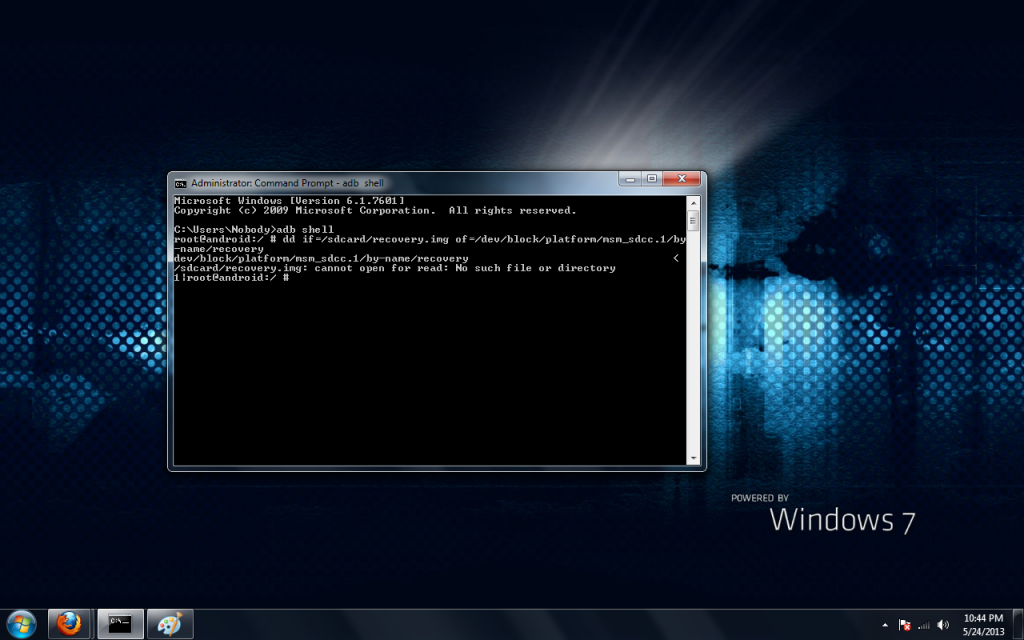
adb shell

open a terminal
type : adb shell
hit enter
type: dd if=/sdcard/recovery.img of=/dev/block/platform/msm_sdcc.1/by-name/recovery
hit enter
when prompt returns type: reboot recovery
hit enter

terminal emulator

open terminal
type: su
hit enter
allow root to terminal
type: dd if=/sdcard/recovery.img of=/dev/block/platform/msm_sdcc.1/by-name/recovery
hit enter
when prompt returns type: reboot recovery
hit enter
 
actually real easy way to do it get fastboot load the recovery into teh fastboot folder.load up a command prompt from that folder or just change directory if needed and from there just get into fastboot then type FASTBOOT FLASH RECOVERY RECOVERY.IMG
 
Hello everyone jsut wanted to share on how to load up a custom recovery such as cwm to your zte force phone.

Pretty straight forward load up your do a adb reboot bootloader .from there fastboot flash recovery recovery.img

then reboot .and your all set .
 
You didnt post a link to it.?.

on another note I stress how important a custom recovery is. I soft bricked my phone today using an app from the market. Needless to say that my Nandroid saved the day.
 
I should state some warning to newbs that Never Do a Factory Reset from with in the phone after a Custom Recovery has been installed only wipe your data from within the recovery.
 
Confirmed,Works for me.
I know the value of having a recovery mode on my phone.Old phones custom rom freaked out after resetting it,Glad I had a recovery mode on it.
Thanks guys.
 
firststep_zps1b3772e0.png


this is error i get when i try to install cwm recovery image
 
Just copy the recovery file to your sd card and install it from terminal on your android. It's easier and for sure to work. I think I couldn't get abd to work either so I think it's why I just used the terminal emulator.
 
I recently installed the recovery, but whenever I boot into recovery mode the screen is black and is unresponsive. If I remove the battery and do a regular boot, it boots into android perfectly fine. Any suggestions on getting this to work?

EDIT: Nevermind I got it working. My SD has a bad sector and needed to be installed from the internal nand.
 
oh that sucks because my phone wont boot up lol oh well i guess its dead now i will be sending back to zte for replacement.

You can push recovery from adb
First go in ftm mode then in windows type cmd from start run then in cmd find were you have adb folder in there put recovery ones you there a have recovery.IMG in the folder in cmd type adb push recovery.img sdcard/recovery.img then you can use dd command to flash from sdcard


this is to put recovery in your sdcard
Then you can flash with dd command if you have any questions let me know
 
You can push recovery from adb
First go in ftm mode then in windows type cmd from start run then in cmd find were you have adb folder in there put recovery ones you there a have recovery.IMG in the folder in cmd type adb push recovery.img sdcard/recovery.img then you can use dd command to flash from sdcard


this is to put recovery in your sdcard
Then you can flash with dd command if you have any questions let me know

i wish this was available before i sent it back to zte for replacement :( my phone is my work line so i have to be available and it can take 10 days to receive my phone back :(..so i bought a galaxy nexus with Verizon with extended battery for $100 from guy that just upgraded to galaxy 4.and good lord they have a lot of people working on it. they have a toolkit that does everything automated ...root,recovery,unlock/lock boot loader,anything you can imagine. i wish we had that type support on boost devices.
 
If the phone is/was already dead or wont boot, then this should have been mentioned in the beginning maybe.[/QUOTE


what exactly are you talking about?? it was mentioned in another post including this one that phone wouldn't reboot :confused: anyways i am done with boost phones (for the time being) i thought this phone was promising and had a chance since it was dual core but it will never get the development it needs.
 
If the phone is/was already dead or wont boot, then this should have been mentioned in the beginning maybe.[/QUOTE


what exactly are you talking about?? it was mentioned in another post including this one that phone wouldn't reboot :confused: anyways i am done with boost phones (for the time being) i thought this phone was promising and had a chance since it was dual core but it will never get the development it needs.
What exactly are you talking about. This phone is new.......it takes a while for enough people to get the phone before people will start developing for it......and since there is already root access and CWM, I think the process is already rolling. Please someone correct me if I'm wrong.........
 
What exactly are you talking about. This phone is new.......it takes a while for enough people to get the phone before people will start developing for it......and since there is already root access and CWM, I think the process is already rolling. Please someone correct me if I'm wrong.........

Panic mode is the sense I felt in early posts which makes sense when your not that familiar with something. We can only help if all information is givin.
I wouldn't install much on it until I had a Custom Recovery. Since then I softbricked once with Font changer. :p
 
Back
Top Bottom