• After 15+ years, we've made a big change: Android Forums is now Early Bird Club. Learn more here.

Help Droid X Not Recognizing the Upgrade

nengard

Newbie
I just got a used Droid X. It's activated on the Verizon network and I'm using it just fine, but it doesn't seem to know that there is an upgrade (gingerbread) out there. I have gone to settings and about this phone and had it check for system updates, but it keeps saying there aren't any.

Is there a way to force the issue?
 
Does it already have GB? Go to Settings / About Phone and look at the Android version. If it's 2.3.3 you have GB!

If not, sounds like your used phone is rooted or running a custom ROM. Either of those issues will keep GB from being pushed to the phone.

Is it rooted? Look in your app drawer and see if you have an app called Superuser. If you do, you are rooted. Superuser is a root app that remembers the permissions for any root apps you may use.

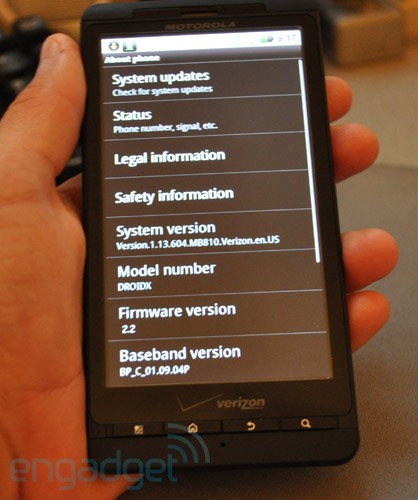
Do I have a custom ROM? Go to Settings / About Phone. What is your Model number, Android version, and Build number? Is there a Mod version listed? Sometimes these will indicate which custom ROM the phone is running.

You can always unroot the phone and the quickest way to remove a custom ROM and get back to Froyo is SBF. Both of which are explained in the root section of our Droid X forum.

Example
droid-x-froyo-phone.jpg
 
As the previous response says first thing to do is go to Settings>>>About Phone and tell us what version of Android it says you're running...if you could tell me what the "System Version" is it would be a great help

If not, sounds like your used phone is rooted or running a custom ROM. Either of those issues will keep GB from being pushed to the phone.
For the record, just being rooted will have no effect on the ability of the phone to not only see...but also install the update...
 
As the previous response says first thing to do is go to Settings>>>About Phone and tell us what version of Android it says you're running...the "system version" would be most helpful

If not, sounds like your used phone is rooted or running a custom ROM. Either of those issues will keep GB from being pushed to the phone.
For the record, just being rooted will have no effect on the ability of the phone to not only see...but also install the update...
 
Thanks for the responses, all. I don't have the SuperUser app, so I don't think I'm rooted. As far as the other information goes, here it is:

Model: DROIDX
Android: 2.2.1
Build: VZW

So I definitely don't already have Gingerbread, and it looks (to me, at least) like I have a stock Verizon Wireless Droid X. Any ideas?
 
Yea, looks like you are stock.

When you go to Settings / About phone / System updates, do you get the message:
"Your device is up to date! No update is necessary at this time".
If so I'm stumped as to why you aren't getting the update. Sorry.

If you get the message:
"Check for update was not available at this time. Try again later."
Go to Settings / Data Delivery / Social Applications / Sync over WiFi only and make sure it is UNCHECKED.
Try again, and you should be good.
 
I get the first error, not the second; it tells me that I'm up to date (even though I'm not). I checked Wifi sync just to be sure, and it's unchecked.
 
Do you want root? If so, I'd say root your phone and then flash the pre-rooted Gingerbread OTA. It's the same update you would get through Verizon but with the added bonus of root access.
 
I get the first error, not the second; it tells me that I'm up to date (even though I'm not). I checked Wifi sync just to be sure, and it's unchecked.

There's always the chance the previous owner had the phone rooted and either removed a bloatware blur app they didn't want, or froze or renamed the updater app so they wouldn't get any OTA updates, then removed root to sell the phone.

If that's the case, doing a SBF back to stock FroYo would put you phone in the condition of "all stock". You would be able to receive the GB update and any stock OTA updates in the future.

The way I did mine:
SBF
 
Back
Top Bottom