• After 15+ years, we've made a big change: Android Forums is now Early Bird Club. Learn more here.

Root Elelinux problems

As said. I never used that app. And the free version is somewhere on XDA if I remmember correctly. Free on XDA and he sells it on the market :)

I do it manually always. Its easy.

And yes it changes the resolution. And still looks awesome :P . I wouldnt go back to the laem 4x4 after being like this :D
 
can you pm me, how you do this manually. I am interested in give it a try, but to use that app that doesn't "remembers" the density value on boot (the lite version) it's a no go for me:)
 
no :) use my nick and write me on yahoo/gtalk if you want. (I dont like the PM its slow and I never got the hang of it.

But the process is easy.
You will need a root file manager thats all :)

1. to this folder system
2. locate file build.prop
3. if you are using root explorer mount r/w
4. edit a line that says line ro.sf.lcd.density=140 (now it says 160)

and reboot. Thats all :)

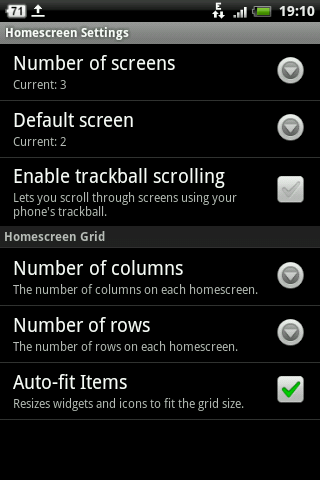
And the grid its in launcher pro :) in preferences you can choose columns and rows
 
thanks man, ill give it a try asap and i'll let you know how it goes

i cannot save the build.props file. Used es file explorer because i can't find root explorer. maybe this is the cause?

aH, nvm. i made it. i needed to make some changes in how es file explorer works. :). i had Cyanogen mod and hiAPK to choose from and i choosed cyanogen mod.

sorry for caps, but the density set at 140 is so cooooool...it's like runing a monitor at 1280x1024 after you used 640x480 whole life. :D Thank you so much nedamdam!


at density 140, the dropdown notifications on the theme BlackMod, the droid is set at the middle of the screen, do you have an workaround on this "issue"?
 
Hehe, yeah the droid is actually smaller :D and no idea about some workaround :( .(not sure its possible)

Okay now that you ate the honey :P . The dark side of the changed DPI :P (evil laugh)

1. some apps dont support it and will display around themselves a black space.
2. some might even lag
3. thats about it the two points up there :P


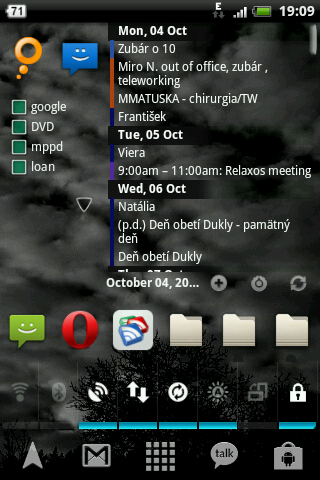
EDIT : PS now I am on a 6x6 grid but psst :P (with the same old 140 DPI, tried till 120 my eyes aren't the best and the font starts to degenerate on the 120 , but the 140 with no titles under the icons runs 6x6 just fine :P)
 
Hehe, yeah the droid is actually smaller :D and no idea about some workaround :( .(not sure its possible)

1. some apps dont support it and will display around themselves a black space.

It's probably not possible to fix, short of changing the theme your self. The theme will specify 'fill X amount of pixels' rather than 'fill X % of the screen', so it won't scale up to the new screen.

That'll be why the apps don't like it either.
 
huh, LP > LauncherPro. I tried ADW few times. Was lagging for me and I was lazy to set it up properly, so I sticked with the LPP :)
 
So what's with that grid, 6x6?

Dont understand your question now kinda :) . 6x6 looks like this


you get there via launcherpro preferences
soo , menu>>>preferences>>>home screen settings and then


Number of columns 6 number of rows 6
 
Ha, i didn't saw these :D.... so if you put density 140 and 6x6 the widgets and shortcuts will be aligned...i guess.


thanks for all explanation man
 
Oh and one thing on 140 the icon names will overlap so somewhere in the appearance preferences untick them :D or tick them depending what there is :P .(or if good eyesight go 128DPI I think :P)
 
Back
Top Bottom