
Install the app
How to install the app on iOS
Follow along with the video below to see how to install our site as a web app on your home screen.
Note: This feature may not be available in some browsers.
-
After 15+ years, we've made a big change: Android Forums is now Early Bird Club. Learn more here.
You are using an out of date browser. It may not display this or other websites correctly.
You should upgrade or use an alternative browser.
You should upgrade or use an alternative browser.
Root Elelinux problems
- Thread starter Deleted User
- Start date
-
- Tags
- htc hero

nedamdam
Android Enthusiast
There's one thing I don't like about Elelinux. I got used to Froyd's interactive kernel that seemed to jump back to speed straight away. Now I always seem to be waiting for SetCPU to speed up the processor again.
Hmm which governor? Cuz I think setcpu+minmax is faster as interactive + cpu speed. Since I had more times situations like the CPU froze on the min speed. Had to off/on button 2x to get it running.
You are still on the BFS?


Now I always seem to be waiting for SetCPU to speed up the processor again.
Have you set it to use the "minmax" governor? FlyKernel-10 is compiled to take advantage of this, so setting constant max/min ranges as you've done is probably counterproductive.

I did use that, although obviously it wouldn't make a difference which I'd picked with the same values for both. Is Min Max supposed to be able to react instantaneously like froyd's interactive? So I'd be able to set it to 350-710 without noticing it jumping around?
Is Min Max supposed to be able to react instantaneously like froyd's interactive?
It only uses the two settings so yes, it should react almost instantaneously.
nedamdam
Android Enthusiast
there is a camera fix in the thread for those who dont know.
And Slug whats your max freq?
Btw every new rom the first comments are: "Its soo fast...." "Faster as the previous one....." "No lag...."
one would wonder if it wouldnt be enough to clock it now on 176 as max being soo incredibly fast
And Slug whats your max freq?
Btw every new rom the first comments are: "Its soo fast...." "Faster as the previous one....." "No lag...."
one would wonder if it wouldnt be enough to clock it now on 176 as max
being soo incredibly fast
whats your max freq?
I run at 691/176. The handset will run at 729MHz but some apps don't seem to like it. 748MHz is battery pull time.

nedamdam
Android Enthusiast
damn, the version 2.0 seems something wrong with it ... or my phone... battery down in sleep 20 percent 1 hour . Will test more.
Btw somehow I think its not the ROM, rather then some google service, like gmail.. Had to clean cache the past few days few times. I think that google is messing up ...
. Will test more. Btw somehow I think its not the ROM, rather then some google service, like gmail.. Had to clean cache the past few days few times. I think that google is messing up ...

smakme7757
Member
I'm so happy with his special edition i don't think i will upgrade to 2.0. The special edition works absolutely fantastic for me except the camera will force close if i press the button that looks like an equalizer.
I'll do a quick hijack here: Does it matter if i charge my phone from 3% to full while it's on or is it better to do that when it's off. or doesn't it make a difference.
/end hijack
I'll do a quick hijack here: Does it matter if i charge my phone from 3% to full while it's on or is it better to do that when it's off. or doesn't it make a difference.
/end hijack
It doesn't matter, Li Ion batteries are meant to be charged in bits, rather than all at once.
You might want to drain the battery every now and then to recalibrate it (letting the phone realise how much 100% is again), but in general the battery doesn't require a full charge/discharge cycle.
You might want to drain the battery every now and then to recalibrate it (letting the phone realise how much 100% is again), but in general the battery doesn't require a full charge/discharge cycle.
nedamdam
Android Enthusiast
I'll do a quick hijack here: Does it matter if i charge my phone from 3% to full while it's on or is it better to do that when it's off. or doesn't it make a difference.
/end hijack
Ofc it does!
Well in theory it shouldnt and I guess for the majority it doesnt.
The LiIon batteries have no memory effect so you can charge them whenever you like. Doesnt matter if 80 percent charged or 1 percent. It even doesnt matter if it off or on.
thats the theory and should work.
however there are dark guides and threads about . discharging it till 0 and charging for many hours while off. making the phone hold one for weeks without charge

If I were you I wouldn't care about that . just charge whenever
EDIT: Like Xyro said
(I was writing too much)
the camera will force close if i press the button that looks like an equalizer.
Have you installed the Camera_Fix update (available under Options on pg1 of the XDA thread)?
smakme7757
Member
Have you installed the Camera_Fix update (available under Options on pg1 of the XDA thread)?
No i have not, i'll do it right away thank you ! **It fixed the problem
**And thank you all for the replies about the battery
(And got to the nonBFS , the BFS eats too much battery)
How does the performance differ?

 )
)
1ceb0x
Member
I didnt see any difference. Games run smooth. Everything is smooth
What's this DPI all about? 6*5 grid screen? where can you change this values? thanks.
nedamdam
Android Enthusiast
Finally someone asks me . Was spamming this everywhere . IRC some forums and no one there for my bragging
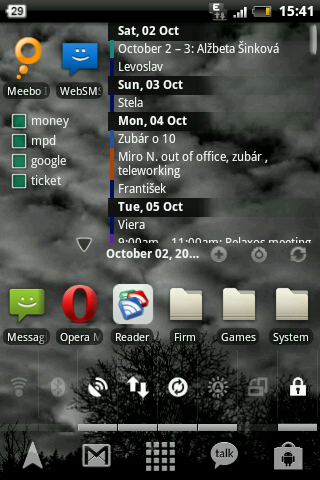
the DPI with something like this LCD Density Changer - Android app on AppBrain I guess?
never used it. I always edited with root explorer /system/build.prop and there the line ro.sf.lcd.density=140
And the grid change is with LauncherPro functions in the preferences.
. Was spamming this everywhere . IRC some forums and no one there for my bragging the DPI with something like this LCD Density Changer - Android app on AppBrain I guess?
never used it. I always edited with root explorer /system/build.prop and there the line ro.sf.lcd.density=140
And the grid change is with LauncherPro functions in the preferences.
1ceb0x
Member
Finally someone asks me
the DPI with something like this LCD Density Changer - Android app on AppBrain I guess?
never used it. I always edited with root explorer /system/build.prop and there the line ro.sf.lcd.density=140
And the grid change is with LauncherPro functions in the preferences.
Hmm, so this app is like chaging your resolution of your phone's screen? If i understand it correctly.
Althought i don't know how this works, i maybe give it a try if i found some "demo" version
.