• After 15+ years, we've made a big change: Android Forums is now Early Bird Club. Learn more here.

Epic 4G Battery Life extension (another thread...)

This is in regards to Samsung Epic 4G running Android 2.1 (Eclair).

Battery life can vary from 3 hours to 12 in stock configuration. Poor. 24 hours is easy and 30+ is attainable. Read on:

{Everything here I learned from other posts and experimenting. Not claiming any credit. Read ALL OF THIS POST. I read dozens of posts and condensed it to this one for YOU!}

A note regarding 3G, 4G and cdma: 3G and 4G are DATA SERVICES ONLY! These are NOT your phone and text services (cdma). They ARE your email and voice mail notification services (as well as web data, obviously). Turning all of these services off makes your smart phone a dumb phone. This is VERY appropriate during a movie at the theater, during work hours, while commuting, etc. However, I like my phone being a smart phone. So keep in mind that the WiFi uses LESS battery than the 3G, which uses less than the 4G. Use WiFi ALL THE TIME when in range INSTEAD of 3G or 4G (which are MOBILE data services---like when you are MOBILE). I use WiFi only, turning it off (if I remember) when commuting. Really--3G and 4G are services that most users will rarely use! These are only useful for when you are outside, travelling, in the mall, etc. Again--MOBILE data services. WiFi is in most of our homes, schools, and workplaces.

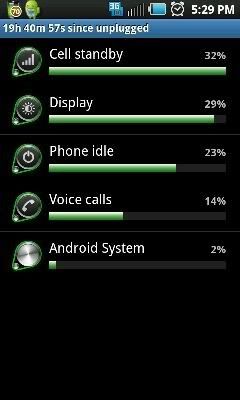
**A note regarding the radio/battery "Airplane Mode BUG" in the Samsung phone. The Epic 4G needs a radio reset ONCE upon reboot to reset the radios. This is a known bug and if not reset the cdma will constantly hunt for service, draining your battery. This can account for HALF of your battery drain!!!!! To verify this--go to settings->about phone->battery use--and look at battery uses. Number one on the list is the Display at upwards of 50%. (should be). Number two is probably cell standby. This number should be UNDER 45% (assuming you have had near-constant signal). Mine is currently at 16%, but runs at almost exactly 50% if I don't address the bug.
---> To reset the radios: With phone running, hold the power switch on the side of the phone for a couple of seconds until you feel a slight vibration. A menu will pop up. Click on Airplane Mode. This turns ALL radios off. Repeat. Click on Airplane Mode to turn radios back on. This must be done right after restart, once. Extra times wont help or hurt.

Now that we have the preliminary steps and info covered, follow these steps to further extend your battery life:

*Kill DRM services (this is the media hub stuff that no one has ever used but it eats a lot of battery). Go to settings->Applications->running services and look for DRM Services and DRM protected services. Disable both of them. You will get a warning about making media hub not work. That should be fine. Kill it. This is a BIG DEAL! Don't skip this one!

*Download, Install and run, in the default configuration, JuiceDefender (free, not beta (beta crashes)) from the Market. Just install and run. Nothing to really set up in the free version.

*Press and hold the home screen until the menu pops up and click on "widget" and install the "Toggle mobile data" widget. This widget installs when you install juice defender. This widget puts a toggle on your home screen allowing you to turn off the 3G radio. Click the toggle until it turns red and your 3G turns off. (Turning WiFi ON turns 3G off. Setting WiFi to "sleep never" will keep it on while keeping 3G off. I prefer toggles on my home screen that change colors. Simple and I am in control.

*Download and install "WiFi Toggle" from the Market Place. Install this widget on the home screen near the Mobile Data widget. It toggles WiFi on and off and turns colors when off and on. (Yeah-the phone has a built-in switch. But this widget is simple and installed right next to the 3G widget it gives you simple, verifiable control over your radios).

*Background Data and automatic sync: This option (found in settings) uses battery when the phone routinely syncs with servers seeking updates on new messages, emails, etc. I prefer to leave mine on and keep my phone smart. It will drain a bit more power. If you want to micro-manage, keep this off at all times and manually check your email, etc. (If WiFi and 3/4G are toggled off, background sync can't do anything anyway...)

*Keep your Display set to auto time-out in a short time. Keep brightness to auto or low. Display is your NUMBER ONE battery killer. Oh well. You gotta use your phone, right?

*Task Killers: a controversial subject. An important consideration: Most services, applications, etc running will show up in Battery Usage monitor as "Android System." My Android System is currently using 12% of my battery. I DO NOT run an automated task killer. Yeah--Android keeps a bunch of crap running in the background. And if you kill it all the time you can reduce your Android System battery use from 12% to 10% gaining a whopping 2%. If you manage 30 hours out of your battery this could get you an extra 40 minutes of battery time....
Consider that automated task killers ALSO use resources and wake the phone up to kill processes.
However, it is nice to be able to shut down all non-essential processes when necessary (during a near-lock up, etc). I use System Panel Lite for a system monitor and task killer when necessary. You have to set up exclusions for this program. Use your common sense and exclude everything that says Android, and Swype, etc. Don't exclude Media Hub, Amazon MP3, etc. When you want to, you can select "end all" from System Panel and end everything BELOW the level you select (should be below Excluded Apps generally).

That's really it. Reset the Airplane Mode. Keep 3G and 4G off unless actually using them. Use WiFi. Kill DRM services. Keep the screen off when you can. Use JuiceDefender. Don't worry about automated task killers.

I doubled battery life in my phone immediately. The biggies were the Airplane mode bug (dropped cell standby use on my phone from 50% to 16%!) and turning off 3G. JuiceDefender got me a bit more. These simple things will get you a lot of gains.

Worry yourself to death with app killers and auto sync settings and micro-manage your phone and you can get life upwards of 35 hours...but I fail to see the point. This is a "charge every day" phone. As long as it works for 24 hours, everything is good. These tips should get that for you.

However--keep in mind: if you sit there and obsess on your phone (you are a teenager) you are gonna need extra or extended batteries. I am referring to NORMAL USE in this thread. A few texts in a day, checking the web here and there, playing Pandora on the way to work, a few phone calls, a few emails. Basic use. Executives attached to their phones and teens probably can't get desired usage time out of the stock battery.

Good luck.
 
Thanks for the info. I hadn't heard about the airplane mode trick before, and was wondering why my Epic always had awful battery life compared to my Evo. We'll see if the airplane mode trick works or not.

Here it is confirmed by Engaget: Epic 4G: problems so far -- and a few solutions -- Engadget#

Problem: Battery drain
Description: One particular source of battery drain on the Epic appears to be the cell modem on standby. After a fresh boot, when it's on battery it consistently draws power and reports up to 50% of time spent off network, even in areas with good signal coverage. It appears to be searching for signal unnecessarily and drianing the battery while left on standby.

Workaround: Flipping the phone into airplane mode and then back to normal at any point after turning it on clears up the reported time off of network and appears to lower the drain on the battery enabling it ot last longer on standby, but this has to be done every time the phone is turned on.
 
This is in regards to Samsung Epic 4G running Android 2.1 (Eclair).

Battery life can vary from 3 hours to 12 in stock configuration. Poor. 24 hours is easy and 30+ is attainable. Read on:

{Everything here I learned from other posts and experimenting. Not claiming any credit. Read ALL OF THIS POST. I read dozens of posts and condensed it to this one for YOU!}

A note regarding 3G, 4G and cdma: 3G and 4G are DATA SERVICES ONLY! These are NOT your phone and text services (cdma). They ARE your email and voice mail notification services (as well as web data, obviously). Turning all of these services off makes your smart phone a dumb phone. This is VERY appropriate during a movie at the theater, during work hours, while commuting, etc. However, I like my phone being a smart phone. So keep in mind that the WiFi uses LESS battery than the 3G, which uses less than the 4G. Use WiFi ALL THE TIME when in range INSTEAD of 3G or 4G (which are MOBILE data services---like when you are MOBILE). I use WiFi only, turning it off (if I remember) when commuting. Really--3G and 4G are services that most users will rarely use! These are only useful for when you are outside, travelling, in the mall, etc. Again--MOBILE data services. WiFi is in most of our homes, schools, and workplaces.

**A note regarding the radio/battery "Airplane Mode BUG" in the Samsung phone. The Epic 4G needs a radio reset ONCE upon reboot to reset the radios. This is a known bug and if not reset the cdma will constantly hunt for service, draining your battery. This can account for HALF of your battery drain!!!!! To verify this--go to settings->about phone->battery use--and look at battery uses. Number one on the list is the Display at upwards of 50%. (should be). Number two is probably cell standby. This number should be UNDER 45% (assuming you have had near-constant signal). Mine is currently at 16%, but runs at almost exactly 50% if I don't address the bug.
---> To reset the radios: With phone running, hold the power switch on the side of the phone for a couple of seconds until you feel a slight vibration. A menu will pop up. Click on Airplane Mode. This turns ALL radios off. Repeat. Click on Airplane Mode to turn radios back on. This must be done right after restart, once. Extra times wont help or hurt.

Now that we have the preliminary steps and info covered, follow these steps to further extend your battery life:

*Kill DRM services (this is the media hub stuff that no one has ever used but it eats a lot of battery). Go to settings->Applications->running services and look for DRM Services and DRM protected services. Disable both of them. You will get a warning about making media hub not work. That should be fine. Kill it. This is a BIG DEAL! Don't skip this one!

*Download, Install and run, in the default configuration, JuiceDefender (free, not beta (beta crashes)) from the Market. Just install and run. Nothing to really set up in the free version.

*Press and hold the home screen until the menu pops up and click on "widget" and install the "Toggle mobile data" widget. This widget installs when you install juice defender. This widget puts a toggle on your home screen allowing you to turn off the 3G radio. Click the toggle until it turns red and your 3G turns off. (Turning WiFi ON turns 3G off. Setting WiFi to "sleep never" will keep it on while keeping 3G off. I prefer toggles on my home screen that change colors. Simple and I am in control.

*Download and install "WiFi Toggle" from the Market Place. Install this widget on the home screen near the Mobile Data widget. It toggles WiFi on and off and turns colors when off and on. (Yeah-the phone has a built-in switch. But this widget is simple and installed right next to the 3G widget it gives you simple, verifiable control over your radios).

*Background Data and automatic sync: This option (found in settings) uses battery when the phone routinely syncs with servers seeking updates on new messages, emails, etc. I prefer to leave mine on and keep my phone smart. It will drain a bit more power. If you want to micro-manage, keep this off at all times and manually check your email, etc. (If WiFi and 3/4G are toggled off, background sync can't do anything anyway...)

*Keep your Display set to auto time-out in a short time. Keep brightness to auto or low. Display is your NUMBER ONE battery killer. Oh well. You gotta use your phone, right?

*Task Killers: a controversial subject. An important consideration: Most services, applications, etc running will show up in Battery Usage monitor as "Android System." My Android System is currently using 12% of my battery. I DO NOT run an automated task killer. Yeah--Android keeps a bunch of crap running in the background. And if you kill it all the time you can reduce your Android System battery use from 12% to 10% gaining a whopping 2%. If you manage 30 hours out of your battery this could get you an extra 40 minutes of battery time....
Consider that automated task killers ALSO use resources and wake the phone up to kill processes.
However, it is nice to be able to shut down all non-essential processes when necessary (during a near-lock up, etc). I use System Panel Lite for a system monitor and task killer when necessary. You have to set up exclusions for this program. Use your common sense and exclude everything that says Android, and Swype, etc. Don't exclude Media Hub, Amazon MP3, etc. When you want to, you can select "end all" from System Panel and end everything BELOW the level you select (should be below Excluded Apps generally).

That's really it. Reset the Airplane Mode. Keep 3G and 4G off unless actually using them. Use WiFi. Kill DRM services. Keep the screen off when you can. Use JuiceDefender. Don't worry about automated task killers.

I doubled battery life in my phone immediately. The biggies were the Airplane mode bug (dropped cell standby use on my phone from 50% to 16%!) and turning off 3G. JuiceDefender got me a bit more. These simple things will get you a lot of gains.

Worry yourself to death with app killers and auto sync settings and micro-manage your phone and you can get life upwards of 35 hours...but I fail to see the point. This is a "charge every day" phone. As long as it works for 24 hours, everything is good. These tips should get that for you.

However--keep in mind: if you sit there and obsess on your phone (you are a teenager) you are gonna need extra or extended batteries. I am referring to NORMAL USE in this thread. A few texts in a day, checking the web here and there, playing Pandora on the way to work, a few phone calls, a few emails. Basic use. Executives attached to their phones and teens probably can't get desired usage time out of the stock battery.

Good luck.
Read through your tips more thoroughly and I agree with it. This thread should be stickied. You 'da man!!!

You've definitely done your research. Very impressive. I'll report back later on the "airplane mode" bug fix and see if it makes a difference. My cell standby was at 51% prior to the "airplane" mode tweak.
 
I should have mentioned that I use Startup Auditor Free, which only lets you stop 5 programs, to disable the MediaHub/DRM and the Amazon MP3. I may actually purchase Startup Auditor. Very, very useful program to address bloatware for people who don't wanna root their phones.
 
Thanks for posting that link, however, that was one of my sources. That link does not address JuiceDefender or the WiFi toggle. So actually, it has some of this thread and less.

Just saying.

Thanks for posting, just the same.

:)
 
No worries but yeah this stuff should make your epic battery last longer.

Ps. Startup Cleaner Pro is awesome.
beats auditor
 
Installed the yahoo mail app. It ate my battery. Ran it down in about 8 hours. Very strange. Uninstalled app, cycled battery, back up to 30 hours of charge time. And we hammered this phone last night, playing youtube vids for quite a while. Still got 30 hours out of it. And I leave background data on and don't mess with automated task killers. I do use startup auditor to kill stupid DRM stuff. And I use system tools to kill apps a couple times a day.
Basically, this phone works well with stock battery, getting more than 24 hrs of use with each charge.

Oh, and stop whining about not having froyo. As soon a you get it you will start crying you want gingerbread. Waaaaa. The epic is great right out of the box.
 
Theres also an app you need to download. Its called juice defender. What it does is turns off your internet on the phone and kills all data while the screen is turned off. You can still recieve texts, phone calls but it kills all data connections and really helps save battery life. With my 3500mah extended battery and phone in stock form, I achieve 2 full days and that includes streaming pandora for 5+ hours each day, random facebook checks and chats, internet browsing, ect. Very impressed with the apps and it without a doubt works wonders. You can also select any apps you have to still accept data such as pandora so that way only that 1 app recieves data while the rest of the phone is locked out from data while the screen is off.
 
Thank you for your reply.
However, Juice Defender is mentioned in the ost that started this thread and again a bit farther down.
It is a very handy application and also includes a 3G an/off widget.

:)
 
First off Id like to say great post!!

Ok here are my issue:

I recently had an Iphone that I ditched for the Epic 4g and what the Iphone would do was it would switch automatically from Wifi to 3g depending where your at. There was no need for you to do it manually.

Now since I have the epic here is what Iv'e been dealing with:

It seems like I have to do eveything manually when switching from Wifi to 4g/3g, and Id really like for it to be automated i.e like the Iphone. Can it do this? I think it can but here is my question? It looks like I can keep wifi and 4g on at the same time, but in doing so I get serious battery drainage!! So I feel like Im stuck in a dilemma. Keep eveything on so its automated or change everything manually depending where Im at so it saves juice. Im just wondering am I missing something, like certain settings? Like I see the phone constantly search for wifi when Im outside, and in doing so Im thinking that this is one of the main reasons for the battery losing power. But then again I want to know when Im able to connect to wifi hotspots. So Im really confused. I also see 4g notifications constantly pop up when Im connected to it saying 4g disconnected then it reconnects. One last thing. When I have 4g connected I also have 3g connected so this way if for some reason I lose 4g service I still have 3g. Is that right?

Anyone else have these issues? Maybe you guys can help me shed some light on this. Im just looking to get the most out of my battery but also get the right setting

Thanks
 
This is merely my opinion, as I've been a JD user for a while; but that new update sucks arse seriously...

again, 'him' jus sayin 'him' opinion :cool:
 
I agree with those that use juice defender. It has improved my battery life considerably. I bought the ultimate juice when it was on sale and it has so many good options. The best is the automatic toggling of data when I open specific apps.
 
Installed the yahoo mail app. It ate my battery. Ran it down in about 8 hours. Very strange. Uninstalled app, cycled battery, back up to 30 hours of charge time. And we hammered this phone last night, playing youtube vids for quite a while. Still got 30 hours out of it. And I leave background data on and don't mess with automated task killers. I do use startup auditor to kill stupid DRM stuff. And I use system tools to kill apps a couple times a day.
Basically, this phone works well with stock battery, getting more than 24 hrs of use with each charge.

Oh, and stop whining about not having froyo. As soon a you get it you will start crying you want gingerbread. Waaaaa. The epic is great right out of the box.

I love my Epic, but the Yahoo mail app is killing my battery too. I had 3 Yahoo accounts and a school account going into the onboard mail program, but I noticed that it wouldn't always notify me when I had an e-mail, sometimes for 6 or 7 hours (I had it set to check every 2 hours to save battery). So I downloaded the Yahoo app to handle my Yahoo accounts. It's extremely reliable in terms of delivering messages, but takes my battery life from 30+ hours to about 10. On heavy e-mail days it's even worse. I'm uninstalling it and going back to the onboard app until something better is out there.
 
which yahoo app are you referring to? The one I use is always running. I just killed it just to see what happens
 
22528a89.jpg


is this average drainage with moderate use? 70%
 
thanks :D


This is in regards to Samsung Epic 4G running Android 2.1 (Eclair).

Battery life can vary from 3 hours to 12 in stock configuration. Poor. 24 hours is easy and 30+ is attainable. Read on:

{Everything here I learned from other posts and experimenting. Not claiming any credit. Read ALL OF THIS POST. I read dozens of posts and condensed it to this one for YOU!}

A note regarding 3G, 4G and cdma: 3G and 4G are DATA SERVICES ONLY! These are NOT your phone and text services (cdma). They ARE your email and voice mail notification services (as well as web data, obviously). Turning all of these services off makes your smart phone a dumb phone. This is VERY appropriate during a movie at the theater, during work hours, while commuting, etc. However, I like my phone being a smart phone. So keep in mind that the WiFi uses LESS battery than the 3G, which uses less than the 4G. Use WiFi ALL THE TIME when in range INSTEAD of 3G or 4G (which are MOBILE data services---like when you are MOBILE). I use WiFi only, turning it off (if I remember) when commuting. Really--3G and 4G are services that most users will rarely use! These are only useful for when you are outside, travelling, in the mall, etc. Again--MOBILE data services. WiFi is in most of our homes, schools, and workplaces.

**A note regarding the radio/battery "Airplane Mode BUG" in the Samsung phone. The Epic 4G needs a radio reset ONCE upon reboot to reset the radios. This is a known bug and if not reset the cdma will constantly hunt for service, draining your battery. This can account for HALF of your battery drain!!!!! To verify this--go to settings->about phone->battery use--and look at battery uses. Number one on the list is the Display at upwards of 50%. (should be). Number two is probably cell standby. This number should be UNDER 45% (assuming you have had near-constant signal). Mine is currently at 16%, but runs at almost exactly 50% if I don't address the bug.
---> To reset the radios: With phone running, hold the power switch on the side of the phone for a couple of seconds until you feel a slight vibration. A menu will pop up. Click on Airplane Mode. This turns ALL radios off. Repeat. Click on Airplane Mode to turn radios back on. This must be done right after restart, once. Extra times wont help or hurt.

Now that we have the preliminary steps and info covered, follow these steps to further extend your battery life:

*Kill DRM services (this is the media hub stuff that no one has ever used but it eats a lot of battery). Go to settings->Applications->running services and look for DRM Services and DRM protected services. Disable both of them. You will get a warning about making media hub not work. That should be fine. Kill it. This is a BIG DEAL! Don't skip this one!

*Download, Install and run, in the default configuration, JuiceDefender (free, not beta (beta crashes)) from the Market. Just install and run. Nothing to really set up in the free version.

*Press and hold the home screen until the menu pops up and click on "widget" and install the "Toggle mobile data" widget. This widget installs when you install juice defender. This widget puts a toggle on your home screen allowing you to turn off the 3G radio. Click the toggle until it turns red and your 3G turns off. (Turning WiFi ON turns 3G off. Setting WiFi to "sleep never" will keep it on while keeping 3G off. I prefer toggles on my home screen that change colors. Simple and I am in control.

*Download and install "WiFi Toggle" from the Market Place. Install this widget on the home screen near the Mobile Data widget. It toggles WiFi on and off and turns colors when off and on. (Yeah-the phone has a built-in switch. But this widget is simple and installed right next to the 3G widget it gives you simple, verifiable control over your radios).

*Background Data and automatic sync: This option (found in settings) uses battery when the phone routinely syncs with servers seeking updates on new messages, emails, etc. I prefer to leave mine on and keep my phone smart. It will drain a bit more power. If you want to micro-manage, keep this off at all times and manually check your email, etc. (If WiFi and 3/4G are toggled off, background sync can't do anything anyway...)

*Keep your Display set to auto time-out in a short time. Keep brightness to auto or low. Display is your NUMBER ONE battery killer. Oh well. You gotta use your phone, right?

*Task Killers: a controversial subject. An important consideration: Most services, applications, etc running will show up in Battery Usage monitor as "Android System." My Android System is currently using 12% of my battery. I DO NOT run an automated task killer. Yeah--Android keeps a bunch of crap running in the background. And if you kill it all the time you can reduce your Android System battery use from 12% to 10% gaining a whopping 2%. If you manage 30 hours out of your battery this could get you an extra 40 minutes of battery time....
Consider that automated task killers ALSO use resources and wake the phone up to kill processes.
However, it is nice to be able to shut down all non-essential processes when necessary (during a near-lock up, etc). I use System Panel Lite for a system monitor and task killer when necessary. You have to set up exclusions for this program. Use your common sense and exclude everything that says Android, and Swype, etc. Don't exclude Media Hub, Amazon MP3, etc. When you want to, you can select "end all" from System Panel and end everything BELOW the level you select (should be below Excluded Apps generally).

That's really it. Reset the Airplane Mode. Keep 3G and 4G off unless actually using them. Use WiFi. Kill DRM services. Keep the screen off when you can. Use JuiceDefender. Don't worry about automated task killers.

I doubled battery life in my phone immediately. The biggies were the Airplane mode bug (dropped cell standby use on my phone from 50% to 16%!) and turning off 3G. JuiceDefender got me a bit more. These simple things will get you a lot of gains.

Worry yourself to death with app killers and auto sync settings and micro-manage your phone and you can get life upwards of 35 hours...but I fail to see the point. This is a "charge every day" phone. As long as it works for 24 hours, everything is good. These tips should get that for you.

However--keep in mind: if you sit there and obsess on your phone (you are a teenager) you are gonna need extra or extended batteries. I am referring to NORMAL USE in this thread. A few texts in a day, checking the web here and there, playing Pandora on the way to work, a few phone calls, a few emails. Basic use. Executives attached to their phones and teens probably can't get desired usage time out of the stock battery.

Good luck.
 
Back
Top Bottom