• After 15+ years, we've made a big change: Android Forums is now Early Bird Club. Learn more here.

Root first post, first root, replacement evo

Hey guys,
I've been planning to root and denying updates for a while (2.2) Then I developed the charge port issue and my speakers were shot, so the sent me a replacement with the latest on it. I have not transfered yet and have lots of stuff including most the root files on the old one. Should I transfer my service and data and just follow the revised guide or would I need anything else from the old one? Also, does the pc need to have internet access or can I just dl to my phone and transfer to pc? Recommend pre root back up for transfer?

Thanks for any help.
 
When you say "Have lots of stuff including most the root files on the old one" what do you mean? What "root files" are you referring to? You say you have been "planning" to root so I assume you haven't rooted the replacement phone yet?
 
Hey guys,
I've been planning to root and denying updates for a while (2.2) Then I developed the charge port issue and my speakers were shot, so the sent me a replacement with the latest on it. I have not transfered yet and have lots of stuff including most the root files on the old one. Should I transfer my service and data and just follow the revised guide or would I need anything else from the old one? Also, does the pc need to have internet access or can I just dl to my phone and transfer to pc? Recommend pre root back up for transfer?

Thanks for any help.

Good Evening and welcome to AF!!
So, if I read correctly, your old Evo, which is no good was never rooted.
You got your new Evo, and plan on rooting it and it has current software?
I'm not clear on what you mean by root files.
I personally would get your new phone up and running and then follow this guide to root.
http://androidforums.com/evo-4g-all...-rooting-gingerbread-2-3-5-dummies-guide.html

If you could, post back what your bootloader screen says.
From the guide---
before we do anything make sure that you have disabled fastboot. on your phone go to settings>apps>uncheck the fastboot option at the bottom. next you will need to power off then press and hold power+vol down. this will take you to the bootloader screen.
 
*** LOCKED (OOW) ***
SUPERSONIC EVT3 SHIP S-ON
HBOOT-2.18.0001
MICROP-041f
TOUCH PANEL- ATMEL224_16ab
RADIO-2.15.00.12.19
Dec 21 2011 12:50:32

By root files I meant the files the guide says to download; abd, fastboot, HTC...
 
*** LOCKED (OOW) ***
SUPERSONIC EVT3 SHIP S-ON
HBOOT-2.18.0001
MICROP-041f
TOUCH PANEL- ATMEL224_16ab
RADIO-2.15.00.12.19
Dec 21 2011 12:50:32

By root files I meant the files the guide says to download; abd, fastboot, HTC...
Some of those, if not all those files need to be on your computer. Then yes, you do need a computer with internet access to use the htc dev method as your phone will be in fastboot and connected to your computer while issuing commands.
 
Hey guys,
I've been planning to root and denying updates for a while (2.2) Then I developed the charge port issue and my speakers were shot, so the sent me a replacement with the latest on it. I have not transfered yet and have lots of stuff including most the root files on the old one. Should I transfer my service and data and just follow the revised guide or would I need anything else from the old one? Also, does the pc need to have internet access or can I just dl to my phone and transfer to pc? Recommend pre root back up for transfer?

Thanks for any help.

no need for files from the old evo. all you need are in the guide mikey linked you to. and yes you will need internet access. and yes backup with what you can as HTCdev method will wipe the phone.
 
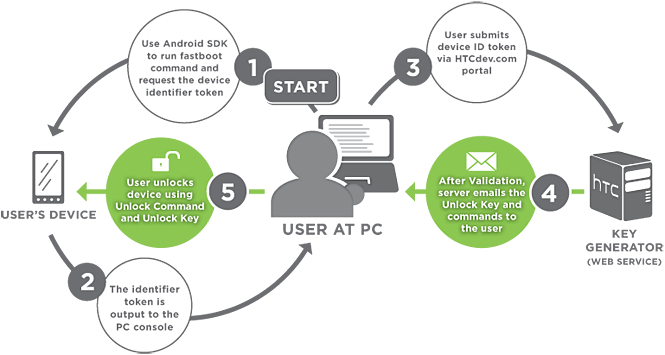
well you need to submit the bootloader token and receive the key that will ultimately unlock your bootloader. that is done via the website.

unlockprocess.png
 
no need for files from the old evo. all you need are in the guide mikey linked you to. and yes you will need internet access. and yes backup with what you can as HTCdev method will wipe the phone.

If access is only for those files, couldn't I just transfer them to pc before starting? Or still need internet after that?
Read ocn's reply...you may have missed it:p
And since you need a computer with internet, might as well download the files fresh.
 
Gotcha. Sorry for the lag. Got a 3 yo jumping on my head. Pc net access will put this on hold for me. Think tethering a diff phone to pc would work? It's awful slow.
Anyway, ill sort out the net access and let er fly. Thanks so much for the quick replies. Im willing to bet you'll be hearing from me again real soon.
 
Gotcha. Sorry for the lag. Got a 3 yo jumping on my head. Pc net access will put this on hold for me. Think tethering a diff phone to pc would work? It's awful slow.
Anyway, ill sort out the net access and let er fly. Thanks so much for the quick replies. Im willing to bet you'll be hearing from me again real soon.

no worries mate. let us know when you go about rooting again. someone will be here if you need help.
 
I'm back.
Im now unlocked and running MikG with AnthraX and that's working out great. I'd like to finish the job and lose the watermark, but I have a few questions.

After unlocking, can Captains method be completed on a different pc or will it be looking for the original path?

Does the pc need internet access? Can I dl all the files I need to my phone and transfer to pc before beginning?

Also having speed issues, but i always have with @*$?%?@ sprint. I've tried the data reset, updating prl THEN profile, called and yelled every other day just wondering if there were any other tricks I missed.

Thanks for any help, you guys rock.
 
I'm back.
Im now unlocked and running MikG with AnthraX and that's working out great. I'd like to finish the job and lose the watermark, but I have a few questions.

After unlocking, can Captains method be completed on a different pc or will it be looking for the original path?

Does the pc need internet access? Can I dl all the files I need to my phone and transfer to pc before beginning?

Also having speed issues, but i always have with @*$?%?@ sprint. I've tried the data reset, updating prl THEN profile, called and yelled every other day just wondering if there were any other tricks I missed.

Thanks for any help, you guys rock.
Nice to see you got it going!!
First I would like to ask your intent to remove the watermark?
I dont think you need the internet for it, but when you go to use unrevoked or revolutionary, then yes, you will.
You will need some of the files that you have from when you unlocked along with more files.
One more thing that I am not 100% sure on is, if it will leave your rom and data intact tho....


Edit: I was just reading thru the Capt guide, and I just need verification on this, but the state your phone is in now, I think you can start at step 6.....but I just want someone to verify that k?
 
Nice to see you got it going!!
First I would like to ask your intent to remove the watermark?
I dont think you need the internet for it, but when you go to use unrevoked or revolutionary, then yes, you will.
You will need some of the files that you have from when you unlocked along with more files.
One more thing that I am not 100% sure on is, if it will leave your rom and data intact tho....


Edit: I was just reading thru the Capt guide, and I just need verification on this, but the state your phone is in now, I think you can start at step 6.....but I just want someone to verify that k?

yeah if you are already unlocked no need to do that part. you will need to do the part where you use the flash.img and the mtd-eng.img files. not sure what step # that is, but that is where you will need to start. and no this part will not wipe data. however, running unrevoked or revolutionary, it is recommended that you wipe the phone first. but running them will not wipe data.
 
Intent is mainly to use root only apps some of which are already paid. Titanium to ease back up and re downloading chores. Anyway, I'm best off waiting till I get back to the pc I used before. Will do. I left off at unlocked because android flasher did not see the su zip and I ran out of time. Any idea? Better method?
Also wondering if unrevoked or revolutionary have anything over each other. Is one preferred?
Anyway, thanks again. I'll take another swing at it this weekend when I can get at the pc.
 
Intent is mainly to use root only apps some of which are already paid. Titanium to ease back up and re downloading chores. Anyway, I'm best off waiting till I get back to the pc I used before. Will do. I left off at unlocked because android flasher did not see the su zip and I ran out of time. Any idea? Better method?
Also wondering if unrevoked or revolutionary have anything over each other. Is one preferred?
Anyway, thanks again. I'll take another swing at it this weekend when I can get at the pc.
The only reason you would want s-off is to flash radios, or splash screens and I think one other thing.
You can still flash roms, kernels, use rooted apps, etc.
See this write up!
Pocketables – The difference between root, S-OFF/S-ON, and locked/unlocked bootloaders in the HTC EVO series
 
Intent is mainly to use root only apps some of which are already paid. Titanium to ease back up and re downloading chores. Anyway, I'm best off waiting till I get back to the pc I used before. Will do. I left off at unlocked because android flasher did not see the su zip and I ran out of time. Any idea? Better method?
Also wondering if unrevoked or revolutionary have anything over each other. Is one preferred?
Anyway, thanks again. I'll take another swing at it this weekend when I can get at the pc.

you do not have to use the same computer. you can just download the files i have listed in the guide. as long as you have the right folder and open the command window from that folder then you are fine. but that is up to you.

and both are relatively easy. i liked unrevoked as that was the first one i ever used to root my phone. but revolutionary is easy enough as well. so really there is no advantage over one from the other.

and as far as getting recovery i would suggest the PC36IMG method or the fastboot method.
 
Back
Top Bottom