• After 15+ years, we've made a big change: Android Forums is now Early Bird Club. Learn more here.

flytouch 3 internal pictures

xerox77

Newbie
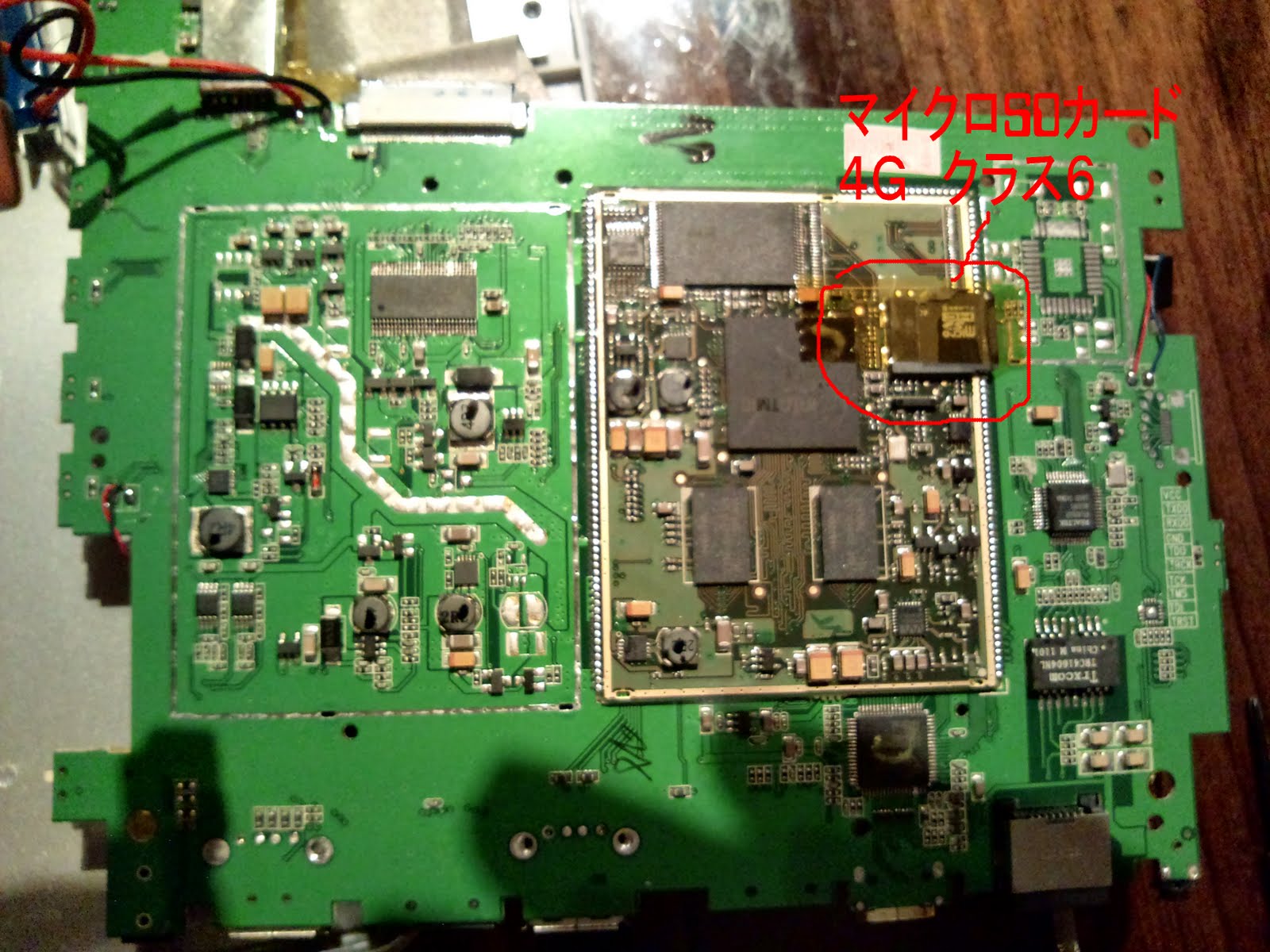
Today I had a look what is inside of my flytouch 3 :)
It is really easy to dismantle, you just need to remove the four screws at the corners, than gently flip out the screen with help of a screw driver. Take care the display cable is not so long.
When it is in two pieces than you will see the back of the circuit board, you should remove 3 screws and some tapes to be able to turn the board and see the components.
Unfortunately I do not have my micro SD adapter with me right now so had not try to insert my bigger 8Gb SD card in.
As it was promoted my battery size is...or labeled :)... 6400mAh.
I tried to take pictures about the general layout, processor, battery and wifi adapter.
 

Attachments

  • P1000136_1024x768_100KB.jpg
    P1000136_1024x768_100KB.jpg
    88.1 KB · Views: 1,367
  • P1000137_1024x768_100KB.jpg
    P1000137_1024x768_100KB.jpg
    82.2 KB · Views: 1,110
  • P1000139_1024x768_100KB.jpg
    P1000139_1024x768_100KB.jpg
    79.4 KB · Views: 1,056
  • P1000140_1024x768_100KB.jpg
    P1000140_1024x768_100KB.jpg
    88.1 KB · Views: 1,128
  • P1000141_1024x768_100KB.jpg
    P1000141_1024x768_100KB.jpg
    88.8 KB · Views: 1,348
What is the use of this upgrade? Only to enlarge the space or will it become faster also?
Another question.... is it possible to make WiFi the N-standard? For example by inserting a usb-dongle with wireless-N capacity?

Kind regards,

Martin.
 
I would also like to know. I am going to purchase a fly touch 3 here pretty soon. If you change the internal SD card, do you have to copy the contents of the old card to the new card? Otherwise how would you install android? Will this read micro SDHC cards? up to 32GB?
 
yeah why would you replace or exchange the internal sd card.....will it give you more space (which sounds reasonable) and if so....how do you get the original contents from the first sd card to the second allowing it to opperate the tablet
 
Hi friends i just purchased flytouch 3 and it arrived today. When i pressed the power button it just vibrates and does not powers on. Please help me what to do as i am very tense as this is my first android tablet...... waiting for your reply.
 
Hi!

I purchased a flytouch 3 two weeks ago. Unfortunately after 1 day! it started to vibrate and doesn't boot. I read a lot of forums and I understood that it should be charged... When I plug the charger, the green led lights couple of seconds, after this time goes out. (I have never seen red led on this pad.) Sometimes the led lights more time (hours) but bothe the device and charger are cold, I don't think it is charging.
My question is: what else can be done in a non invasive way becouse I'm still trying to convince the supplier to replace the device. In case this fails, I have to do something...
 
How long do you press the power button in for. If its less than a second the Flytouch will vibrate and that's about it. Try holding the power button down for a bit longer, basically until you see the android robot logo then let go.
 
Hi!

I purchased a flytouch 3 two weeks ago. Unfortunately after 1 day! it started to vibrate and doesn't boot. I read a lot of forums and I understood that it should be charged... When I plug the charger, the green led lights couple of seconds, after this time goes out. (I have never seen red led on this pad.) Sometimes the led lights more time (hours) but bothe the device and charger are cold, I don't think it is charging.
My question is: what else can be done in a non invasive way becouse I'm still trying to convince the supplier to replace the device. In case this fails, I have to do something...

sounds to me you have problems with yr charger. You are not alone, the charger is total crap. The pin prolly doesnt connect good enough to charge, i had the same problem and with me many others.

I suggest taking yr charger to a electronic store and ask for a simular charger ( you get a better quality charger garantied )
 
hi,

because the carher pin at the end of the cable broke, I tried a multicharger. But I configures the voltage wrong. Something within the pad fried... Now, is there a chance to replace the fried part or is the mainboard damaged beyond repair?

Regards, Torben
 
hmm - that sounds really bad... i suggest letting a proffesional look at it... next time before using a alternative charger, measure the voltage ! if u can't measure it, make 500% sure its configured right, if u are not sure, let someone look at it that is 500% sure its correct.

good luck, i hope its fixable !
 
i would also be interested in changing the internal memory, you make sound so easy. is it as easy as you make it out to be. and how do you get the info from the original internal sd card to your new one, and i hear alot about a class 10 card what exactly does that meen
 
The wifi radio looks like a stripped-down usb dongle but it's antenna placement is one of the worst places to put it. Those lithium-polymer batteries have an aluminum foil package and the antenna's proximity is not only affecting the radiation pattern but also changes the tuning and therefor the effective range.

Do you think it possible that a 802.11 N dongle would work in in place of this or would the N protocols be ignored?
I'm guessing an 802-11B/G/N dongle would work. I would also either remove or change the position of that antenna, to a less reactive spot on the back panel and/or the installation of a SMA male chassis mount connector to facilitate the use of an external antenna.

One could sure have a neat wardriving tablet!
 
Flytouch 3 : gps not working anymore
I have a flytouch 3 android 2.2 (disco model)
The gps was working lastweek but not not anymore.

After playing some games : First there was a ticking sound in the speaker.
I found in a forum that the solution was to open the tablet and to move the wires of the speaker a little bit, after that, the ticking issue was solved. I did not touch anything else.

The gps is on, antenna is attached and in test it shows no signals at all.
Also after restart.

What can I do, pls help.


Attachments

  • 2011-6-1-0-11-53.jpg
    2011-6-1-0-11-53.jpg
    106.5 KB · Views: 316
Today I had a look what is inside of my flytouch 3 :)
It is really easy to dismantle, you just need to remove the four screws at the corners, than gently flip out the screen with help of a screw driver. Take care the display cable is not so long.
When it is in two pieces than you will see the back of the circuit board, you should remove 3 screws and some tapes to be able to turn the board and see the components.
Unfortunately I do not have my micro SD adapter with me right now so had not try to insert my bigger 8Gb SD card in.
As it was promoted my battery size is...or labeled :)... 6400mAh.
I tried to take pictures about the general layout, processor, battery and wifi adapter.

Hello, Have you got a picture of the other side (wifi module)
Because my FT3 doesn't have some wifi antenna. I want to solder one but i don't know where?
Thanks a lot and sorry for my english i'm a new frenchy user of FT3
 
The receptacle for the charging plug has broken, I need to repair or replace it. I am thinking of doing a Pigtail mod to it, so that I don't have the plug putting undue pressure on the motherboard and female plug unit. Any info on a part number or something? The plug itself uses a Type 'A' male plug. I can charge it by using a rubber-band and just the right placement and tension on the cord (LOL).
 
Today I had a look what is inside of my flytouch 3 :)
It is really easy to dismantle, you just need to remove the four screws at the corners, than gently flip out the screen with help of a screw driver. Take care the display cable is not so long.
When it is in two pieces than you will see the back of the circuit board, you should remove 3 screws and some tapes to be able to turn the board and see the components.
Unfortunately I do not have my micro SD adapter with me right now so had not try to insert my bigger 8Gb SD card in.
As it was promoted my battery size is...or labeled :)... 6400mAh.
I tried to take pictures about the general layout, processor, battery and wifi adapter.

Hallo, i was wondering, after you replace the sdcard, how do you get Android 2.2 back on to it again? My 8GB card is corrupt you see, so i need to replace the internal sdcard.
 
Hallo, i was wondering, after you replace the sdcard, how do you get Android 2.2 back on to it again? My 8GB card is corrupt you see, so i need to replace the internal sdcard.

Get a Sd tool like Sdformatter or Easeus. Remove the internal SD and try to repartion and format it. If neither app gives you errors you can reuse it or take the opportunity to put a larger sd in the device.

When you have two good sd, place one back in the FT3 and reassemble. The place the firmware files on the other card, insert it in the FT3 and flash as normal. The firmware will rebuild the internal SD card.
 
Back
Top Bottom