• After 15+ years, we've made a big change: Android Forums is now Early Bird Club. Learn more here.

Forced 2.0.1 DROID UPDATE! HOWTO

I get all these security warnings when trying to download the file. Things like "cannot verify the identify of the site" and "certificate does not match".

the site is a https site and the certificates are not signed by a trusted source (such as verisign) click ok and proceed with the download
 
wow seemed to be working great till i took a picture... i take a pic, then it goes to a black screen and never comes back. everything still works but the screen is black?! wtf

how do i go back to the old one and just wait it out? where could i find that file?
 
alright, I did the forced update as instructed and it worked like a charm...took a little longer than I thought it would, I got a little nervous, but all is well...

does anyone else think that the screen became more vibrant after the update? maybe just me, but it sure looks brighter to me...

Wow - me too. Plus my wife looked prettier, and my son seemed smarter. ;)

Sorry - I'm being a smartaxx. :) No - didn't notice any change in the screen.

The only part that scared me was the first reboot after the update...took a really long time. Reboots since then (tried a couple to be sure) seem as fast as before the update.
 
No, some mod merged and my post was buried, this should be the most up to date:

http://androidforums.com/motorola-droid/25188-new-2-0-1-update-first-post-again-sorry-rob.html

Just post there if you have downloaded and successfully installed, or have issues. For some reason my thread(this one) is not my thread, interesting.

I talked to Rob real quick about it, hopefully it works itself out beforehand.

Your new thread is gone. Would be nice to have the instructions you had there...
 
wow seemed to be working great till i took a picture... i take a pic, then it goes to a black screen and never comes back. everything still works but the screen is black?! wtf

how do i go back to the old one and just wait it out? where could i find that file?

I haven't seen anyone post about problems w/the camera. Try power-cycling the phone.

You can't go back, as far as I understand...once you've updated that's it (unless you rooted the phone back to 2.0, but I wouldn't suggest that...)
 
Thanks! Tried with the Mac first and it didn't work, so I switched the the PC. That is the only time I plan on saying that.
 
To show the new Unlock/Lock screen remove the old unlock pattern:

SETTINGS > location and security > Uncheck "require pattern". You should now see the new unlock. :D

fabioq
 
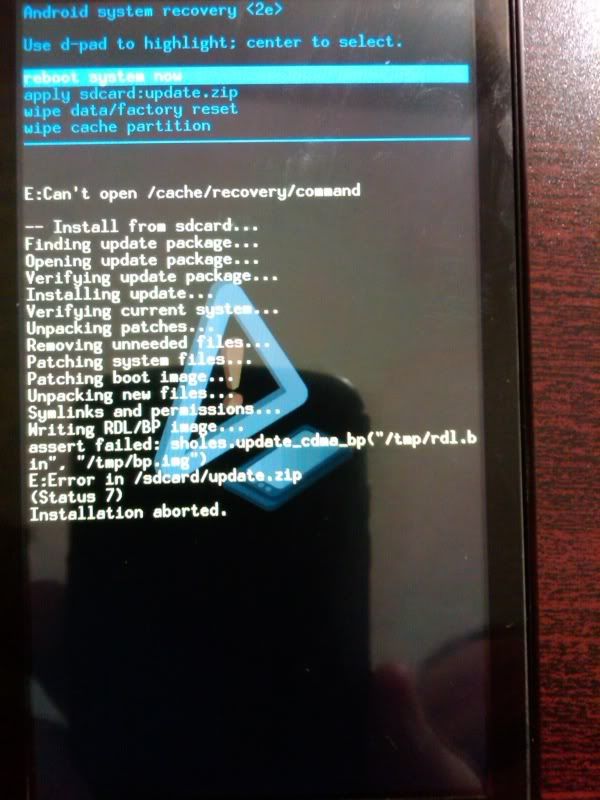
I got the following error, however, I did upgrade, but I'm still at the old baseband version:

IMG00003-20091103-2120.jpg
My downloaded filesize:
10.1 MB (10,648,643 bytes)(not size on disk)
 
I edited the (new) original post to include a link to the (old) original post. We do not need separate threads for this unless they are different methods or doing something different.
 
wow seemed to be working great till i took a picture... i take a pic, then it goes to a black screen and never comes back. everything still works but the screen is black?! wtf

how do i go back to the old one and just wait it out? where could i find that file?


also when i put it on auto brightness it goes to complete black? PLEASE! help!
 
Just updated from 2.0, works just fine, new lock screen is nice displays the time. Unlock screen looks a little different, not bad though.

BEFORE
kmfdmk-albums-stuff-picture338-before.png


AFTER

kmfdmk-albums-stuff-picture339-after.png


kmfdmk-albums-stuff-picture340-after2.png

The wife gets a cameo. :D
 
Loving this. Thank you. Seriously took me like a total of 4 minutes from download to complete reboot. Just don't be scared of it, that's all. When you're unsure of something, that's when you break it.
 
kmfdmk-albums-stuff-picture340-after2.png

The wife gets a cameo. :D
............................................................
why the **** is that?

kinda hot


Because I wanted to show the new lock/unlock screen, and I'm not going to swap out my BG for a default one just to take a screen cap... Thanks I'll relay the compliments.
 
when you save it, its gonna ask u where you want to save it, and the file name. change it to update and go from there. no need to go back and rename it. All you'll have to do after that is move it to the root directory on the SD card. i use astro file manager.
 
Back
Top Bottom