
Install the app
How to install the app on iOS
Follow along with the video below to see how to install our site as a web app on your home screen.
Note: This feature may not be available in some browsers.
-
After 15+ years, we've made a big change: Android Forums is now Early Bird Club. Learn more here.
You are using an out of date browser. It may not display this or other websites correctly.
You should upgrade or use an alternative browser.
You should upgrade or use an alternative browser.
Help Found & Disabled: AT&T Startup Sound
- Thread starter MrTony
- Start date
-
- Tags
- samsung captivate
Pinetree09
Newbie
and oh... by the way... the steak isnt locked down to bad.... so theres your next at&t device!
Will Steak sauce be included in the box?
Pinetree09
Newbie
yeah it still fails, so its gotta be something else, im going to try doing this on another computer entirely and see what happens... ive NEVER had this issue with anything, im usually very smart when it comes to this stuff.
is there something else i could have forgotten...?
Did you name your folder "android" ?
yeah it still fails, so its gotta be something else, im going to try doing this on another computer entirely and see what happens... ive NEVER had this issue with anything, im usually very smart when it comes to this stuff.
is there something else i could have forgotten...?
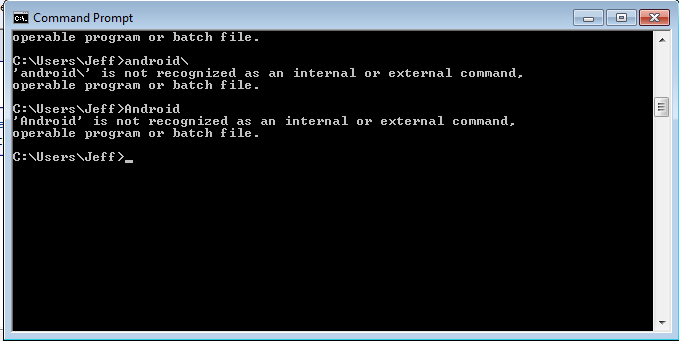
You're entering your commands wrong. Substitute "Jeff" for "Timber" in this image
Attachments


sremick
Android Expert
JScott,
The others are right. While I respect there are areas in which you are very adept, not everything translates over. I've known plenty of doctors who couldn't work a computer to save their own life, and meanwhile I couldn't remove an appendix without killing the person while they could do it with one hand and their eyes closed.
There's absolutely nothing wrong with wanting to learn, like you say, and I applaud you for it. But you need to learn to walk before you can run. The mistakes you're making and the things that are confusing you are basic things extremely fundamental to the bigger task, and your confusion reveals that you are rather in over your head here. By all means, learn and teach yourself, but start off with learning basic command line commands, syntax and concepts, and the difference between Microsoft DOS' and Unix style (as there are some big differences which trip up even MS-DOS gurus). Wait on the rooting and fiddling with the Linux innards of your phone until you've worked yourself up to that point, that way there won't be so much hand-holding necessary and frustrated forum members trying to help.
Don't be insulted, but to the others it's sort of akin to a person asking over the internet how to rebuild his car's transmission, and in the process those trying to help are wrestling with things like him holding the wrong end of a screwdriver and not knowing the difference between flathead and Philips.
The others are right. While I respect there are areas in which you are very adept, not everything translates over. I've known plenty of doctors who couldn't work a computer to save their own life, and meanwhile I couldn't remove an appendix without killing the person while they could do it with one hand and their eyes closed.
There's absolutely nothing wrong with wanting to learn, like you say, and I applaud you for it.
But you need to learn to walk before you can run. The mistakes you're making and the things that are confusing you are basic things extremely fundamental to the bigger task, and your confusion reveals that you are rather in over your head here. By all means, learn and teach yourself, but start off with learning basic command line commands, syntax and concepts, and the difference between Microsoft DOS' and Unix style (as there are some big differences which trip up even MS-DOS gurus). Wait on the rooting and fiddling with the Linux innards of your phone until you've worked yourself up to that point, that way there won't be so much hand-holding necessary and frustrated forum members trying to help. Don't be insulted, but to the others it's sort of akin to a person asking over the internet how to rebuild his car's transmission, and in the process those trying to help are wrestling with things like him holding the wrong end of a screwdriver and not knowing the difference between flathead and Philips.
Darkeligos
Well-Known Member
Woo I'm gonna be changing all of the sounds of the device now. The keyboard clicks, button taps, startup, and more.
Was thinking of changing the startup sound to this:
YouTube - Custom Alienware Startup Sound
Was thinking of changing the startup sound to this:
YouTube - Custom Alienware Startup Sound
If I could give you a thanks for each one of my coworkers, i would do so. I restart my phone a few times a day right now, as I'm changing settings, installing and uninstalling etc. and every time, the stupid ATT startup sound blares over the cube walls, and I have to poke my head up and apologize for disturbing their sleep. No more!
Could you upload this again? I'm an idiot and did the same.
Thanks
JScott21: Maybe I can help. When at the command prompt, if you just type "Android" by itself, Windows is trying to execute a command or program. But if you type "CD Android" (CD meaning Change Directory) it will move you into the folder (provided the "Android" folder is located at "C:\Users\Jeff\Android"). The easier way to do it is to just navigate to that "Android" folder in Explorer, and when in there, hold Shift and right-click in that folder and select "Open Command Window here". Then you can run the commands.
Woo I'm gonna be changing all of the sounds of the device now. The keyboard clicks, button taps, startup, and more.
Was thinking of changing the startup sound to this:
YouTube - Custom Alienware Startup Sound
That's actually a Transformers clip. If you install Zedge on your phone I think that clip is in there so you can just download it and convert it to .wav.

FlawedLegacy
Newbie
Super easier non-modding... "Quiet Boot" app!
Turn it on and no more boot sound.
Turn it on and no more boot sound.

nomoiphone
Member
Will this delete the default ringtones? I want to get rid of most of them.Here's how I did it:
If you spend the small amount of money for Root Explorer (once your phone is rooted) there's a much easier way to do that.
