• After 15+ years, we've made a big change: Android Forums is now Early Bird Club. Learn more here.

Help gmail app very slow to receive messages/notifications

LineDriver5

Newbie
Hi again. Have recently been turned on to the gmail app since I'm told its better than the stock email.. I happen to agree..

But.. is there a way to make.sure my gmail app gets the emails pushed to it?

If I have the Gmail and the stock app both on my home page sometimes just the stock app will register the new emails and I can go as far.as to open up the Gmail app and hit refresh and it still doesn't update my inbox to date..

Is there a fetch or push or default setting that I'm missing??? Can I clear defaults and maybe set gmail as my defualy email app??
 
The only settings are located in settings from the desktop side. If Gmail is fetching your other accounts it only does so every 15 minutes or so. I dont recal the lowest setting.

If your accounts are set up individually in stock email it may in fact update more frequently


If I am right.. the only way to set this up differently would be to have your other accounts forward the msg to Gmail...which might be a little sloppy bit should work.
 
The only settings are located in settings from the desktop side. If Gmail is fetching your other accounts it only does so every 15 minutes or so. I dont recal the lowest setting.

If your accounts are set up individually in stock email it may in fact update more frequently


If I am right.. the only way to set this up differently would be to have your other accounts forward the msg to Gmail...which might be a little sloppy bit should work.

I'm sorry I didn't explain myself.. my email is a gmail account.. and the stock app fetches every 5 minutes but the gmail app only updates and notifies sometimes..

Is there a way to set it so the gmail app is the default email app? I'm guessing it would fetch more often.. I just sent an email to myself an HOUR later the gmail app still hadn't notified me that I had a new message, I needed up open the gmail app and refresh for it to recognize the new email..
 
I'm sorry I didn't explain myself.. my email is a gmail account.. and the stock app fetches every 5 minutes but the gmail app only updates and notifies sometimes..

Is there a way to set it so the gmail app is the default email app? I'm guessing it would fetch more often.. I just sent an email to myself an HOUR later the gmail app still hadn't notified me that I had a new message, I needed up open the gmail app and refresh for it to recognize the new email..

Gotcha...let me play with my settings and see what I can find as I have noticed the same at times. It has not been consist and enough for me to be concerned about it.

Do a few tests in the meantime , make sure Gmail is all the way closed (back button all the way out) same with stock mail. Take note of delays and feel free to add more variables

Send yourself emails:
From stock email to yourself
From Gmail to yourself
From desktop to yourself

And are you using a task killer.
 
Gotcha...let me play with my settings and see what I can find as I have noticed the same at times. It has not been consist and enough for me to be concerned about it.

Do a few tests in the meantime , make sure Gmail is all the way closed (back button all the way out) same with stock mail. Take note of delays and feel free to add more variables

Send yourself emails:
From stock email to yourself
From Gmail to yourself
From desktop to yourself

And are you using a task killer.

Bro you are all over this board and better than any manual or ANY other type of help, it's much appreciated!!! running tests now..
 
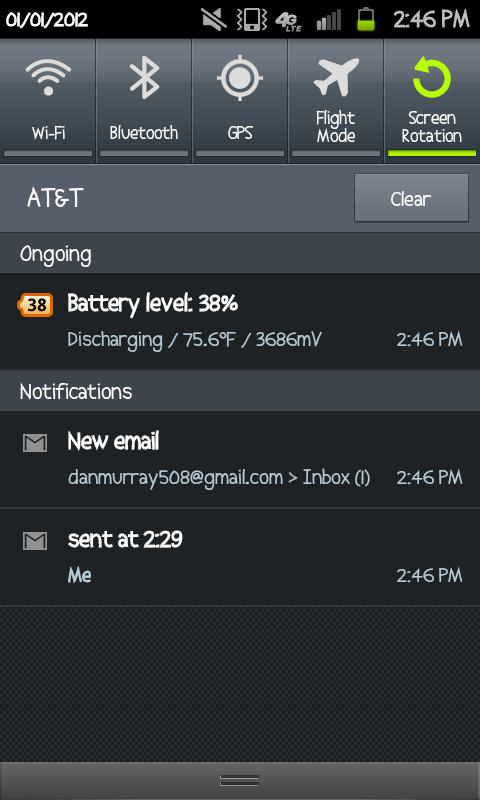
SC20120101-144639.png


Sent it.. it didn't show up after 15 minutes on the gmail.. but It Pop's up within 5 for the stock app..

I opened the Gmail to see if opening it helps.. and it found it 2 minutes later
 
Bro you are all over this board and better than any manual or ANY other type of help, it's much appreciated!!! running tests now..

Thanks

Its an addiction :) comments like this feed it haha

This is honestly one that bugs me too. Both of our skyrockets do it but I have not played with it to figure out why
 
OK...getting all of my Gmail instantly ....only getting my stock email notifications if I open the app.

There was a setting when I set up the account that was real time ...I could not get it to work though.


Still playing with my settings though. The stock mail app has some benefits I was not aware of (like view all new mail). And it recognizes all of my folders in Gmail... back in the evo days stock android mail did not have any of this cool stuff haha
 
Hi again. Have recently been turned on to the gmail app since I'm told its better than the stock email.. I happen to agree..

But.. is there a way to make.sure my gmail app gets the emails pushed to it?

If I have the Gmail and the stock app both on my home page sometimes just the stock app will register the new emails and I can go as far.as to open up the Gmail app and hit refresh and it still doesn't update my inbox to date..

Is there a fetch or push or default setting that I'm missing??? Can I clear defaults and maybe set gmail as my defualy email app??

The issue you are having OP is due to a problem that customers have with the LTE data plan in an LTE coverage area where the phone loses connectivity to Google servers (but not to internet).
This is why your gmail are taking ages to arrive (and if you use gtalk you will notice it disconnects all the time)

I opened a thread about this over at XDA Constantly getting disconnected from Google servers on LTE - xda-developers

No solution as of yet.
 
I have kept both apps on the phone and see no pattern or consistent behavior

Sometimes Gmail is first....others it is the email app

Club tech I can understand you want for a solution but your issue may be entirely different.
 
Glad it's not just me - I've had android phones since the very first Droid and Gmail would update instantly. I would check an email on my desktop and it would instantly be marked as read on my phone, and vice versa.

Now I have the Verizon Galaxy Nexus and a tablet, and sometimes 30-60 minutes later the mobile devices still haven't updated, showing me that I have mail I already deleted on the desktop (or I'll read it on my phone, delete it, and it'll still show up on the desktop).

This stinks.
 
Hey everyone, has there been a solution for this yet? I recently got the skyrocket and my gmail is coming to my phone extremely sporadically. Sometimes it'll come to my phone right after the e-mail gets to the gmail servers and other times it will come 20+ minutes after getting to the gmail servers.
 
I am also getting the same issue, I find that I have to keep opening the email box to receive them, I have checked the settings and it says that it is set to Push.
Has anyone found a solution yet?
 
I have noticed the same thing with gmail and the skyrocket. Yesterday I tried to send a photo via both gmail and a separate email account. The separate account transmitted the photo right away, whereas the gmail didn't appear until a hour later.
 
Back
Top Bottom