

• After 15+ years, we've made a big change: Android Forums is now Early Bird Club. Learn more here.

Root GUIDE: From stock 1.5 to the latest root 2.1

GRRR I WANT TO FIGURE THIS OUT. ha ha. So when I try to run the md5sum app, it looks like a command prompt opens and closes really fast and thats it. So I just assumed it was something that ran in the background. I opened a command prompt in the folder where the PB00IMG.zip and typed lots of versions of "md5sum.exe PB00IMG.zip". Nada.
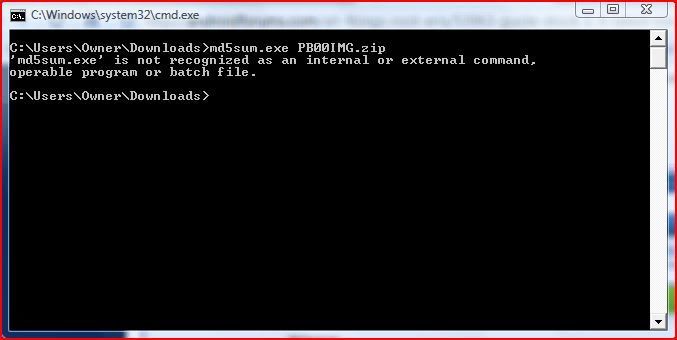
md5sumissue.jpg


I'm going to read up and let you know what I am doing wrong. I can pretty much guarantee its something really really stupid on my part.

lol! You're doing great!

Did you extract the md5sum.exe to the c:\users\owner\downloads directory from the md5sum.zip? Do a "dir" in the directory to see what files are there.

Cheers!

P.S. you can, of course, place the .exe file anywhere you want on your system, but you'd have to adjust the PATH environment variable or make sure that you placed your .exe file in a directory that your PATH already points to. Just didn't want to complicate things.
 
You are welcome and congratulations! :D:)

im having problems getting the driver installed for the phone before i even start this. i have the android sdk downloaded, installed all of the packages including the usb drivers downloaded and installed

i go into my device manager and i see the phone listed as "ADB" and i try to update the driver but it wont accept the driver that the package downloaded. the phone is connected with the usb cable and its in debugging mode

i didnt want to continue any further and risk doing anything to the phone if the driver wont install.

any ideas ?
 
im having problems getting the driver installed for the phone before i even start this. i have the android sdk downloaded, installed all of the packages including the usb drivers downloaded and installed

i go into my device manager and i see the phone listed as "ADB" and i try to update the driver but it wont accept the driver that the package downloaded. the phone is connected with the usb cable and its in debugging mode

i didnt want to continue any further and risk doing anything to the phone if the driver wont install.

any ideas ?

white91formula, try looking in this thread for some consolidated info. re. connectivity issues, etc:

http://androidforums.com/all-things...oot-troubleshooting-guide-htc-droid-eris.html

Not 100% guaranteed that it will solve your problems, but there's some good USB things to try. Please let us know what does finally solve your issue so I can update the guide (and emphasize that solution in the guide).

Hope this helps.
 
white91formula, try looking in this thread for some consolidated info. re. connectivity issues, etc:

http://androidforums.com/all-things...oot-troubleshooting-guide-htc-droid-eris.html

Not 100% guaranteed that it will solve your problems, but there's some good USB things to try. Please let us know what does finally solve your issue so I can update the guide (and emphasize that solution in the guide).

Hope this helps.


stupid question and ive been reading so many things about rooting and i still cant seem to find a clear answer. is steps 2 and 3 really necessary or are they only if you want to install a custom rom ?

im hoping to root so i can get rid of all of the junk that comes with the phone like amazon, teeter, footprints etc

i dont need a custom rom, or atleast i dont think i want one, maybe i do but i basically right now just looking to get rid of all of the junk i dont need that runs in the background.
 
stupid question and ive been reading so many things about rooting and i still cant seem to find a clear answer. is steps 2 and 3 really necessary or are they only if you want to install a custom rom ?

im hoping to root so i can get rid of all of the junk that comes with the phone like amazon, teeter, footprints etc

i dont need a custom rom, or atleast i dont think i want one, maybe i do but i basically right now just looking to get rid of all of the junk i dont need that runs in the background.

Well, the base root ROM that you install in the first step is very old and has a lot of bugs that the custom root ROMs have fixed (because they were built/based-off of at least the v3 2.1 leak code).

You can use 2.1 from the base root ROM, but it might not be the most pleasant user experience for you.

BTW, the custom ROM that I installed (Ivanmmj's Eris Official 1.0 alpha w/controllable overclocking) is considered very close to "regular" 2.1, but with root functionality (i.e., wi-fi tethering, overclocking, etc.) and some bloatware already removed (you start with more than 140MB of free memory).
 
white91formula, try looking in this thread for some consolidated info. re. connectivity issues, etc:

http://androidforums.com/all-things...oot-troubleshooting-guide-htc-droid-eris.html

Not 100% guaranteed that it will solve your problems, but there's some good USB things to try. Please let us know what does finally solve your issue so I can update the guide (and emphasize that solution in the guide).

Hope this helps.


thank you, i ended up getting a tip from android developers off of one of the links to install htc sync which made everything work. for some reason i guess people have issues if it is not installed on the computer.

im moving forward now i have gone in the android sdk directory in the command prompt and the computer can see the phone just fine now and i got the device listed and the $ for it not being rooted yet.

i backed everything up on the phone to the sd card, but after the root is it going to wipe everything out like it was a new phone again ? i assume yess but i wasnt sure.
 
thank you, i ended up getting a tip from android developers off of one of the links to install htc sync which made everything work. for some reason i guess people have issues if it is not installed on the computer.

im moving forward now i have gone in the android sdk directory in the command prompt and the computer can see the phone just fine now and i got the device listed and the $ for it not being rooted yet.

i backed everything up on the phone to the sd card, but after the root is it going to wipe everything out like it was a new phone again ? i assume yess but i wasnt sure.

Well, it won't delete stuff off of your /sdcard, but you will lose your apps -- you can back those up though, using several different methods:

this thead has lots of good info:

http://androidforums.com/htc-droid-eris/16859-eris-tips-tricks.html

inside that thread is a reference to this thread:

http://androidforums.com/htc-droid-eris/41385-how-backup-your-htc-eris.html

Hope this helps. Good luck!
 
Well, it won't delete stuff off of your /sdcard, but you will lose your apps -- you can back those up though, using several different methods:

this thead has lots of good info:

http://androidforums.com/htc-droid-eris/16859-eris-tips-tricks.html

inside that thread is a reference to this thread:

http://androidforums.com/htc-droid-eris/41385-how-backup-your-htc-eris.html

Hope this helps. Good luck!

yes i had everything backed up already.

new problem, i got through step 1 fine and most of step 2, however at the last promt to enter into the command prompt it gave me a error, i attached a picture to show you. what now ?

uhoh.jpg
 
yes i had everything backed up already.

new problem, i got through step 1 fine and most of step 2, however at the last promt to enter into the command prompt it gave me a error, i attached a picture to show you. what now ?

uhoh.jpg

LOL, yes, lots of folks have reported this...you've got to take a pause in-between typing the adb commands to allow adb and your phone time to finish processing the command/request. Bet if you re-typed it now, it will work for you.

Let me know.
 
what do i need to do if i want to root and i am on the official 2.1 update? do i follow the same steps? is the latest 2.1 root rom the same as 2.1 OTA? im just a bit confused on what i need to do. any help would be appreciated. thanks:confused:
 
what do i need to do if i want to root and i am on the official 2.1 update? do i follow the same steps? is the latest 2.1 root rom the same as 2.1 OTA? im just a bit confused on what i need to do. any help would be appreciated. thanks:confused:

joshminton, yes, you can use this same guide to root a 2.1 OTA phone (like yours). (i.e., this assumes that you have never installed one of the 2.1 "leaks" and it sounds like you have not).

You should read through the stickied threads in this subforum (all-things-root-eris) as well as this thread: http://androidforums.com/all-things...oot-troubleshooting-guide-htc-droid-eris.html (its gots some tips that should help).

The 2.1 base root ROM that you use to actually get rooted is a very old, very early version of 2.1 that is fairly buggy. You use this ROM to get you rooted and then use the recovery partition that you install to put on a new custom ROM of your choosing (i.e., various flavors of 2.1 with root goodies). Read through the threads and see if you still have more questions.
 
joshminton, yes, you can use this same guide to root a 2.1 OTA phone (like yours). (i.e., this assumes that you have never installed one of the 2.1 "leaks" and it sounds like you have not).

You should read through the stickied threads in this subforum (all-things-root-eris) as well as this thread: http://androidforums.com/all-things...oot-troubleshooting-guide-htc-droid-eris.html (its gots some tips that should help).

The 2.1 base root ROM that you use to actually get rooted is a very old, very early version of 2.1 that is fairly buggy. You use this ROM to get you rooted and then use the recovery partition that you install to put on a new custom ROM of your choosing (i.e., various flavors of 2.1 with root goodies). Read through the threads and see if you still have more questions.


I have a question my friend love sense and everything all on the phone all he wants is the to be able to use WIFI tether. I I use this method on step 4 instead of using the custom rom zip files can he just use the update.zip 2.1 OTA to give him back to the newer 2.1 or will that delete root for him.
 
Ok I guess what I wanted to say is this
I would follow setup 1- 3 but on setup 4 is there a way to load the OTA 2.1 (which would include the bug fixes from 2.1 base root ROM) but still have root, If not is there another root method I could use that could achieve this
 
ok im new to the android scene and have many many questions.

first i just got my Eris less then a week ago and would like to root it.
Firmware version
2.1

Baseband Version
2.42.00.04.12

Kernel Version
2.6.29-8a03cb9a
htc-kernal@18-2#1

Build number
2.36.605.1 CL 165907 Release-keys

Software Number
2.36.605.1

will the all-in-one package work on this phone? or do i need to do something different? i have been all over the web and seen many different ways to root my device. (information overkill?) and am now confused as hell. so if the all in one isnt the way i should be doing it, can someone please give me a quick step by step on how to do it? and a suggestion on a good rom? ( i would like the live wallpapers) and any other info i need to know. sorry, but im getting overly confused and frustrated.

Phrite.:confused:

I just checked and this is what i got from the hboot loader version
destrex XC SHIP S-ON
Hboot 1.47.0000

so if i am reading the basic root and troubleshooting guide then i am unrootable at this time. am i reading this correctly?
 
ok im new to the android scene and have many many questions.

first i just got my Eris less then a week ago and would like to root it.
Firmware version
2.1

Baseband Version
2.42.00.04.12

Kernel Version
2.6.29-8a03cb9a
htc-kernal@18-2#1

Build number
2.36.605.1 CL 165907 Release-keys

Software Number
2.36.605.1

will the all-in-one package work on this phone? or do i need to do something different? i have been all over the web and seen many different ways to root my device. (information overkill?) and am now confused as hell. so if the all in one isnt the way i should be doing it, can someone please give me a quick step by step on how to do it? and a suggestion on a good rom? ( i would like the live wallpapers) and any other info i need to know. sorry, but im getting overly confused and frustrated.

Phrite.:confused:

I just checked and this is what i got from the hboot loader version
destrex XC SHIP S-ON
Hboot 1.47.0000

so if i am reading the basic root and troubleshooting guide then i am unrootable at this time. am i reading this correctly?

phrite, you are in the right place. This thread will also root your 2.1 phone (since you do have the 1.47 HBOOT bootloader). Follow the instructions carefully and you should get root w/o too much trouble. Go to the first post in this thread (i.e., post #1 on page #1) for the detailed instructions.

Also, you might want to read through this thread http://androidforums.com/all-things...oot-troubleshooting-guide-htc-droid-eris.html to make your rooting journey a little smoother.

As far as ROMs go, a good starter ROM that is pretty much base 2.1 but with some added root functionality (overclocking, wi-fi tethering, etc.) is Ivan's Eris Official w/overclocking.

I understand your interest in live wallpapers...I'm sure they are neat, at least initially, but a lot of folks have reported that the cool factor quickly fades and they would rather save / extend their battery life.

Good luck and hope this helps.
 
Ok I guess what I wanted to say is this
I would follow setup 1- 3 but on setup 4 is there a way to load the OTA 2.1 (which would include the bug fixes from 2.1 base root ROM) but still have root, If not is there another root method I could use that could achieve this

Qbfinest83, not 100% sure I understand what you are asking, but let me give a little bit of information and see if that helps focus on what you want.

The base root ROM is a signed HTC ROM that was leaked and included a version 1.49.2000 S-OFF (security OFF) HBOOT bootloader. This was/is a pretty old version of 2.1 and is basically just used to get you rooted (you have to have the S-OFF bootloader in order to do the remaining rooting tasks). Using this base root ROM is the easist way to achieve root on the Eris (I can't say "only" anymore since there is a very timing-sensitive, fairly complex method currently being tried--its only been successful for a small handful of users).

So, after flashing/installing this base root ROM, you would then install a custom recovery partition/utility (typically Amon_RA's custom recovery). This custom recovery allows you (among other things) to flash other custom ROMs.

The custom ROMs that the developers have created ("baked" / "cooked") typically do included the most current bug fixes, etc. from the latest official release of 2.1 from HTC/VZW (they devs hack into the OTA file and pull-out the fixed/updated pieces of code). Additionally, they devs add their own twists and features to their custom ROMs like removing Sense, adding overclocking, a2sd (apps-to-SD), removing bloatware, etc. There are many very good custom ROMs out there to choose from that will likely meet your needs.

So, all that being said, does this answer your question(s) or change what you would like to know?
 
Qbfinest83, not 100% sure I understand what you are asking, but let me give a little bit of information and see if that helps focus on what you want.

The base root ROM is a signed HTC ROM that was leaked and included a version 1.49.2000 S-OFF (security OFF) HBOOT bootloader. This was/is a pretty old version of 2.1 and is basically just used to get you rooted (you have to have the S-OFF bootloader in order to do the remaining rooting tasks). Using this base root ROM is the easist way to achieve root on the Eris (I can't say "only" anymore since there is a very timing-sensitive, fairly complex method currently being tried--its only been successful for a small handful of users).

So, after flashing/installing this base root ROM, you would then install a custom recovery partition/utility (typically Amon_RA's custom recovery). This custom recovery allows you (among other things) to flash other custom ROMs.

The custom ROMs that the developers have created ("baked" / "cooked") typically do included the most current bug fixes, etc. from the latest official release of 2.1 from HTC/VZW (they devs hack into the OTA file and pull-out the fixed/updated pieces of code). Additionally, they devs add their own twists and features to their custom ROMs like removing Sense, adding overclocking, a2sd (apps-to-SD), removing bloatware, etc. There are many very good custom ROMs out there to choose from that will likely meet your needs.

So, all that being said, does this answer your question(s) or change what you would like to know?

Yeah it pretty much does. Thanks
 
Back
Top Bottom