

hey guys,
so i added an unrooting section to the http://androidforums.com/evo-4g-all...-rooting-gingerbread-2-3-5-dummies-guide.html. but i figure i will start a thread explaining the process. please feel free to post here if you have any questions about unrooting your phone.
again the usual disclaimer:
i am not responsible for you bricking your phone
Unrooting
ok so you want to unroot your phone. unfortunately, the process is more complicated then the previous methods. basically to get rid of the watermark you will need to change the misc partition and then you can flash the PC36IMG RUU to finish the process in getting a stock rom and recovery with s-on.
this will only work if you have used the HTCdev method. if you have used the other methods (captain throwback's method and taco root) then follow the guides linked at the bottom of this thread.
so here is how you do it:
for unrevoked:
http://androidforums.com/evo-4g-all-things-root/194918-rooting-dummies.html
for revolutionary:
http://androidforums.com/evo-4g-all...ooting-dummies-guide-gingerbread-edition.html
so i added an unrooting section to the http://androidforums.com/evo-4g-all...-rooting-gingerbread-2-3-5-dummies-guide.html. but i figure i will start a thread explaining the process. please feel free to post here if you have any questions about unrooting your phone.
again the usual disclaimer:
i am not responsible for you bricking your phone
Unrooting
ok so you want to unroot your phone. unfortunately, the process is more complicated then the previous methods. basically to get rid of the watermark you will need to change the misc partition and then you can flash the PC36IMG RUU to finish the process in getting a stock rom and recovery with s-on.
this will only work if you have used the HTCdev method. if you have used the other methods (captain throwback's method and taco root) then follow the guides linked at the bottom of this thread.
so here is how you do it:
these are the files you will need:
step #1 downgrading the misc partition
1.download the first three files and create a folder and call it android then move the downloaded files to the android folder.(you should have already have this setup when you rooted with HTCdev)
2.download and install (do not run) htc sync:HTC Sync 3.0.5551
3.connect your phone to the pc via usb cable
4.we need to extract and then move the flash_image and the mtd-eng files on to the sd card. make sure that you do not put the extracted files in any folders. they need to be on the root of the card (very top level)
5.change the setting from disk to charge only, make sure that usb debugging is turned on, settings>apps>development>check usb debugging, and lastly make sure that fastboot is disabled, settings>apps>uncheck fastboot.
6.on your pc hold shift while right clicking on the android folder. select open command window here option.
7. in the command window type:
ok you should get # in the command window if not then something went wrong.
if you do get # then type:
then:
and last:
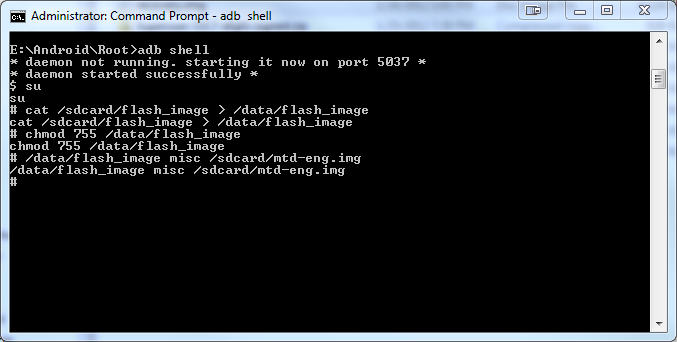
the command screen should look like this when all the commands are entered:
step #2 installing the stock rom and recovery
1.download the 4.67 PC36IMG file and rename it by deleting everything but the PC36IMG part in the name. make sure not to add an extra zip as windows hides extensions.
2.move it to the root of the sd card that means on the top level of the card and not in any folders.
3.power off then press and hold power+vol down. this will take you to the bootloader. if you named the file right and it is on the root of the card then it will ask you to update. select yes.
4.before you reboot your phone double check your bootloader screen. at the top it should say locked and your hboot should be 2.18 with s-on. if that is what you see then congrats!!!!!!!!!! you are now unrooted!!!!!!!!!!!!
- adb.exe
- fastboot.exe
- AdbWinApi.dll
- flash_image.zip
- mtd-eng.zip
- PC36IMG_SuperSonic_GB_Sprint_WWE_4.67.651.3
step #1 downgrading the misc partition
1.download the first three files and create a folder and call it android then move the downloaded files to the android folder.(you should have already have this setup when you rooted with HTCdev)
2.download and install (do not run) htc sync:HTC Sync 3.0.5551
3.connect your phone to the pc via usb cable
4.we need to extract and then move the flash_image and the mtd-eng files on to the sd card. make sure that you do not put the extracted files in any folders. they need to be on the root of the card (very top level)
5.change the setting from disk to charge only, make sure that usb debugging is turned on, settings>apps>development>check usb debugging, and lastly make sure that fastboot is disabled, settings>apps>uncheck fastboot.
6.on your pc hold shift while right clicking on the android folder. select open command window here option.
7. in the command window type:
Code:
adb shellok you should get # in the command window if not then something went wrong.
if you do get # then type:
Code:
cat /sdcard/flash_image > /data/flash_image
Code:
chmod 755 /data/flash_image
Code:
/data/flash_image misc /sdcard/mtd-eng.imgthe command screen should look like this when all the commands are entered:
step #2 installing the stock rom and recovery
1.download the 4.67 PC36IMG file and rename it by deleting everything but the PC36IMG part in the name. make sure not to add an extra zip as windows hides extensions.
2.move it to the root of the sd card that means on the top level of the card and not in any folders.
3.power off then press and hold power+vol down. this will take you to the bootloader. if you named the file right and it is on the root of the card then it will ask you to update. select yes.
4.before you reboot your phone double check your bootloader screen. at the top it should say locked and your hboot should be 2.18 with s-on. if that is what you see then congrats!!!!!!!!!! you are now unrooted!!!!!!!!!!!!
for unrevoked:
http://androidforums.com/evo-4g-all-things-root/194918-rooting-dummies.html
for revolutionary:
http://androidforums.com/evo-4g-all...ooting-dummies-guide-gingerbread-edition.html

 B:7F:10:0F:F2

