• After 15+ years, we've made a big change: Android Forums is now Early Bird Club. Learn more here.

Handcent SMS Custom v3

Haha, I could teach you if you want. It's not too difficult. You just need to have a few tools like the Android SDK, know how to do a few commands, and edit some PNGs in Photoshop. Lol :D

I would like to learn also! it would be so cool to edit apps, oh and I'm already pretty good at photoshop so that part wouldn't be hard for me to learn, but only if you have the time
 
Ok, I got the signing apk/batch file posted above. Do you have a link for GIMP for vista?
Edit: Nevermind. How do you use that program to re-sign the files though?
 
Ok, hooked up gimp and I'm assuming I use the sdk to get the .png files to edit, edit them, put them back, re-zip and resign them, then download the app and that's it?

I'll search too, but if it's easier for you to just say, let me know. How do I extract the necessary files using the sdk?
 
Alright when you modify any apk, you MUST resign. No matter what changes you make.

So unzip that file, and double click on autosign.bat. A terminal should come up with a list of options (1-7). All you have to do is type the number 4. Now type in the exact location where that apk is at, and the full name (Ex. C:\Users\Me\Desktop\Handcent.apk). Then type yes, if it's the right spot. Then it will resign the apk.

Now if you do this for apk's that already have been signed a different way, you will have to open the apk as an archive in 7-zip or any program like that and go into the META-INF folder and delete some things.

If you're doing Handcent, for example, there will be 2 files already in that folder. One is like HANDCENTCERT or something and the other says HANDCENT also. You will have to delete those files after you've resigned, leaving only 3 files. The files that say CERT are the ones that you did.

Then you will have to resign again after deleting those files.

I know it seems confusing.
 
I can figure that out. That's the re-signing process, but how do I get to the raw .png files that make up the 'skin' of the application?
 
Extract the contents of the apk to your desktop using 7-zip. Go into the folder, click the res folder, and all of those drawable folders, are what you can edit. Almost anything in those folders are the PNGs that make up an app. You can edit a lot of them and replace them, but make sure you use the same name and file type or the app will force close.
 
Extract the contents of the apk to your desktop using 7-zip. Go into the folder, click the res folder, and all of those drawable folders, are what you can edit. Almost anything in those folders are the PNGs that make up an app. You can edit a lot of them and replace them, but make sure you use the same name and file type or the app will force close.

Awesome! I might try this as soon as I get more comfortable with that editing program. Maybe on some more basic apps, but still. Thanks for the help, I'll be sure to let you know if I get stuck with anything.
 
Can't seem to find the .apk when using 7-zip... I figured I'd just mess around with your other version of handcent that I already had downloaded on my computer.

Edit: nevermind. Right click>7-zip>extract
 
Alright. All you need to do is just right click on the apk and choose 7-zip, open archive.

And btw, here's the Swype themed version :D
HandcentCustom-Swype.apk

Let me know what you think. I don't have Swype at the moment so I can't tell exactly how it looks compared to it. I don't know what settings you use, but I only themed the iPhone skin, not the Hero.

But I just got an idea. Maybe I'll put the Swype themed one as the Hero version and the regular one as the iPhone version. That way you just need one app and you change from a Swype theme to a regular theme without reinstalling.

I'll be working on that.. ;)
 
Alright. All you need to do is just right click on the apk and choose 7-zip, open archive.

And btw, here's the Swype themed version :D
HandcentCustom-Swype.apk

Let me know what you think. I don't have Swype at the moment so I can't tell exactly how it looks compared to it. I don't know what settings you use, but I only themed the iPhone skin, not the Hero.

But I just got an idea. Maybe I'll put the Swype themed one as the Hero version and the regular one as the iPhone version. That way you just need one app and you change from a Swype theme to a regular theme without reinstalling.

I'll be working on that.. ;)

Awesome, I'll test it out right now. Maybe I'll add on to this one if I decide to mess with it. Gimme a few minutes, I'll let you know how close it is!
 
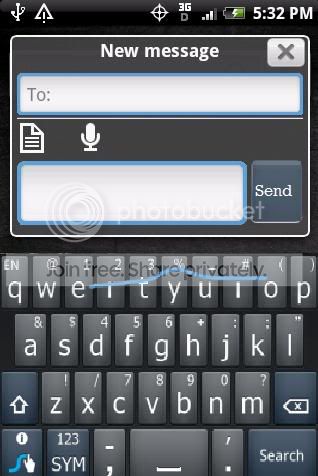
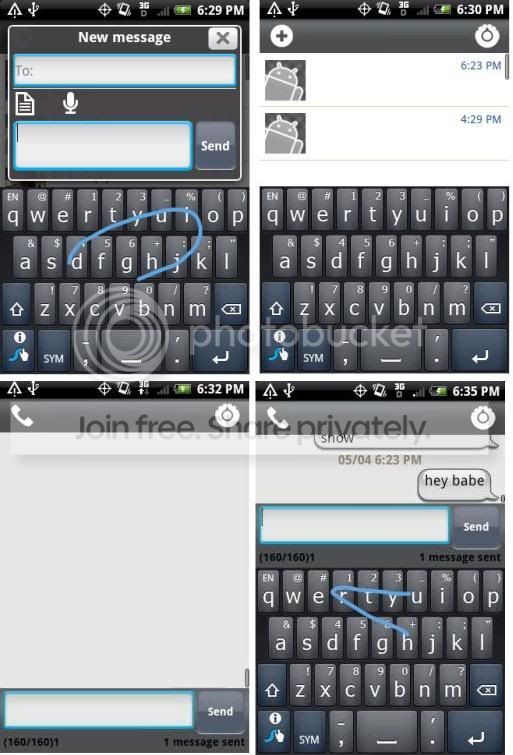
So far so good, I like the different top bar too, with the settings and new messages. The color match is nice, so is the send, it looks recessed in the back which is nice.

I'll put up a few screenshots for everyone.
 
Sorry about the quick ms paint mockup, but something like this:
Swype trail blue for text box outlines
swype navy blue for send button
swype grey for all the grey areas - (didn't do in paint) the grey from the letters

SwypeTheme.jpg


Edit: I don't know if you can sort of 'fade it' like the swype skin is standard (lighter on top, darker on the bottom) if that's easy for you to do then that would be cool. Couldn't really do it on paint though :)

I am also using Swpe with Handcent. However I do not have the "page/paper" or "microphone" icons when I compose a message, like you do in this image.

How come? What do I need to do to show that?
 
That's called Handcent Quick Compose. You can enable that by going into Handcent, settings, scrolling all the way down and checking the box that says quick compose.
 
Very nice. How many .png files did you have to edit total? Are there any that you did that aren't totally obvious (like the blue border)?

Edit: you should start a new thread for this one, or I will if you don't feel like it...not to steal thanks or anything of course ;) (I'd tell them you made it =D)
 
Eh, didn't get the swype color just right around the text boxes. But gosh darn, that's what took me so dang long in the first place. Getting those stupid .9 PNGs to stretch just right. And after modifying them, you have to compile them in Eclipse. Ugh. Haha.
 
Very nice. How many .png files did you have to edit total? Are there any that you did that aren't totally obvious (like the blue border)?

I don't know exactly how many. I changed a lot of things like when you press menu in your conversation list, I changed a few of those icons that come up. I also changed things like when you attach something, there's little images beside each thing, I changed all those images.

Basically for what I did, I changed the contact png, the text boxes (there's like 3 you have to change, all .9 pngs.), the top bar, bottom bar, notification icons, and various little things here and there that I didn't like.
 
The swype color is pretty close when you're actually doing it. It fades off very quickly, and to the eye it looks right, it only looks off because I took a screen cap.
 
Oh, alright then. Cool. Can you edit that screenshots post of yours and put 2 pictures under the other 2? It's making this whole thread shift out of place. Haha. Thanks.
 
Back
Top Bottom