
Install the app
How to install the app on iOS
Follow along with the video below to see how to install our site as a web app on your home screen.
Note: This feature may not be available in some browsers.
-
After 15+ years, we've made a big change: Android Forums is now Early Bird Club. Learn more here.
You are using an out of date browser. It may not display this or other websites correctly.
You should upgrade or use an alternative browser.
You should upgrade or use an alternative browser.
Root How to check ext partition?
- Thread starter arkazain
- Start date
-
- Tags
- htc desire


SUroot
Extreme Android User
See attached screenshot, that's what I get, but my internal memory is very small.
I checked in root explorer and my apps appear in sd-ext\apps, but also in data\apps is that normal?
Can't see screenshot but data app is symlinked to ext app so they contain the same

arkazain
Well-Known Member

Rastaman-FB
Extreme Android User
its normal to see apps in data/app and sd-ext/app
however your usage doesnt look right
please go to settings>applications>manage applications> on Sdcard
do you see anything there?
iif you do then thats your problem, move them all to phone and reboot
youll find youll have more space
however your usage doesnt look right
please go to settings>applications>manage applications> on Sdcard
do you see anything there?
iif you do then thats your problem, move them all to phone and reboot
youll find youll have more space
arkazain
Well-Known Member
its normal to see apps in data/app and sd-ext/app
however your usage doesnt look right
please go to settings>applications>manage applications> on Sdcard
do you see anything there?
iif you do then thats your problem, move them all to phone and reboot
youll find youll have more space
Just Aldiko and Root checker :/
I can also confirm that I had around 109 MB free before I installed this new ROM (MIUI 1.1.28).
Rastaman-FB
Extreme Android User
Just Aldiko and Root checker :/
I can also confirm that I had around 109 MB free before I installed this new ROM (MIUI 1.1.28).
you mention installing new rom!
ok what rom did you come from?
when upgrading did you clear cache and dalvic before installing the latest rom?
have you run a2sd cachesd?
arkazain
Well-Known Member
have you run a2sd cachesd?
How do you do that?
SUroot
Extreme Android User
How do you do that?
If you have Dark termore apps2sd, download terminal emulator from market
Type SU and press enter
Type a2sd cachesd and press enter.
arkazain
Well-Known Member
If you have Dark termore apps2sd, download terminal emulator from market
Type SU and press enter
Type a2sd cachesd and press enter.
How can I check if I have it?
arkazain
Well-Known Member
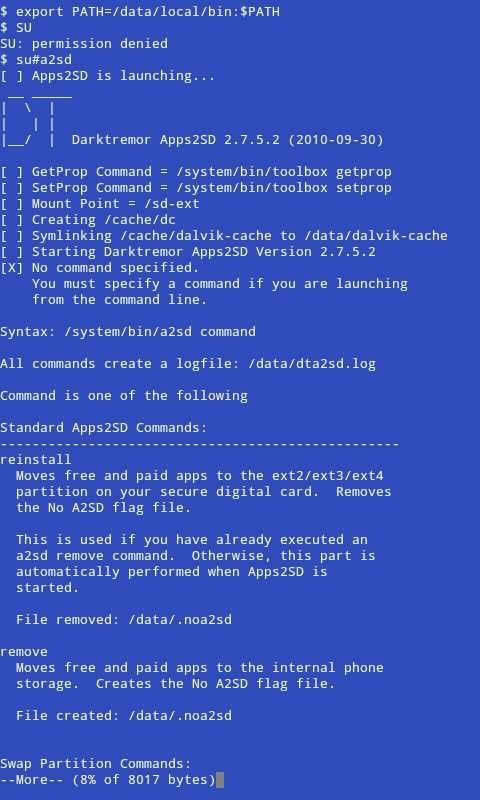
SUroot
Extreme Android User
No. You dont reinstall anything. The command was supposed to be "A2sd cachesd" but you didn't type that, you just typed "a2sd" (no idea why) without the command after it, so its showing you what commands you could have put.
Anyway, you hit a problem before that. Did terminal emulator prompt for Root access? When you type SU in the emulator, you are trying to get Super User access (same as root) but you got permission denied.
What does it say in your superuser app next to Terminal emulator? Maybe you need to clear cache and data on the superuser app, if it is not working properly.
Anyway, you hit a problem before that. Did terminal emulator prompt for Root access? When you type SU in the emulator, you are trying to get Super User access (same as root) but you got permission denied.
What does it say in your superuser app next to Terminal emulator? Maybe you need to clear cache and data on the superuser app, if it is not working properly.
arkazain
Well-Known Member
No. You dont reinstall anything. The command was supposed to be "A2sd cachesd" but you didn't type that, you just typed "a2sd" (no idea why) without the command after it, so its showing you what commands you could have put.
Anyway, you hit a problem before that. Did terminal emulator prompt for Root access? When you type SU in the emulator, you are trying to get Super User access (same as root) but you got permission denied.
What does it say in your superuser app next to Terminal emulator? Maybe you need to clear cache and data on the superuser app, if it is not working properly.
Didn't see the "cachesd"

First, I typed SU (upper case letters), and got denied without asking for permission, then I typed su (lower case) and Superuser asked and I accepted.
I reread your post (
) and typed a2sd cachesd and a bunch of text showed up and my phone rebooted.EDIT:
I now have 105 MB free internal memory!
All thanks to you guys.
Seriously, you guys are my heroes, I can't imagine how I can thank you enough

Rastaman-FB
Extreme Android User
bingo wings