
hi guys,i installed an app called bandog but its not really much good,however when going to uninstall it,it just wont,i keep getting a message"uninstall not successfull".is there anyway(other than rooting),i uninstalled from the market place but that just clears it from there not the phone,ive emailled the developer anyway,any ideas,thanks.
Install the app
How to install the app on iOS
Follow along with the video below to see how to install our site as a web app on your home screen.
Note: This feature may not be available in some browsers.
-
After 15+ years, we've made a big change: Android Forums is now Early Bird Club. Learn more here.
You are using an out of date browser. It may not display this or other websites correctly.
You should upgrade or use an alternative browser.
You should upgrade or use an alternative browser.
Help how to uninstall apps that wont uninstall
- Thread starter mi6-bond
- Start date
-
- Tags
- htc desire

Rastaman-FB
Extreme Android User
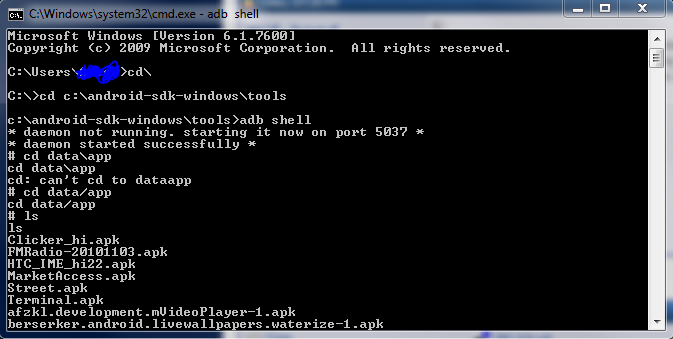
you could try using adb shell on a computer
type lines in oder
adb shell
cd data/app
ls
(this will show you a list of apps in data/apps)
rm name.of.apkfile.apk
cant remember if you need root for it but you will deffo need android sdk installed and the drivers for adb for htc
have you checked in applications that its moved to phone and not on sdcard? vice verse, then uninstalled it after moving it (if there is an option)
type lines in oder
adb shell
cd data/app
ls
(this will show you a list of apps in data/apps)
rm name.of.apkfile.apk
cant remember if you need root for it but you will deffo need android sdk installed and the drivers for adb for htc
have you checked in applications that its moved to phone and not on sdcard? vice verse, then uninstalled it after moving it (if there is an option)
Rastaman-FB
Extreme Android User
adb shell is a command line utility bundled with with android sdk
you enable support for this by turning on debug mode in "settings>applications>development"
you enable support for this by turning on debug mode in "settings>applications>development"
speedycolzalez
Android Enthusiast
SysAdmins. Don't you just love 'em. No inability to communicate in English (you are a SysAdmin aren't you RM  )
)
Shall I translate (geek to English is a speciality of mine )
)
Rastaman is suggesting you install a piece of specialist software called the Software Development Kit and run some operating system commands to manually delete the installation file for the app
As a non-technical user you probably don't want to go there.
There are a number of apps in the market that claim to delete problematic applications. Search for uninstall in the market and try whatever takes your fancy.
HTH
)Shall I translate (geek to English is a speciality of mine
)Rastaman is suggesting you install a piece of specialist software called the Software Development Kit and run some operating system commands to manually delete the installation file for the app
As a non-technical user you probably don't want to go there.
There are a number of apps in the market that claim to delete problematic applications. Search for uninstall in the market and try whatever takes your fancy.
HTH
Rastaman-FB
Extreme Android User
SysAdmins. Don't you just love 'em. No inability to communicate in English (you are a SysAdmin aren't you RM
Shall I translate (geek to English is a speciality of mine
Rastaman is suggesting you install a piece of specialist software called the Software Development Kit and run some operating system commands to manually delete the installation file for the app
As a non-technical user you probably don't want to go there.
There are a number of apps in the market that claim to delete problematic applications. Search for uninstall in the market and try whatever takes your fancy.
HTH
this is true however my experience of developers is that they do not respond or will ask you to do just what i did
applications that remove software just link to the android uninstaller
other than tat he can wipe the device

yes i am a sys admin/server admin type. however i try and help in the simplest manner
The reason i went straight for SDK is because there are not many options
