
Install the app
How to install the app on iOS
Follow along with the video below to see how to install our site as a web app on your home screen.
Note: This feature may not be available in some browsers.
-
After 15+ years, we've made a big change: Android Forums is now Early Bird Club. Learn more here.
You are using an out of date browser. It may not display this or other websites correctly.
You should upgrade or use an alternative browser.
You should upgrade or use an alternative browser.
Root If I download Slepnir....
- Thread starter Zero82992
- Start date
-
- Tags
- lg optimus elite

OptimusV123
Well-Known Member
OK, so I've been considering downloading Slepnir because it looks so friggin' pretty! But by downloading it, will anything get deleted? Also, if someone can give me a basic list of instructions for downloading it, that would be great. I'm a complete n00b.
Have we installed clockworkmod yet?

sneaky_1
Android Enthusiast
OK, so I've been considering downloading Slepnir because it looks so friggin' pretty! But by downloading it, will anything get deleted? Also, if someone can give me a basic list of instructions for downloading it, that would be great. I'm a complete n00b.
Read the Stickies. >>>> First one [FAQ- GUIDE] ClockWork Mod http://androidforums.com/elite-all-things-root/620742-faq-guide-clockworkmod-optimus-elite.html
It will tell you everything, you can post questions in that thread (for recovery related) and the Sleipnir thread (Sleipnir rom related).
OptimusV123
Well-Known Member
Still need help?
sneaky_1
Android Enthusiast
1. Download the rom
2. Transfer the rom from your computer to your phone
3. Boot into cwm
- Format /data once.
- Install Sleipnir_vXXX.zip. The installer will take care of the rest.
- For fun, immediately reboot the phone once it successfully boots into Sleipnir for the first time
#1....!.. make a backup with cwm of the current stock rom.
#2 ....... backup your user apps you want to save with titanium backup. So you can restore apps only (no data) after the new ROM install.
To the op, you already have the hard part done, with installing cwm. There is really no risk if you have as backup in cwm.

BIONICLE38
Guest
Power off and when you turn on hold volume- and power at the same time tell I does that little vibration, and then your in cwm..

Artine
Android Expert
OK, so I've been considering downloading Slepnir because it looks so friggin' pretty! But by downloading it, will anything get deleted? Also, if someone can give me a basic list of instructions for downloading it, that would be great. I'm a complete n00b.
Firstly, backup all of your data via ClockWorkMod (instructions are detailed in the ClockWorkMod for the Optimus Elite thread, stickied at the top of the board, found here) via a Nandroid Backup. Next, in ClockWorkMod, format/erase /data (this is all of your user data), but don't fret! Once you've installed the ROM (I've made it super easy for everyone), head back into ClockWorkMod and restore your data (only data, nothing else) from an Advanced Nandroid Restore (there are instructions in the ClockWorkMod for the Optimus Elite thread as well, everything you need to know is either there or on the Sleipnir ROM's thread page, and I know both are quite lengthy but it is meant to cover basically anything you might need to know, so check thoroughly
 ), and then reboot the phone. The result should be that you have Sleipnir installed, but your Data has also been retained - because you restored your data after having erased it prior to the ROM installation (if you don't, the phone gets stuck).
There are instructions on the ROM page itself, in the first post. It's as simple as downloading it via a computer or your phone, and placing it on your phone somewhere (internal or external sd card). All of the guides and pages were written for anyone - I was a noob once, and had to write it so even I could understand it, so anyone should be able to

And do I need to format that thing? Or will the file do that? I'm really terrible with that stuff. Plus how do I boot into CMW?
In the instructions it states that the file formats the appropriate things for you, so you don't have to (I've made it easy for everyone)
As for booting into CWM, there are four ways, included in the very ClockWorkMod for the Optimus Elite thread, quoted as follows:Artine said:Section 2.1 - Accessing CWM
Method #1: The Extended Power Menu
If you're on a ROM for the Optimus Elite with this feature, you can reboot into recovery simply by holding down the power button until the power menu comes up, then tapping on "Recovery," and then "Ok."
Method #2: The app way
Similar apps should follow similar procedures to be able to reboot your phone straight from the user environment into your OE's recovery.
- Quick Boot (Reboot):
After downloading and installing Quick Boot, run the app. Tap Recovery, and your OE will reboot straight into ClockWorkMod Recovery.
- Titanium Backup:
Run Titanium Backup (either Regular or Pro). Press the capacitive/soft/bottom menu key on your phone. Tap "More." Scroll down to the bottom. Tap "Reboot the device," then "Reboot to recovery mode."
- ROM ToolBox:
Run ROM ToolBox (either Lite or Pro), scroll down to the bottom, tap on "Rebooter," then "Reboot Recovery."
Method #3: Via ADB
Through the terminal/terminal emulator, enter the following:
Code:adb reboot recovery
Method #4: Old School
If your Optimus Elite is currently powered on, power it off. Turn it back on by holding down the power button. Before, or while, it is powering on, hold down the Volume Down (-) button/bottom part of the volume rocker until the phone enters ClockWorkMod, depicted below:
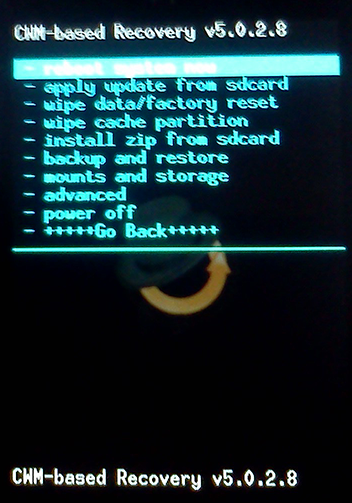
Image courtesy of MacFett. Resized.
And here is the link to the guide, may it aid you in your travels
As far as installing Sleipnir, there is a section on Installation in the first post, quoted as follows:
Artine said:------------------------------------------------------------------------------------------------------------
Installation
------------------------------------------------------------------------------------------------------------
- If this is your first time:
- Make a Nandroid backup.
- Format /data once.
- You can restore your data from a Nandroid backup (Note: only restore data), but do so only after Sleipnir has been installed, otherwise your phone will get stuck in a bootloop.
- Install Sleipnir_vXXX.zip. The installer will take care of the rest.
- For fun, immediately reboot the phone once it successfully boots into Sleipnir for the first time.
- Enjoy!
Also, here is a link to the page for the ROM
I wish you luck on your journey, and hope that you are able to follow those steps, so that you may enjoy an improved experience with your phone, with any ROM you choose to install/flash
Sincerely,
-Artine
Tyjuice069
Newbie
Yep, all of that can be done through your phone. Make sure you make a nandroid backup just in case.
sneaky_1
Android Enthusiast
Yup, like the guy above me said you can do it all from the phone if you like. Just make sure you know where your download location is, so you can point CWM to it when you install the zip.Ok, I plan on doing this today. But before I do, do I have to hook my phone up to a computer? Because if it's possible to do all of this from your phone, I'd much rather not hook it up to a computer for the sake of convenience.
Firstly, I would backup all your apps you want to keep with Titanium Backup, just in case you have some issues with not formatting /data or restoring /data. Just go into TiBu, press menu, select batch then select all user apps. Unselect anything you don't want, then press the check mark.
sneaky_1
Android Enthusiast
Firstly, make sure you have a recent CWM backup (that has all your games and apps). You could try to skip the data wipe (and restore) and just flash it and see if everything works. If it doesn't, just boot back to cwm and wipe data/factory reset (or format /data).Ok, so this is what I'm gonna do:
Backup whatever games I have with Titanium, download the zip and move it to my SD card, go into CMW and format /data, install the zip, restore data, and then enjoy!
Is this the correct order? Also, when I'm in CMW, where do I go to format?
Format data is under the mounts and storage menu. To restore with CWM go to restore, then to advanced restore, and select /data.


Dark One
Android Expert
Go to "install zip from sd card" and see if you can navigate to where you put Sleipnir. Don't install it, just see if cwm can read your external sd card.
Do you have an external sd card? Is it mounted? If cwm doesn't see your sd card, then plug your phone in to a computer and see if you can access your sd card with mass storage. If not, then your sd card might be bad. If your computer does see your sd card, then you might want to try installing cwm again.
Do you have an external sd card? Is it mounted? If cwm doesn't see your sd card, then plug your phone in to a computer and see if you can access your sd card with mass storage. If not, then your sd card might be bad. If your computer does see your sd card, then you might want to try installing cwm again.
sneaky_1
Android Enthusiast
You can choose to backup to the sd card or the internal. The backup on top is to the sd card and the one below it will say backup to internal. Does it give the error for both? If you can get one to work you could be good to go for now. Just don't wipe the internal sd card. Keep in mind though it will gobble up a lot of space backing up to the .
It would be beneficial to get the microsd card issue figured out first though, as Darkone said..
It would be beneficial to get the microsd card issue figured out first though, as Darkone said..

Johnnysparks
Well-Known Member
Artine I messaged u days ago with a few questions about ur Rom (sleipnir) that I installed, do I have to address the issues on a thread like this or will u respond to pm's?