
• After 15+ years, we've made a big change: Android Forums is now Early Bird Club. Learn more here.

Root image editing theming thread?

Crud. I was stealing sliders it think voided has.
My guess is that you would want to look at the type its supposed to replace and make it that.
You could try making .9 if need be, follow t he tutorisl on .9 s.
 
I'm not on my computer right now but if you're just wanting to replace that one unlock symbol just the circle part you don't have to convert it into a .9.png. It should just be a .png. The slider itself is something different it is a .9.png. But you could take the image posted about and throw it straight into a framework-res.apk and it should work. I think the sliders are something like ic_jog_dial_left.9.png or something like that. These actually stretch so they need to .9.png file type. The unlock button symbol doesn't stretch it just moves across the screen.

If that's not what you were looking for lmk and we can figure it out
 
ok I get what your saying. what I'm looking to do is just have the unlock thing hanging there (like how honeycomb has) I could probably take the .png ive got here and lay it over the .9.png from the revo theme... that might accomplish what im looking to do.
also it looks like SDK has a way of changing a .png into a .9.png... im seeing if I can toy with that first, if that doesnt work I think im gonna go the revo theme direction
 
OMG im a f-ing idiot.... ok so I obviously didnt understand what you were saying before... after trying to edit the image and it not working I went back to re-read what you wrote to see if I missed anything. not only did I miss something, I completely misunderstood lol. NOW I get it... wow that was WAY easier than what I was trying to do!


EDIT: ok I was wrong. simply swapping the "ic_jog_dial_unlock" image didnt work. the file for the lock sliders is the "zz_moto_jog_tab_bar_left_begin.9.png" so somehow I need to figure out how to get my image to work in the zz_moto_tab place
 
Haha I do that all the time.

If you want your image there and nothing else to slide we will then just create transparent sliders. I can't do it now since I have a q. mechanics test friday. If you can't get it by then I would be more than happy to do it for you. And yes. The SDK allows you to convert .png to a .9.png. its called drawpatch9 I think. you would run it by cd'ing to tools and the issue adb drawpatch9 if on a pc or ./adb drawpatch9 on a mac. Then you basically set guides on your image. One on the top and one on the side. This will create a 4-sided area on your image. This is where the system will stretch your image when needed. It's really obvious to see with the sliders because it definitely stretches. The only problem I've had setting the guides is that they show up once I save it and it appears on the phone as well. Faber, any ideas as to what's up with that?
 
sure, you have to run it through xcompiler after you are done with drawpatch.9
the directions are in my tutorial....though sadly the pictures are gone. but the written directions are easy enough to follow.
basically you just download this xcompiler, drop your product from drawpatch in the folder and hit the button. when its done your .9 is complete.
 
"Now open up your extracted file of xcompiler and go in to the folders (just open, not in 7zip):
- example1, res, drawable hdpi and delete everything in there. (its someone else's work....just delete all of it. Make sure you are hitting delete, not backspace.

Drag/drop (or copy paste or whatever) your png there.

- Back out until you see the little droid icon (and both example folders/etc.).

-Click/start the little droid icon.

-When it is done there should be a new folder that is called "done" (imagine that). Go into it and example1 and on until you find your png. Then drag/drop it on your desktop.

-Now open 7zip (or find the one you had open or whatever) and navigate to where we originally got all the pngs....look back at the beginning. "

and

[Release] xUltimate - Droid Forum - Verizon Droid & the Motorola Droid Forum

should be available in 64/86 or 64/32 bit called xulimate draw9patch compiler.
 
well, no love from Xultimate for mac/linux :( I will try installing it using wine later but I'm not crossing my fingers
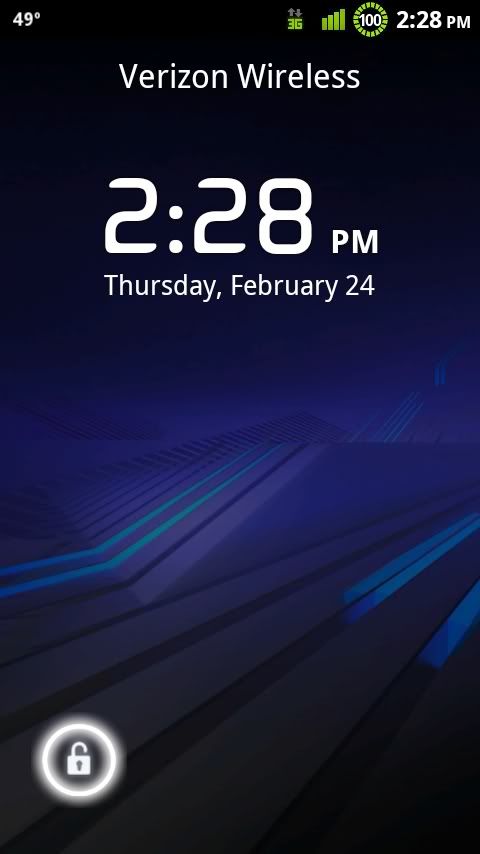
 
thank you so much guys! looks like I've got a project at work today (if we dont get busy lol)

edited my edit cause I figured it out.
 
thanks to you guys I now have myself a fully functional honeycomb-esk lock screen!
I got rid of the right side slider cause I never use it and it makes the whole thing look cleaner I think.
Next im gonna work on replacing the "zz_moto_jog_tab_bar_left_end.9" file with a bigger halo (the one from the Xoom system dump) so when you press the lock, that halo will pop up. (I gotta wait till I get home though cause I have the system dump on my laptop and its already been pulled from XDA's site)
CAP201102241428.jpg

Thanks again guys. now I have a basic knowledge of this stuff to build on!
 
do you guys know what file to look for to change the color of the progress bar in the browser (the one that when you go to a new page it moves across the screen as it loads the page up)? I've looked in the browser.apk and in the framework and cant seem to find it....
 
yeah I figure its probiably going to be a .9.png somewhere... I'm trying to do that and change the icons (browser/sms/phone/gmail that kind of stuff) to match the honeycomb colors and ill be pretty close to done. The icons are a pain it seems like, or atleast I'm having an issue with it lol
 
I changed dolphin browser's status bar pretty quickly. Also changed a lot of it's color. The tabs themselves are .pngs and .9's. The status bar is an .xml. To edit this xml I decompiled the app and then navigated to values/colors.xml. Opened that in dashcode (any xml editor will work) and changed title_bar_progress_color to my ARGB hex color of choice. Recompiled the app. Signed it. adb installed. g2g

2cqd4k3.jpg
 
I changed dolphin browser's status bar pretty quickly. Also changed a lot of it's color. The tabs themselves are .pngs and .9's. The status bar is an .xml. To edit this xml I decompiled the app and then navigated to values/colors.xml. Opened that in dashcode (any xml editor will work) and changed title_bar_progress_color to my ARGB hex color of choice. Recompiled the app. Signed it. adb installed. g2g

2cqd4k3.jpg

I think he's trying to do the stock browser not dolphin hd. Stock browser progress bar is not done in colors.xml.
 
I changed dolphin browser's status bar pretty quickly. Also changed a lot of it's color. The tabs themselves are .pngs and .9's. The status bar is an .xml. To edit this xml I decompiled the app and then navigated to values/colors.xml. Opened that in dashcode (any xml editor will work) and changed title_bar_progress_color to my ARGB hex color of choice. Recompiled the app. Signed it. adb installed. g2g

2cqd4k3.jpg
dude awesome...thanks:)
hadnt gotten around to it, should be gravy now knowing how you did it.
I think he's trying to do the stock browser not dolphin hd. Stock browser progress bar is not done in colors.xml.
nah, id mentioned i was gonna look at doing dolphin and see what i can do inside it; aggie was helping me out....

- i dont think anyone helped out whomever was trying to do stock yet (cant remember who brought that up originally).
 
I think he's trying to do the stock browser not dolphin hd. Stock browser progress bar is not done in colors.xml.

yeah I knew he was asking for the stock browser but I don't use it. I use Dolphin and figured it would be a good start/ somewhat similar. I looked into it and saw that the browser's progress bar was the same color as the progress bar in the notification pull down. So long story short I changed the framework of the system and that changed it. I used colorchangev3.jar and to change that I issued the following command:
Code:
java -Xmx512M -jar colorChangev3.jar theme.zip progressBarBackground=FFa5a9a9 progressBarForeground=FF0290ba
You have to specify both colors to change it. Can't change just one.

33ucy6t.jpg
 
yeah I knew he was asking for the stock browser but I don't use it. I use Dolphin and figured it would be a good start/ somewhat similar. I looked into it and saw that the browser's progress bar was the same color as the progress bar in the notification pull down. So long story short I changed the framework of the system and that changed it. I used colorchangev3.jar and to change that I issued the following command:
Code:
java -Xmx512M -jar colorChangev3.jar theme.zip progressBarBackground=FFa5a9a9 progressBarForeground=FF0290ba
You have to specify both colors to change it. Can't change just one.

33ucy6t.jpg

I remember reading somewhere that you could do that with colorchangev3.jar, but I never tried it that way. I guess I like doing stuff manually, I learn more that way :D
 
quick question... I think I know the answer but I wanna ask just to make sure
To get themed icons onto my theme (like the messaging, dialer, browser, gmail) I have to include those apk's into the theme right? I cant just change the icon somewhere else? the image comes from the apk itself?
 
thats what I thought. OK cool thanks. hmmm.... now to debate if I want to put more apks into the theme... I probably will wind up doing it
also, if gmail updates again its going to change whatever change I made to it right?
 
yeah when you update an app all theming will be gone. And I can't remember if the market links get established with these apps since they weren't downloaded through the market. And its not that difficult once you have one themed. Because then the images are already made and you just drag them into the apk once it's updated.
 
Back
Top Bottom