• After 15+ years, we've made a big change: Android Forums is now Early Bird Club. Learn more here.

ITT: Post your Captivate's battery life

I just went 17 hrs and 15 minutes today on my battery...
  1. No live wallpaper.
  2. i sync nothing, manually check two email accounts five times.
  3. I made a 14 20+ minute calls.
  4. I use atk.
  5. No background data.
  6. Display on lowest setting.
  7. Surfed the web and checked Facebook about 20 times on 3G.
  8. No wi-fi.
  9. No GPS.
  10. No haptic feedback.
  11. Did not visit the android market.
  12. Played Jewels for about 30 minutes.
  13. Ended today with 25%.
 
I'm actually impressed at this, considering I was playing a game and/or playing music with no screen timeout for over 4 hours in the car. That means heavy GPU, heavy CPU, and heavy display drain for 4.5 hours, I can live with that:

4 hrs, 35 min - started at 98%

Display - 76% (4 hrs 10 min)
Music - 8%
Angry Birds - 6%
Cell Standby - 5% (3% time without signal)
(The rest) - 5%

Ended with 18% battery left. Considering the fact that I gave the phone almost no break, I think it was decent.

Wow is that display a huge power drain. That was actually on the lowest brightness setting the whole time. Wifi off, mobile data off, GPS off. Usually I can get more than a day out of my phone under moderate usage (30 min browsing, 30 min music, maybe 10 minutes of phone calls), depending of course on whether or not I stick my phone where it has a signal at night. My room has dead zones all over because our house blocks cell signals for some reason. If I leave it in a dead zone, I may lose 60-80% battery while I sleep. Otherwise I tend to lose 5-7%.
 
GPS is set to automatic, auto refresh is on, and Wi-Fi is on.

What is "GPS is set to automatic?"

On my BlackBerry Bold 9000, applications that used GPS, e.g. the camera and Google Maps, would turn it on automatically and then turn it off when you left them.

Is there an equivalent setting on the Captivate or does it do this as well?
 
I let my friends daughter play angry birds on my phone on christmas day. From 4:00 until somewhere around 11:00 she killed two completely charged batteries. The one that came with the phone and one I bought on ebay. That seems pretty bad to me.
 
I played Angry bird for about 2-3 min and texted maybe 5 times and 4 emails and browsed the web for 5 min and my battery icon is already yellow after an all night full charge.
 
Has anyone noticed much higher battery drain after the latest Maps update? Prior to the update my phone battery lasted several days but after the Maps update it will not last one day. I uninstalled the update and the battery is back to normal. I reinstalled the update and the battery life was horrible again so I uninstalled the update again. Can anyone suggest any setting changes to prevent this parasitic battery drain.

Stock Captivate, unrooted, JH7

Francesco
 
Battery Level: 63%

Time Since Unplugged: 16h 23m

Display - 32%
Cell Standby 31%
Phone Idle - 21%
Android OS - 4%
Android System - 4%
Browser - 3%
Wifi - 3%
Launcherpro - 2%

**This is with:
- a static dark background (suits me just fine)
- auto-brightness disabled
- brightness turned all the way down
- Flight Mode cycled at the start of unplug (to kill any "time without signal" bug)
- permanent Wifi (w/o Juice defender) OR 3G (w/ Juice Defender)
- autosync enabled, gps/bluetooth disabled
- plenty of active widgets (Beautiful, Facebook, Power control, Youtube)....
- Moderate use (30m-1h surfing, 30 min of calls, 100+ text messages, 10m youtube, 30m angry birds)


Side Note: This may be superstition, it may be hokum, but I suggest anyone with a thirst to try anything to extend your battery to at least give it a try: forum.androidcentral.com/t-captivate/30851-recalibrating-your-battery.html

It is instructions on "recalibrating your battery"... Now there is much debate within the thread as to whether or not it actually works or if some steps are unnecessary... but if you're at the bottom of the barrel and hate your phones battery you'll try anything... Am I right?

I decided to give it a go.... My battery life on a whole prior to "recalibration" was roughly 12-16 hours PER CHARGE (I'm talking I ran her til she quit on me).... not too impressive if you ask me... but I gave this a whirl and the report I gave you above was my findings on the day immediately following "recalibration" day.... This is a projected battery life increase of nearly 100%.

Give it a try. Whether it works or not, good luck to you and your endeavors.
:D
 
I've just had my Captivate for not quite 2 weeks and I've been fighting battery life ever since until...

I did 2 deep discharges with seemingly little results but then I performed the "Recalibrating Your Battery" procedure. I know it sounds like voodoo but all I can tell you is that it has made a significant improvement.

It was interesting to observe the reported battery utilization at the different steps. For example, after step 1, Android showed 100%. Then at step 3, although the battery screen doesn't show a percentage it was clearly NOT 100%. The same occurred at step 5.

At the end of today's workday, I had 61% left. I didn't talk on the phone but a few minutes but thanks to my Active Directory credentials expiring over the end of the year, I spend upwards of an hour trying unsuccessfully to get my 802.1x Wi-Fi setup again.

Just to cover all the bases, I also noticed that WeatherBug is not running. That may very well have been a contributor although I had it only using the cellular network to determine "My Location." Just for good measure I'm going to leave it off for now.

Here is the "Recalibrating Your Battery" procedure:
Recalibrating Your Battery... So, you are having trouble with your battery seemingly draining too quickly, especially after having flashed many ROMs/Kernels/etc...

It is possible that the problem (or part of the problem) is not necessarily the phone using too much power. If this is the case for you, you should see some results from doing the following:

1. Connect the phone to the charger with the phone powered on, and allow the phone to charge until it shows 100%
2. Disconnect the phone from the charger, and power it off.
3. Reconnect the phone to the charger with the phone powered off, and allow the phone to charge until the battery indicator shows 100% (you can use vol-up/vol-down to make the indicator come back up when the screen goes to sleep).
4. Disconnect the phone from the charger and power it on.
5. Once the phone is powered completely on, power it off again and reconnect it to the charger until the battery indicator shows 100%.
6. Disconnect the phone, power it on, and use it.

You should only need to use this sequence one time.
 
I haven't timed mine since there are so many variables in the way I use it. A lot of time with email & the web. What I do know is it's quite good considering it has a large 4.0" display.

My iPhone 4 is a bit better but it has a small 3.5" display and a horrible phone. I prefer the Captivate by a wide margin. Especially with it's swype input method, it beats the iPhone hands down. If not for my investment in iTunes music and syncing it to my MacBook Pro, I'd sell it.
 
Display 32%
Voice Calls 28%
Cell Standby 19%
Phone Idle 14%
Android System 3%
Aurora (Live Wallpaper) 2%
 
snap20101231_113222.png


:D
 
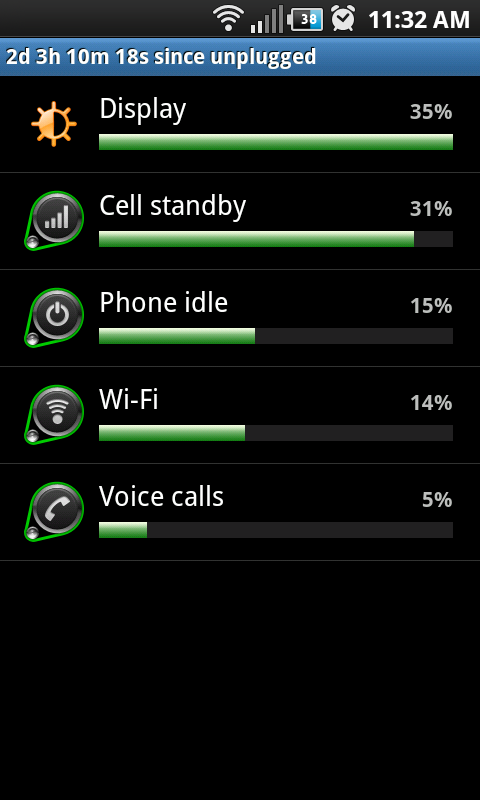
How do you get so many information?
After I getting to Battery use, I just get information for:
- Display
- Cell standby
- Voice calls
- Phone idle
even I view photo galery, take photo, listen to music...
That's all!
 
4d 8h 7m 53sec since unplugged w/ 5% remaining.

Cell Standby : 49%
Phone idle: 36%
Display: 9%
Wifi: 2%
Android: 2%


The above is literally no talk time and just email, sms, wifi/3G and a bit of surfing.

Owned the phone since Oct 26 and full charge/discharge cycles (no premature charging)
 
Does the "unplugged" thing reset when you reboot? I rebooted my phone to get my photo gallery to update the latest pics I took (never had to do that before... it was weird). I'm at 30% and running Cognition. I charge my phone every day. It seems like I only use 10-15% during my lunch break (can include a full half hour of watching video) but after lunch (prior to cognition, haven't tested since) it was like my phone went WAY downhill from there.

I used to get home above 65% until Christmas peak when I was working an additional 2-4 hours a day and got home at under 40%. Battery life is a real issue especially considering there's a minimum requirement for getting the camera to work.
 
Battery life is a real issue especially considering there's a minimum requirement for getting the camera to work.

Only if you use the stock camera app. Try camera 360.

As for me...


92%

3h 42m 27s since unplugged

Display 34%
Cell Standby 32%
Phone Idle 23%
Maps 5%
Android System 4%
Market 2%

I expect that to get me to around 1d 20h.

Starting today I'm going to keep a close eye on battery life so that I can test the viability of ATK.

I know everyone who's anyone says that app killers are pointless, but I'm not one to just believe them. Everyone uses their phone differently, so results may vary. I want to do a decent test on my own, to see whether its worth using or not.
 
I know everyone who's anyone says that app killers are pointless, but I'm not one to just believe them.

I don't think they're pointless, I just think they're misused most of the time, mostly a result of people not understanding how their phone and Android works, and instead try to apply PC mentalities to a platform where the old rules and thinking don't apply. They should never be set to automatic, and should only be used for specific occasional targeting of a known-problem app in that moment.
 
I don't think they're pointless, I just think they're misused most of the time, mostly a result of people not understanding how their phone and Android works, and instead try to apply PC mentalities to a platform where the old rules and thinking don't apply. They should never be set to automatic, and should only be used for specific occasional targeting of a known-problem app in that moment.

Alright, fair enough. "Pointless" was probably the wrong word. How about "misunderstood and misused due to being falsely advertised"? That's closer to the truth, right?

Edit: That came of as sarcastic, didn't it? Although, as you will probably find, I am very cynical and sarcastic, that wasn't my intention in this reply. I don't want to start my residency here with that kind of first impression.
 
My phone has gone with a single, full charge, since my first post. It has just dropped to 2%.

Unfortunately, in my foggy morning state, I managed to restart my phone, so I don't have the usage information... Subjectively, I think I used it slightly more than normal. I spent most of yesterday lost downtown, and was using the map for extended periods of time. Also, on the day of my first post, I changed my background so something much brighter than I had been using.

My first post was 01-11-2011, 05:56 AM

Using that, and the time of this post, my phone lasted nearly 2 whole days.
 
3d 0h 3m 36sec since unplugged w/ 22% remaining.

Cell Standby : 37%
Phone idle: 27%
Display: 26%
Voice Calls 7%
Android: 2%
Mediaserver 2%


Surf a bit, audio player, no live wallpaper (plain grey one), a few calls, no haptic, animations are all off, display is set to lowest...basically eye candy is off.

I just got the phone a couple weeks ago (I love it btw) and the odd thing is, prior to this latest charge I was getting maybe 18-24hrs per charge on the same basic usage pattern. No idea why this time Im getting 3+ days but I'' take it!
 
Hi all,

First post on this forum.I think my android has a problem.
Just bought the captivates a couple of days ago and my battery doesn't even last a day.
I waited the first time until it was completely drained to charge it again. I charged it all night last night.
It is 3.36pm and it just died on me as I was writing down the numbers:

7h58m21s since unplugged w/ 0% remaining. (just died)
Phone display: 26%
Cell Standby : 25%
Phone idle: 18%
Android System 14%
Voice Calls 8%
Android Core Apps: 4%
Dialer: 3%
Angry Birds 2% (yeah, yeah I know)

I just followed some advice on this forum and turned GPS off, auto sync off, brightness to almost the lowest, my background is static and its the dark blue one. Power saving is on, it was connected on wifi pretty much all day.

I actually used the phone for about 30 minutes total today.

do I have a bad battery or will this get better? I have about 10 days to decide whether I want to return it or not.

Thanks for your help
 
Did you read the rest of this thread? Page 3 seems to have the most info on battery life extending techniques.

I would suggest going for a day without wifi, just to see if maybe that is doing all the damage. I can't imagine though; wifi isn't THAT much of a drain.

What stands out to me from you're usage info is that the android system is taking up 14%. Mine never takes up more than 3%... I don't know what that stat is referring to, so not sure what to say about that, its just interesting. Also, which core apps are you using frequently? You must use a few of them regularly to have them use up 4% even. Maybe consider some market replacements that might use less juice.

Angry Birds 2% (yeah, yeah I know)

lol, doodle jump, for me.
 
Back
Top Bottom