• After 15+ years, we've made a big change: Android Forums is now Early Bird Club. Learn more here.

Help Jelly Bean poor battery life?

RipGroove

Newbie
Installed Jelly Bean a couple of days ago and now my battery life is very poor. Usually I'd charge over night and it would just about get me through the day (battery is old so not great great anyway), but now its dead by 5pm.

The phone is as it was before, ie: same apps & settings so I can rule that out. Only thing thats changed is the firmware (LSN via Odin).

I have performed a factory reset via the in phone options and have fully charged the battery with phone switched off then pulled the battery for 5mins. But its not much better tbh.

My battery is old and my settings probably aren't ideal but they are the same as before and battery life has only started reducing since the firmware change.

Any ideas?
 
This is ridiculous, charged overnight to 100%, was down to 30% by 11am so topped it back up to 100% as I was heading out to work and its 4.20pm now and its dropped to 20%.

According to the phone the battery is only lasting 4hrs 15mins at a time from 100% down to 10%

How can a firmware affect battery that much?
 
I had the Spanish rom on my phone in the early leaks which is why im interested to see what this one (LSN) is like! With the Spanish one my phone very easily got hot and the battery life was worse. I could literally see the percentage drop as the minutes went by! Have things improved at all?
They say to leave it 4-5 days to settle down tho :)
 
I had the Spanish rom on my phone in the early leaks which is why im interested to see what this one (LSN) is like! With the Spanish one my phone very easily got hot and the battery life was worse. I could literally see the percentage drop as the minutes went by! Have things improved at all?

No not really. I was under the impression that the firmwares on Sammobile are official so figured it should be ok? Am running the battery completely flat to the point it wont turn on then will charge to full capacity with the phone switched off tonight. Have read that that should calibrate the battery so will see tomorrow morning I guess.
 
Yeah like i said it can take a couple of days to calibrate itself as well, shouldn't be too much harm in doing what your doing this once. I've read that these batteries don't like to be discharged constantly and charged again. I tend to let mine get to 30% before i charge. Id stick with it a few more days. Worst case you could go back to ICS
 
When I first flashed the Spanish jb 4.1.2 rom my battery life was shocking, left it for a week to settle down but to no avail. Flashed the siyah 6.0b kernal (keeping the official Spanish jb rom) and it improved instantly :) Might be worth a try if you don't mind rooting your phone.
 
similar sort of thing happening with my S2 too atm. charge drops down significantly quickly and the cell is warm eventhough when not used. and charging takes more time than usual. also, the cell goes into a cycle of continuous restarts sometimes
i tried doing factory reset, even flashed to the latest LPN, bought a new battery, but none seems to work so far.
anyone having similar issues?
or is it RIP time for my aging S2??
 
'Google Now' seems to eat through battery life very , very quickly in Jelly Bean, I thinks it's on by default so it might be worthwhile turning it off to see what happens
 
Thanks but I already have that switched off. Have just installed a brand new genuine battery as maybe my old tired battery just cant handle jelly bean? So far its been awake 35mins with quite a bit of use and its down to 96% battery. Will see how today goes.

Also I installed BetterBatteryStats but cant seem to figure it out tbh. Got Juice Defnder running too now.
 
Thanks but I already have that switched off. Have just installed a brand new genuine battery as maybe my old tired battery just cant handle jelly bean? So far its been awake 35mins with quite a bit of use and its down to 96% battery. Will see how today goes.

Also I installed BetterBatteryStats but cant seem to figure it out tbh. Got Juice Defnder running too now.

I strongly recommend losing Juice Defender... it can end up using more juice than it saves by merely masking a problem and not curing it. Some app's are designed to remain open in the background on Android.

See here:-

Why You Shouldn
 
Try spinning the battery on a smooth, flat surface. If it spins without much resistance, then it's inflated which would cause poor battery life and random restarts.
 
Ok have removed that and atk. Any insight on how to use BetterBatteryStats to track down offending battery hoggers?

Known identified battery drainers

BetterBatteryStats

How to prevent & handle wakelocks & save battery life

Item #7 in this post.


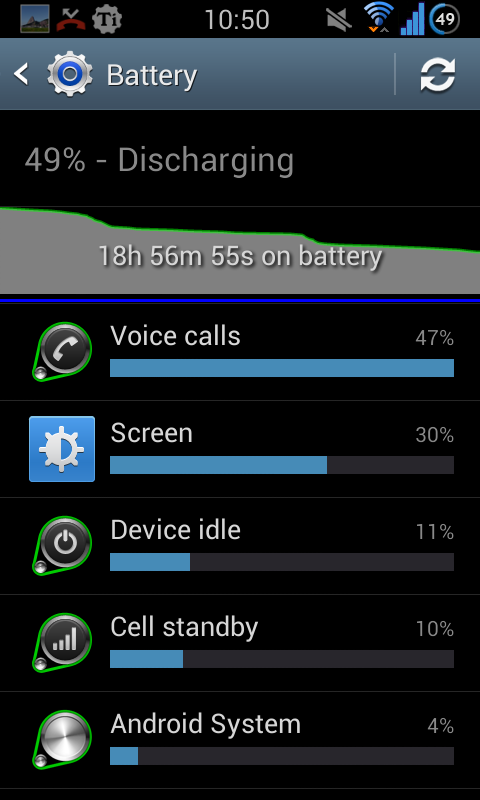
Below is a screenie of 51% average usage for me on a standard battery but rooted with a custom Jelly Bean ROM, (NEAT ROM), and kernel, (Siyah), and by using the tips in the Battery Saving - Dummies Guide. The more tips you enable... the more battery you save. I know that realistically, on an un-rooted phone, that you should get 12-18 hours average use between charges... roughly a third to a half of my rooted phone. 18 hours is usually enough for most people to charge at night. It does require reading, patience and effort... there are no shortcuts I'm afraid as everyone uses their phone differently!

NEATLSJSIYAHBETA4_zps90815b51.png
 
Try spinning the battery on a smooth, flat surface. If it spins without much resistance, then it's inflated which would cause poor battery life and random restarts.

No I haven't yet. After fitting a new battery I'm not sure if thats the fault anyway as I've done 20% battery in 2hrs.
 
Known identified battery drainers

BetterBatteryStats

How to prevent & handle wakelocks & save battery life

Item #7 in this post.


Below is a screenie of 51% average usage for me on a standard battery but rooted with a custom Jelly Bean ROM, (NEAT ROM), and kernel, (Siyah), and by using the tips in the Battery Saving - Dummies Guide. The more tips you enable... the more battery you save. I know that realistically, on an un-rooted phone, that you should get 12-18 hours average use between charges... roughly a third to a half of my rooted phone. 18 hours is usually enough for most people to charge at night. It does require reading, patience and effort... there are no shortcuts I'm afraid!

NEATLSJSIYAHBETA4_zps90815b51.png

Have had this phone for 1.5 yrs now with pretty much the same apps and usage and its always been charged at night and lasted the whole day. Its only dropped massively since jelly bean so am not really sure that settings and tips is the cause if you see what I mean.
 
Start by disabling Google Now, Smart Stay, Samsung Apps and enable Power Saving. Then check to make sure that you do not have any rogue app or settings from ICS that are constantly running.

Go to Settings > Application manager > Running and see what apps are running all the time.

Check on BBS and see what is keeping your phone awake at night and preventing it from going into Deep Sleep.
 
Start by disabling Google Now, Smart Stay, Samsung Apps and enable Power Saving. Then check to make sure that you do not have any rogue app or settings from ICS that are constantly running.

Go to Settings > Application manager > Running and see what apps are running all the time.

Check on BBS and see what is keeping your phone awake at night and preventing it from going into Deep Sleep.

Google Now is already off. Cant really figure out what I'm looking for on BBS, will have a read through the link :-)
 
Start by disabling Google Now, Smart Stay, Samsung Apps and enable Power Saving. Then check to make sure that you do not have any rogue app or settings from ICS that are constantly running.

Go to Settings > Application manager > Running and see what apps are running all the time.

Check on BBS and see what is keeping your phone awake at night and preventing it from going into Deep Sleep.


thanks.
how do u disable google now and samsung apps?
 
After my upgrade to JB my battery life was terrible. I installed a custom rom (Neatrom full) and did a full reset hoping it would make it better but no luck. I switched off Google Now and I have seen a huge improvement. I didn't really find a need for it, didn't find any of the features that useful. I know how long it takes to get back and forth from work and I never take the route it recommends anyway.

I switched it off by loading Google search, tapping the button to the left of the home button, selecting settings and choosing off from there.
 
That's so odd, I'm enjoying great battery life with JB. The only time I have a lot of drain is if I reboot the phone, it will heat up for around 15mins due to sorting out internal and external memory, after that though? It's smooth sailing.

Ensure you Disable apps you do not use such as ChatOn in Application Manager.
 
Back
Top Bottom